Google has been steadily adding AI-generated content to local search, and several of these features directly affect how your business shows up.
Here’s what’s changed recently: Google is now using AI to generate the list of services shown on business profiles. Hotel photos are getting AI-generated caption labels. And Google just rolled out “Ask Maps,” a Gemini-powered search experience inside the Google Maps app.
It’s important to know how to get featured in Google’s new AI features in local search and optimize for accurate recommendations.
Google’s AI pulls from your Google Business Profile, your website, your photos, and your customer reviews, then generates its own description of your business.
Let’s dive in!
1. Google shows AI-generated services on local business panels
Google is showing AI-generated services on local business knowledge panels — this was spotted by Joy Hawkins, who posted a video of it in action on X.
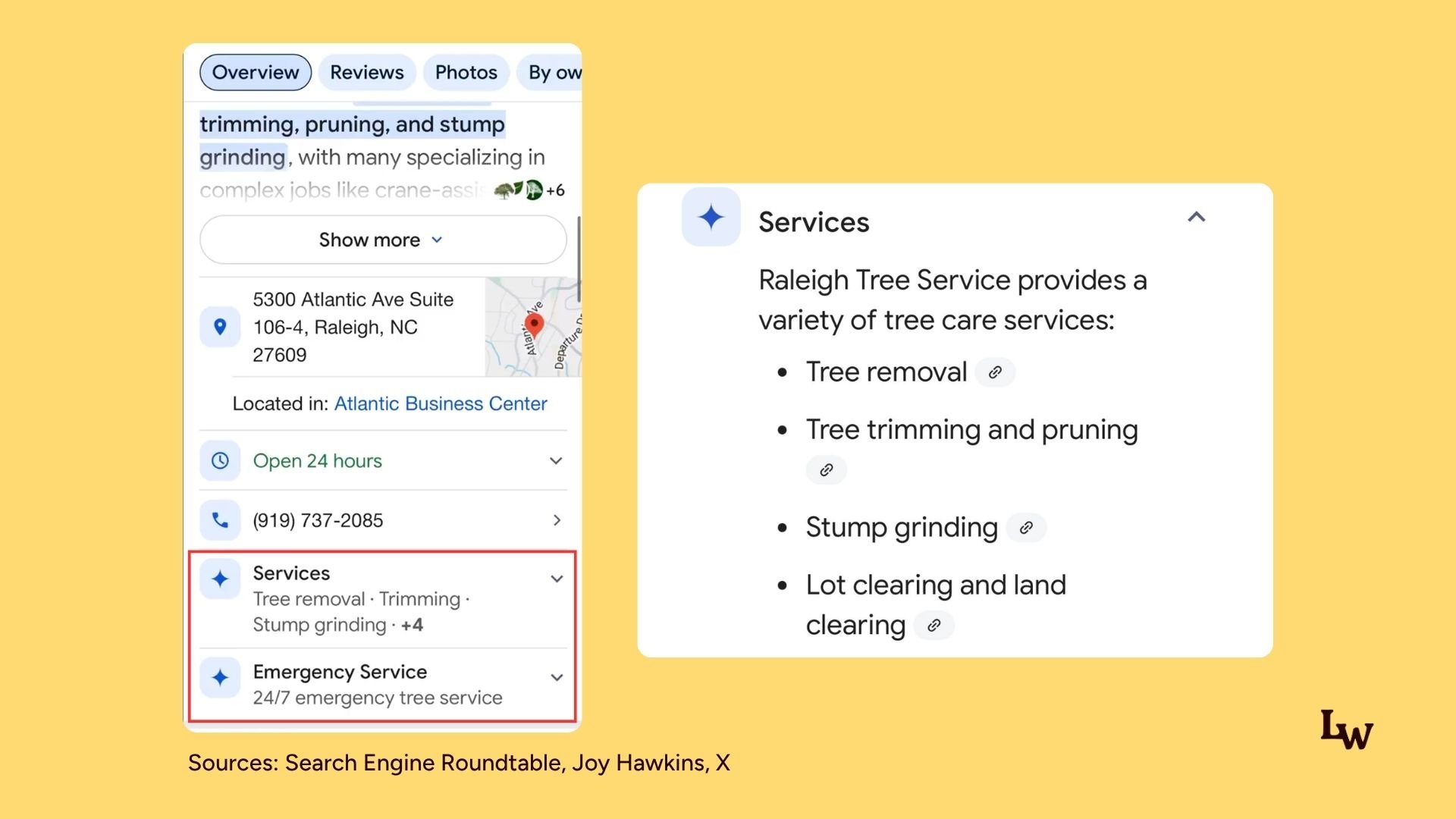
That sparkle icon is Google’s marker for AI-generated content, and the little paperclip icons next to each service are links to the web sources the AI pulled from.
Relevant for: All local service-based businesses
Why it matters: For local business owners, this means the Service information we put inside our GBP service listings matters for Google to accurately include and recommend in the AI service description.
2. AI-generated summaries of restaurant menus
When you look up a restaurant on Mobile in Google Search or Maps, Google now layers AI-generated summaries on top of the restaurant’s menu.
For example, Google will show some sample salads, the number of options the restaurant has, how much they cost, and some photos. They will do the same for starters, entrees, and other categories in the menu.
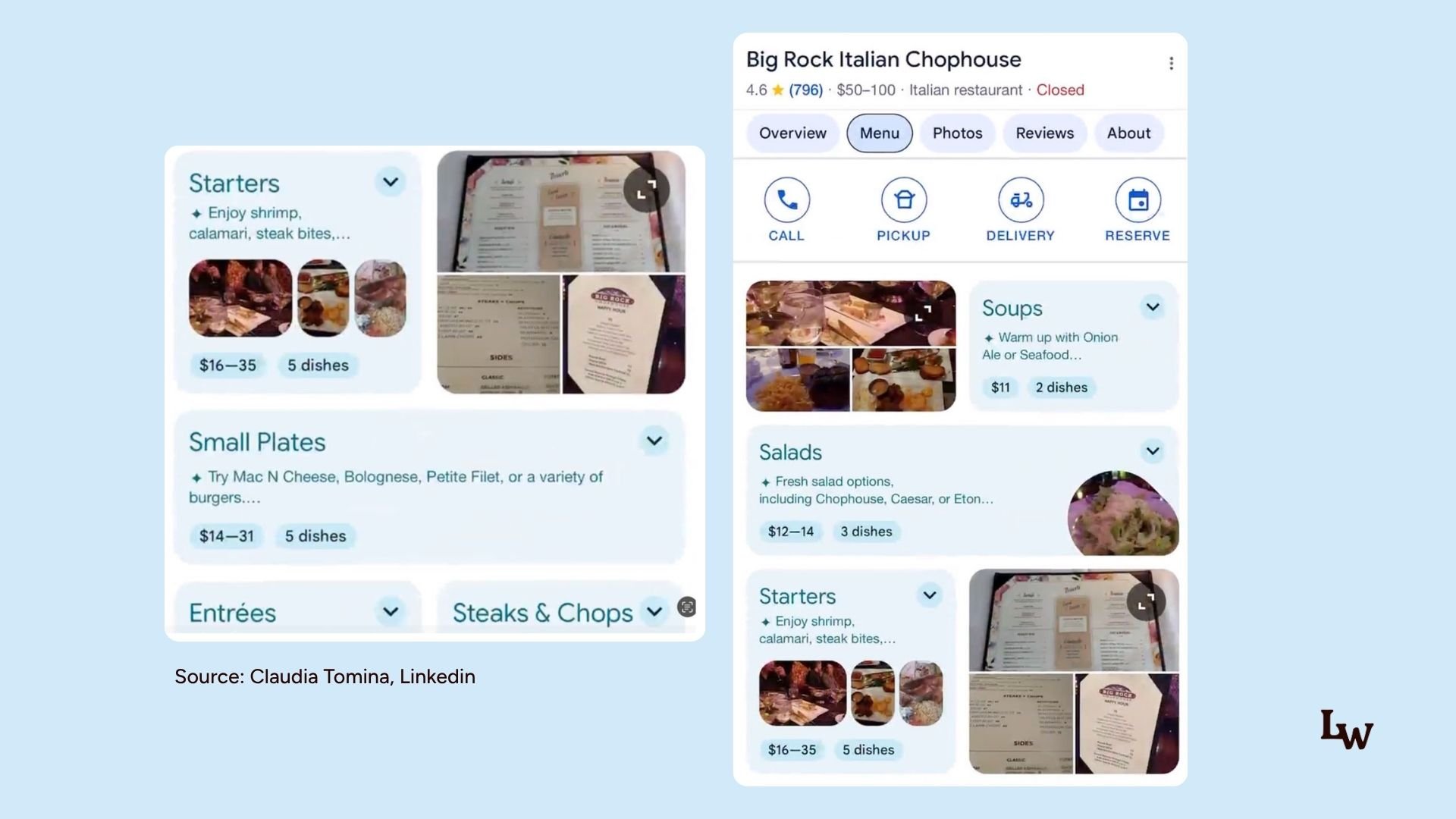
So Google’s AI reads the restaurant’s menu (likely from the GBP menu items, the website, and user content), then summarizes and restructures it into browsable, expandable sections.
Relevant for: F&B businesses, Caterers, Restaurants
Why it matters: Make sure your Google business profile menu items are complete and accurate — and that the menu on your website and in customer-uploaded photos is current too.
Google is progressively layering AI-generated overviews into local search. For restaurants, Google’s AI reads your menu (likely pulling from your GBP menu items, your website, and user-uploaded content), then summarizes and restructures it into browsable, expandable sections with prices, dish counts, and photos.
This was spotted by Claudia Tomina, who posted a video of this in action on LinkedIn.
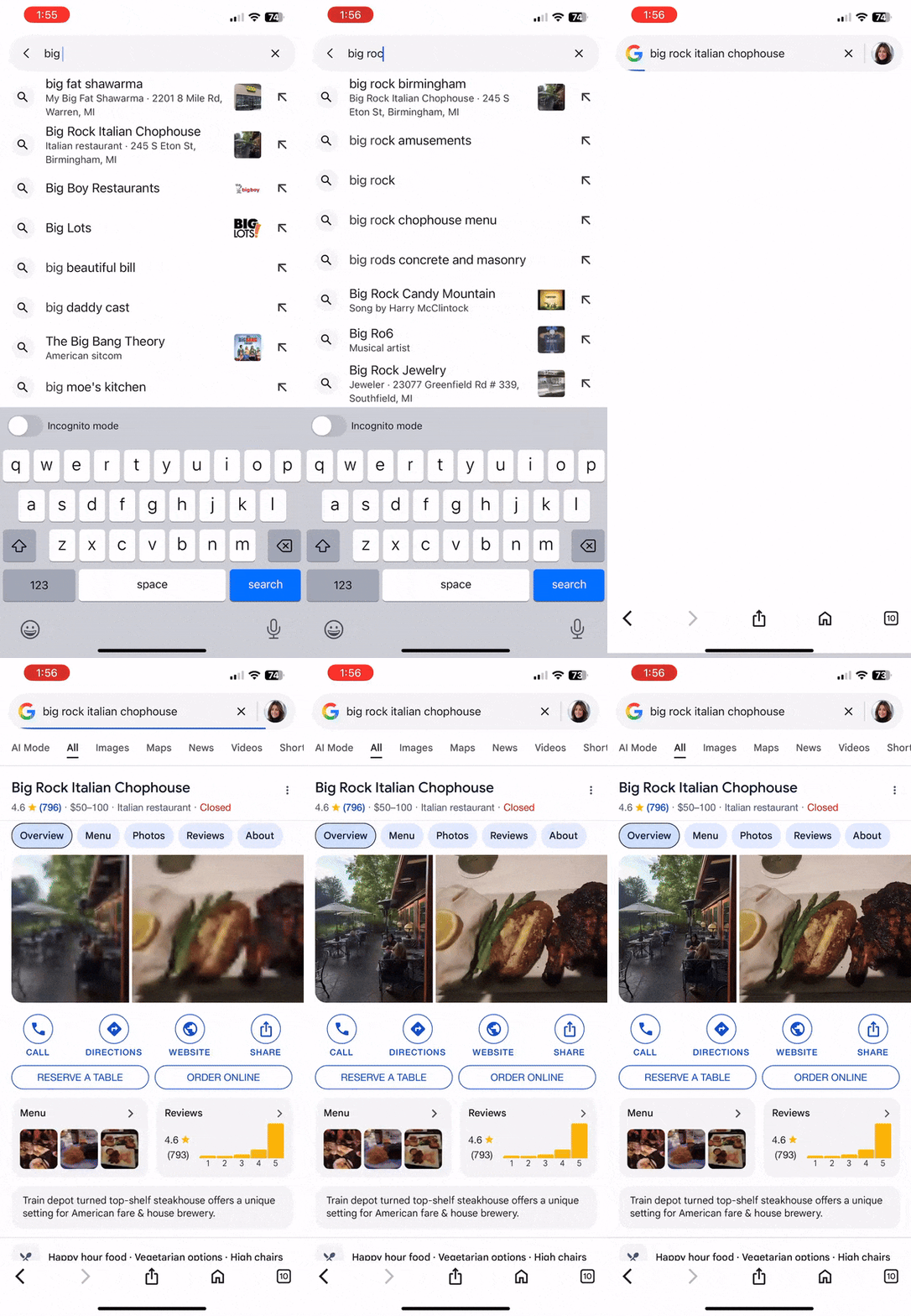
I wonder if this is generated using the AI menu generator tool from Google Business Profiles.
3. Google shows “Good To Know” AI Labels for Hotel listings
“Good to Know” AI-generated descriptions are appearing in the photos of hotel listings on Google Hotels. These labels seem to summarize what the photo and reviews say about the specific area of that hotel.
The AI labels appear for both owner and visitor photos. It does not appear in all photos.
It also includes a link to hotel prices.
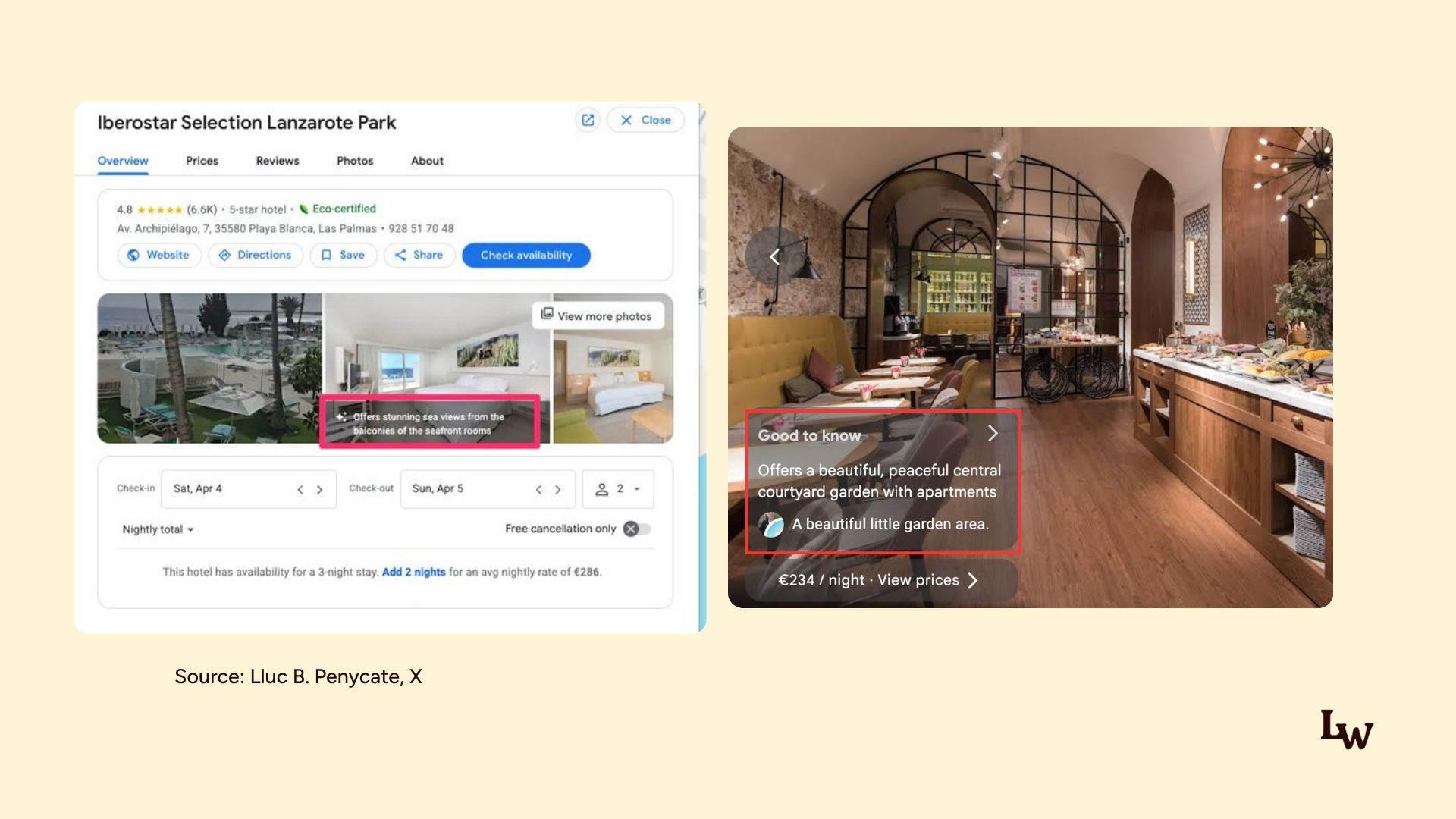
Relevant for: Hotels, Resorts, Vacation rentals, Hospitality businesses
Why it matters: Your Google Business Profile photos are helping Google’s AI to read and write captions for searchers. Upload high-quality, current photos of your venue, and keep encouraging detailed guest reviews – since the AI appears to combine both to write these labels.
This was spotted by Lluc B. Penycate, who posted a number of screenshots and videos of this on X.
Photos from visitors with Good to Know, filter out user reviews on the topic. pic.twitter.com/Dx3CeG34n6
— Lluc B. Penycate Ⓐ (@Lluc_SEO) January 31, 2026
4. Google AI Overviews cites individual reviews from Google business profile
Google seems to be using the reviews on your Google Business Profile listings to give responses in its AI Overviews. If you search for your “[your name/business] + “reviews”, you may see Google cite reviews in the AIO, which are pulled from the reviews section of your Google Business Profile.
This was spotted by Matt Smith, who shared screenshots of AI Overviews featuring individual reviews of doctors.
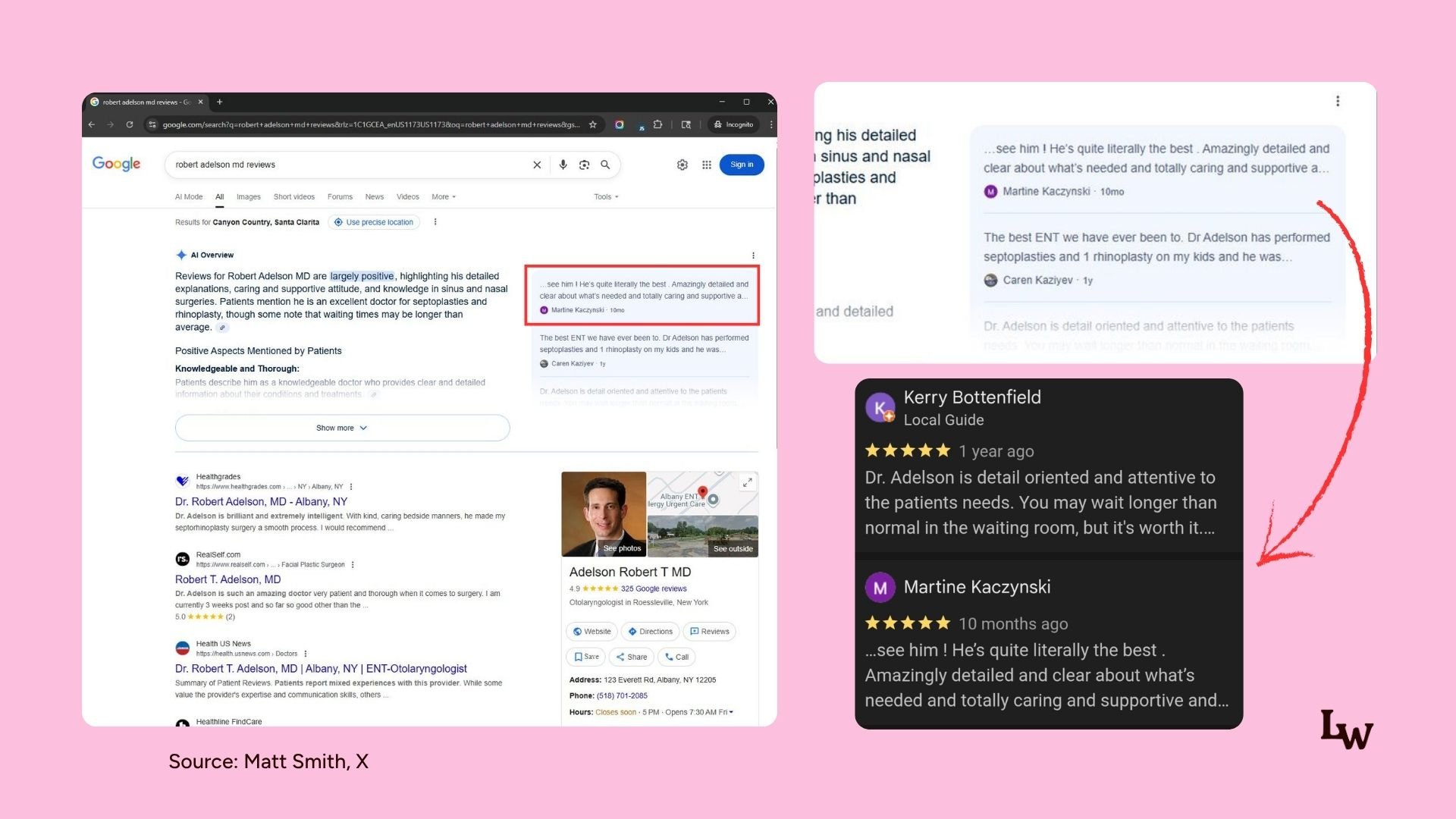
Relevant for: Doctors, Dentists, Lawyers, Clinics, and any reputation-sensitive service business
Why it matters: Your individual Google reviews can be quoted and summarized at the very top of search results, before anyone clicks your profile. Make review generation and review response a priority. Actively encourage happy customers to leave detailed, specific reviews. The AI Overview can pull sentiment like “knowledgeable,” “caring,” “wait times”.
5. Gemini Local Results gives you insight into how Google AI interprets your restaurant
When you ask Gemini about a local restaurant, it now generates a structured profile of the business built almost entirely from Google Maps reviews. Each section is labeled “Gemini Summary of Google Maps Reviews.”
This was spotted by Claudia Tomnia, who wrote on LinkedIn.
The sections spotted so far:
- Review summary. An overall synthesis of sentiment, e.g., highlighting “delicious sushi and sake pairings,” the “intimate experience,” and the “chef’s passion,” with individual reviews quoted below it
- “People talk most about“. A short list of the items mentioned most often in reviews (e.g., omakase, sake, nigiri)
- “People love to order“. Specific dishes with AI-written descriptions, like “Gyutan (Beef Tongue): grilled with a crisp exterior and soft texture”
- “Tips from reviewers“. Practical logistics mined from reviews: “Plates are small, so you’ll want to order several,” “It’s a basement spot, so it can get pretty loud”
- “People go here for“. The AI’s read on your use case and vibe: date night vs. casual bite
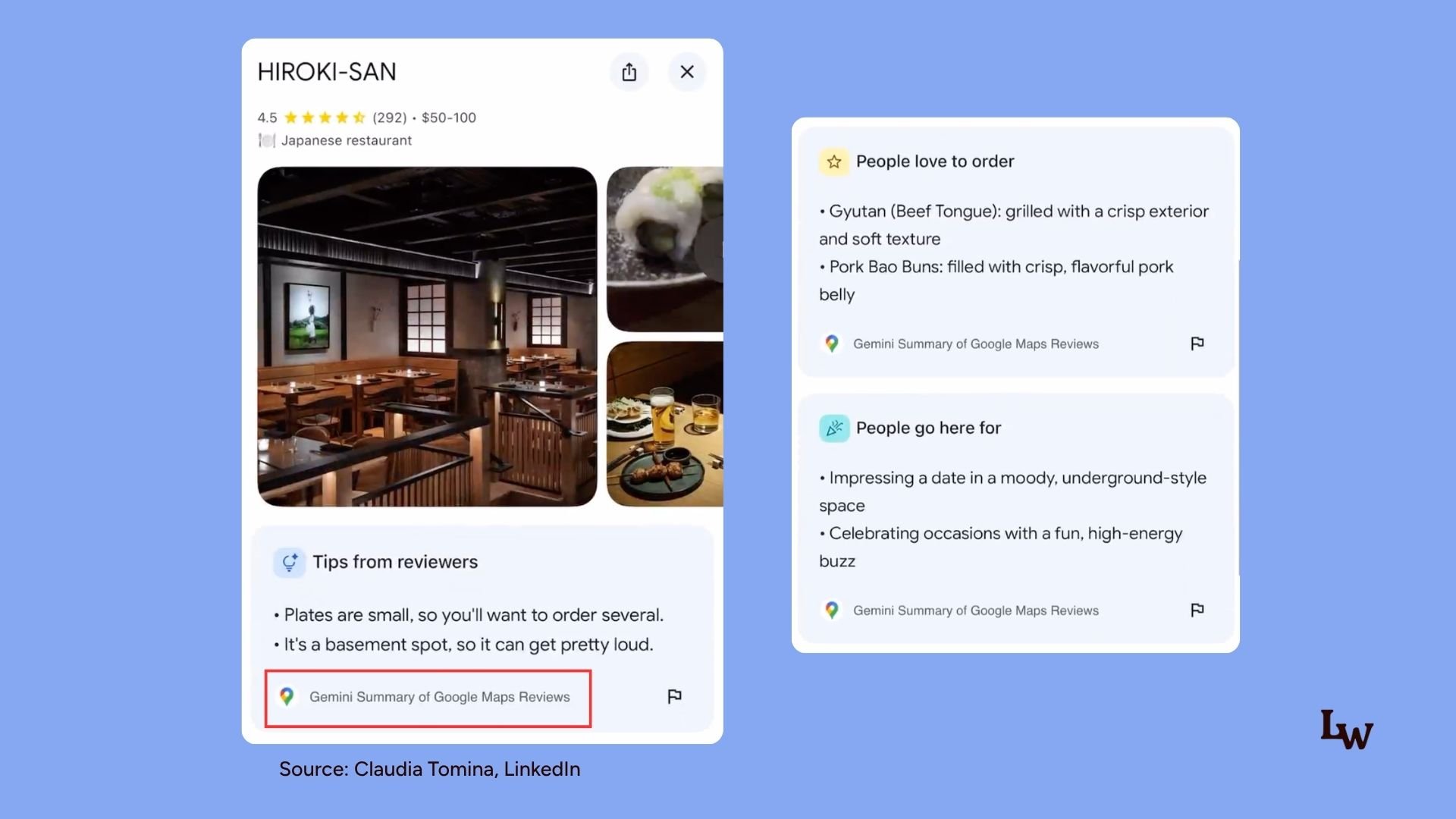
Relevant for: Restaurants, Cafes, Bars, and F&B businesses primarily, but applies to any business with a Google Business Profile and reviews.
Why it matters: We can see how Google’s AI interprets your business. What it thinks you’re known for, what people order, what your vibe is, and what logistical quirks define your experience.
Look up your own business in Gemini and audit what it says. If “People talk most about” lists the wrong dishes, or “People go here for” miscategorizes your vibe, that’s a signal your reviews and content aren’t telling the story you want.
6. Google Maps rolls out “Ask Maps” that leverages Gemini to help users research local businesses, plan trips, get recommendations
There is a new “Ask Maps” button directly in the Google Maps app underneath the main search bar.
You can ask it a prompt, and when “Ask Maps” returns results, you will see local listings, an AI overview-like response, links to reviews, links to websites, and more.
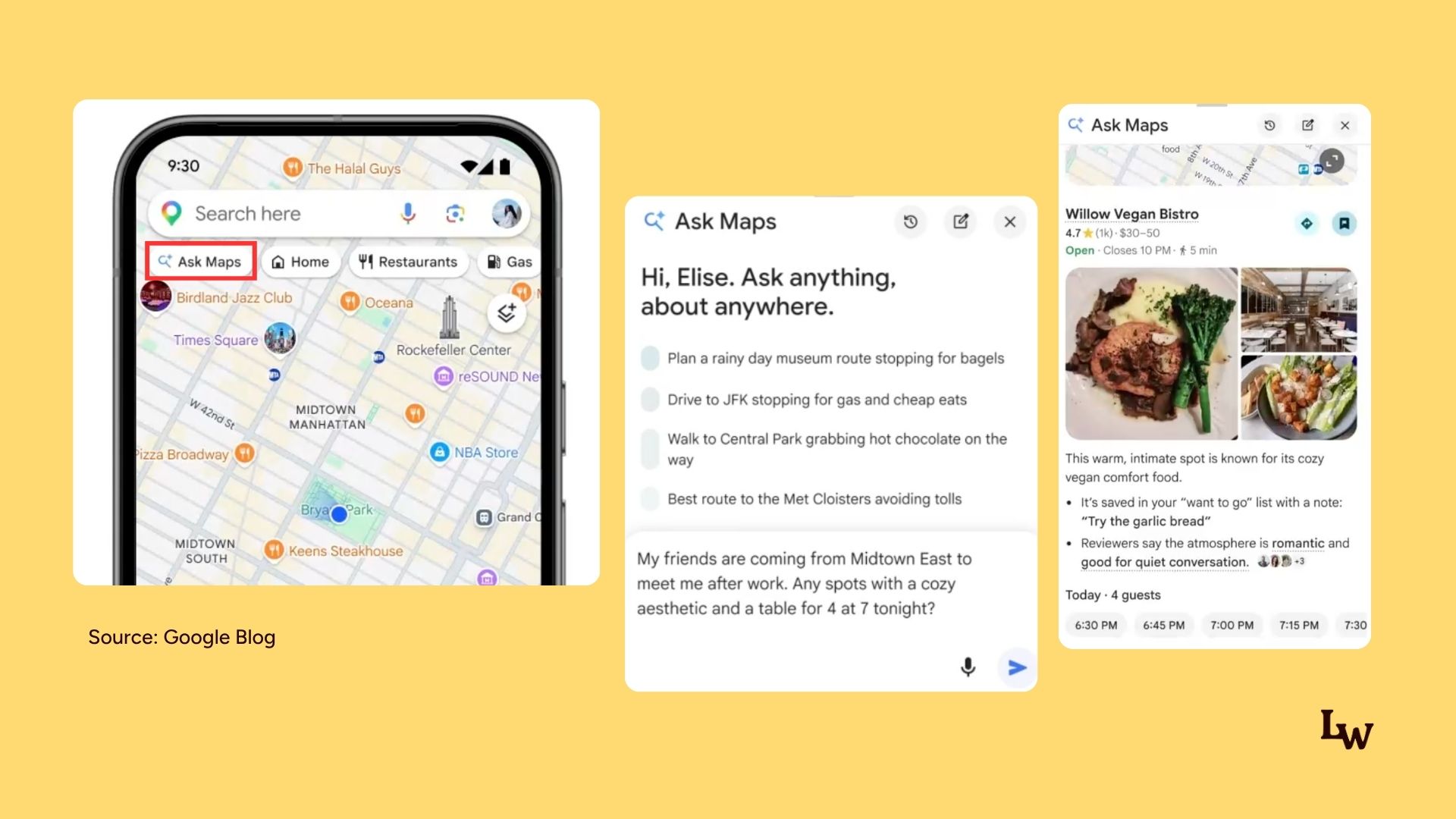
Source: Google Blog
Ask Maps is essentially AI Mode inside Google Maps. Results blend local listings, AI Overview-style responses, reviews, website links, and maps content in one answer.
It’s conversational too. You can string follow-up questions together (e.g., “now give me directions from that coffee shop to the theater”).
It can also handle complex, multi-step planning: 3-day trip itineraries, “best bars near the stadium before the game,” coffee shop + movie theater combos, and organizes recommendations on an overview map.
How results are presented (worth knowing for audits)
- Underlined places link to local listings (pin icon), star icons trigger reviews inline, clip icons show citations to the source websites
- Tapping a listing surfaces everything as normal: menus, reviews, photos, hours, reservations, ordering, plus the newish “Know before you go” AI feature sourced from reviews
- Citations sometimes point to local listings themselves, sometimes to websites, social, Reddit, etc.
Relevant for: Every local business with a physical storefront that cares about foot traffic. Restaurants, Retail, Services.
Why this matters: Google Maps is now AI-powered with Gemini. The businesses that will stay visible are the ones whose profiles, reviews, and website presence give the AI accurate, rich material to work with.
What you can do: Run targeted queries in Ask Maps to see if your business appears and whether you’re being recommended. Review how your listing looks inside Ask Maps: which photos surface, is the info accurate?
Test the conversational flow. Don’t stop at one question; string niche-related follow-ups and see if you stay in the answers.
Check what Gemini says about your customer sentiment (pulled from reviews). Check the citations — do they lead to your site, your social, Reddit, or Google itself?
Sources:
- Search Engine Roundtable
- Ask Maps in Google Maps – When Local Search Meets Gemini AI, Glenn Gabb
- How we’re reimagining Maps with Gemini, Google Blog