

Why, hello there! If you’re looking to learn more about traffic sources and mediums in Google Analytics, this article will help you out.
Website owners with marketing in place for their business will have data to crunch and insights to uncover in analytics.
There is a lot that data can tell us about how our marketing efforts are doing. Like:
- How people found your website
- Which pages people landed on first
- What time, day of the week people visited your website and how long they stayed on your site
Knowing your traffic sources and mediums can help you double down on whats working best for you.
As an SEO specialist, I have a little bias for organic strategies.
But I think it is wise to work towards long-term organic growth. And to test what is working well organically before amplifying with ads. Agree?
That’s why I encourage all my 1-1 coaching clients to look inward and explore their data. What are the different sources of traffic attracting new users to your website? What sources of referral traffic are driving you the most valuable leads?
Google Analytics classes and workshops
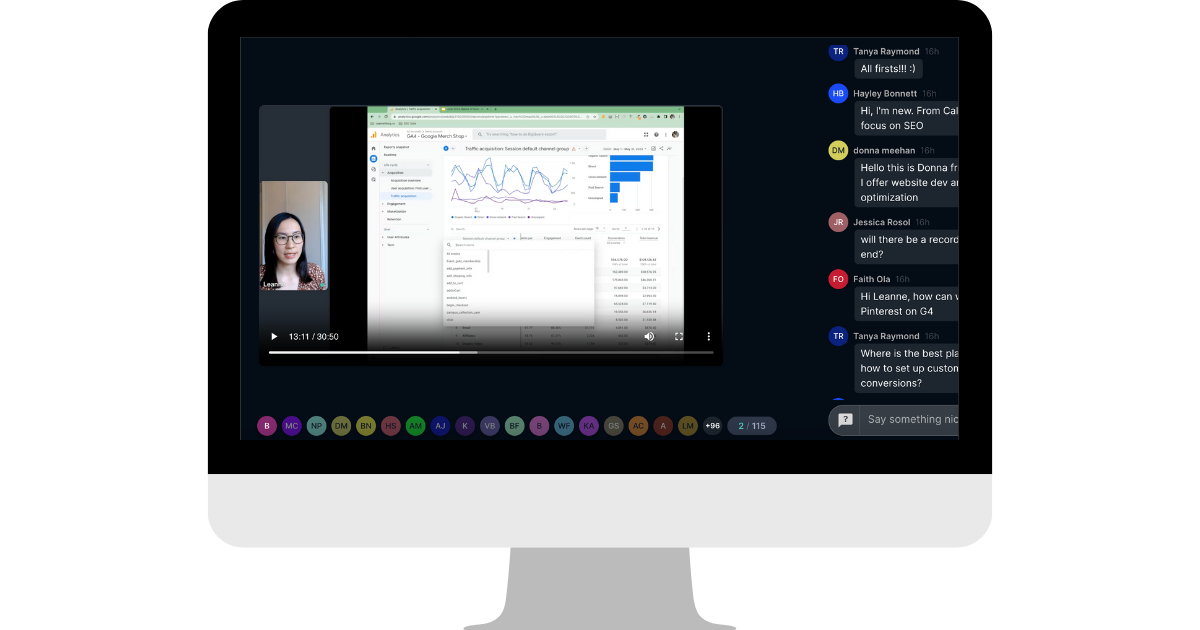
If you want to learn more about SEO and Google Analytics, check out my $99 workshop on GA4 Essentials.
You’ll learn how to read the most important reports in Google Analytics, how to read and understand your Google Analytics data and learn about conversion tracking too.
Google Analytics Sources, Mediums and Channels
Whenever someone checks out your website, Google Analytics figures out where they came from.
In GA4, there are 3 data points that can answer the question of “how people found your website”. The report for this is the Traffic Acquisition report.
- Source
- Medium
- Channel
Source
First, the source is the specific origin of your traffic. Examples of sources are Facebook, LinkedIn, Pinterest, Google, Yahoo, Bing, Duck duck go, Yelp, Yellowpages, and more.
In Google Analytics reports, sources of traffic are based on Google’s predefined source categories and UTM tracking.
For example, traffic source from “google” is the name of the search engine.
“facebook.com” is the name of the referring site.
The source is the most granular and specific classification of traffic. It tells you the exact platform your traffic came from.
Medium
Next, the medium is the category of your traffic source. Examples of mediums are email, social media, organic search, referral, or paid like PPC and CPC.
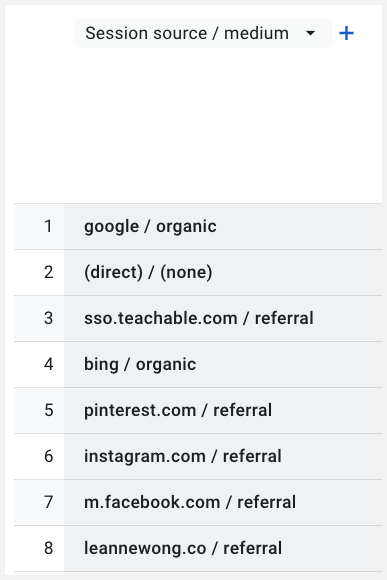
In GA4, traffic from social media platforms are categorised under the Referral medium.
Google uses the social media website as the referral source and the medium is Referral.
If we look at organic search traffic.
This is natural, unpaid traffic that can come from different search engines. Such as Yahoo, Bing, Duck Duck Go. So the names of the search engine would appear in your GA reports as a traffic source, categorised under the medium organic. Because it is natural organic traffic.
After Google Analytics figures out your traffic source and medium, it categorises the traffic in an even broader group, called a Channel. Google calls it traffic classification.
Read more about it here.
Channels
When you log in to your Google Analytics account, you may see this top channels chart. This tells you the broad traffic grouping your website traffic belong to.
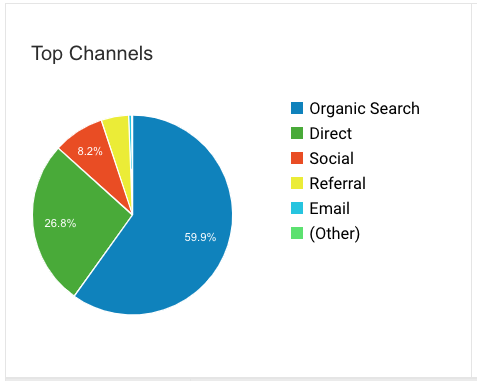
(This chart was from my Google Analytics dashboard in Universal Analytics).
The most common default traffic channels for most websites are direct, organic search, social, email, referral and paid search.
What is the (other), (none) and (not set) traffic in analytics
Google will try to figure out which source and medium your traffic came from in order to classify that traffic into a Channel.
If Google cannot identify your traffic source and medium or if the traffic does not fall into one of Google’s predefined categories, Google classifies that traffic as Other, None or Not Set.
This is all about categorization.
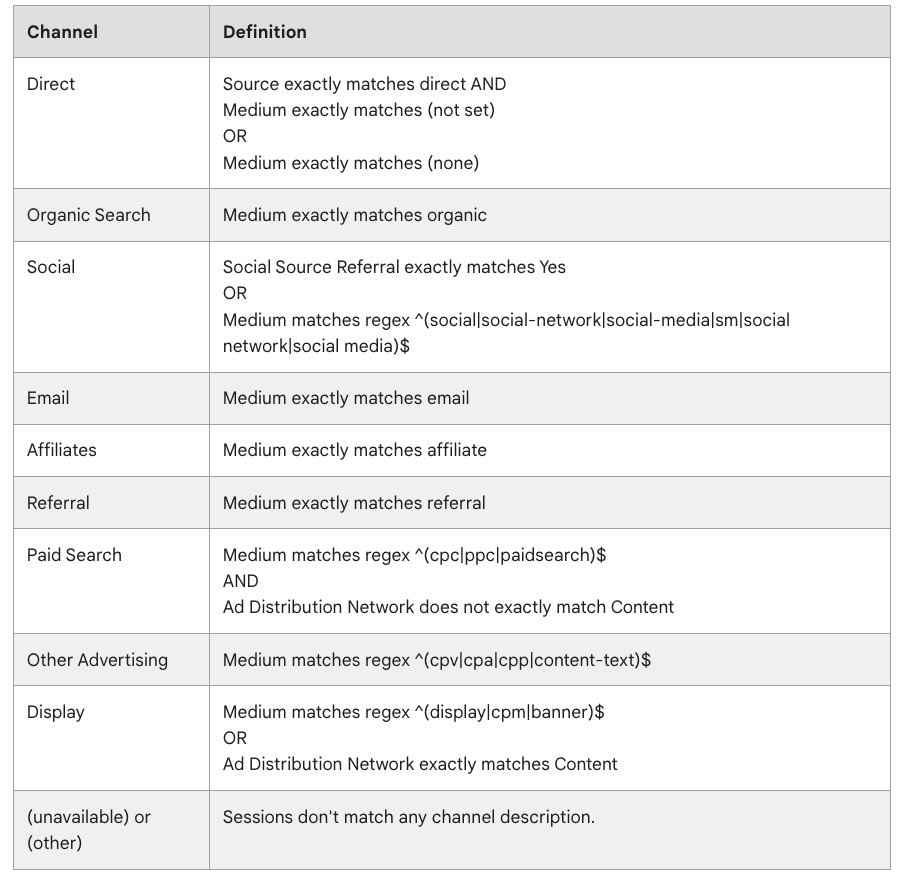
Source: Analytics Help – Default channel definitions
The (other) and (not set) channel groupings are definitely not helpful. Most of the time, you will always have this channel group in your analytics data as not all traffic sources/mediums may fall under Google’s predefined categories already.
But you can also take steps to reduce the instances of website traffic being classified as (other) or (note set) by using UTM parameters.
Direct / None traffic source
When Google can’t identify both the source and medium of your website traffic, the visit is categorized as “direct” with a source of “direct” and a medium of “none.”
Most of the websites I’ve reviewed will have the direct / none traffic source. It is common to see that in your own analytics reports.
That just means Google was not able to figure out your website’s traffic source based on its predefined categories. And that you may have marketing campaigns set up without proper UTM tracking.
The problem that arises is inaccurate data reporting.
For example, traffic from email broadcasts are appear as direct traffic. If your company sends out many newsletter emails with outgoing links to your website, then the traffic attribution from email would not be reported correctly.
You can reduce that data inaccuracy with UTM links.
UTM Tracking
You can manually create UTM parameters to track a custom campaign and understand which sources and mediums are driving the most valuable traffic to it.
First, select specific pages for your custom campaign.
Second, create a UTM-tagged URL for each page. The best way to create UTM parameters is to use the Campaign URL Builder here.

For example, if you have a webinar event that you want to promote across different marketing channels, using UTM parameters will help you understand which campaign is performing best.
I to track which email campaign is driving the most sign ups to my webinar.
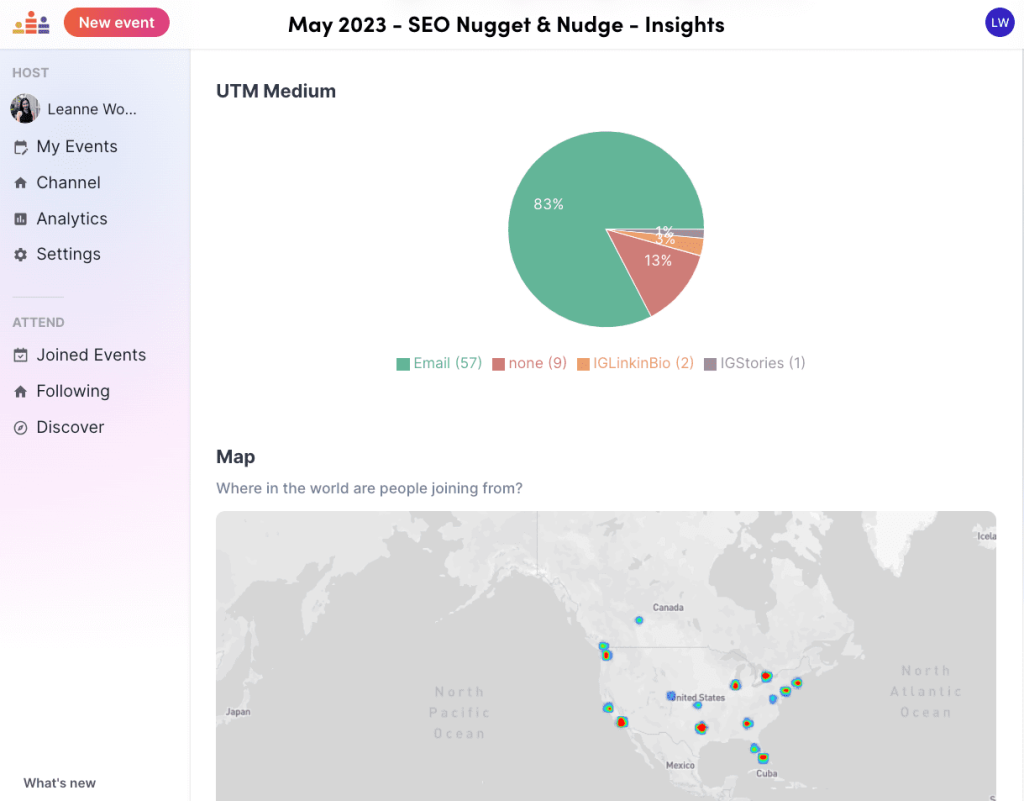
I use Crowdcast to host SEO classes and use UTM links to track which traffic medium is converting best.
To create UTM parameters, you will need to fill in these fields:
- website URL: the URL of a specific page you want to share
- campaign_source: This parameter identifies the referral source of your traffic, such as a search engine, newsletter, or social media platform.
- campaign_medium: This parameter specifies the medium or marketing channel through which the traffic is coming, such as organic search, email, or social media.
- campaign_name: This parameter allows you to label your campaign to track its performance separately.
You can also add in additional parameters like campaign term and campaign content. If you are running Google Ads campaigns, using the additional parameter for campaign term can be used for identifying paid search keywords.





25 people reacted on this
Personally I like your blog and tips also. its very useful for all.
Thanks!
With those links that do not help your site – do you disavow? Great article by the way.
Hey Jana! I generally leave them be unless as Google’s algorithms have a way of detecting links
Very nice information. Analyzing the sources which are available for marketing can be a wonderful thing for sure. Thank you very much for sharing this post here.
Glad you found the article useful!
Hi Leanne, such an amazing writeup!!
Google Analytics is a gem when it comes to site data reporting, traffic analysis and much more.
Thanks!
In addition to the sources listed above, you can also create custom sources in Google Analytics. This can be useful for tracking traffic from specific campaigns or initiatives. To create a custom source, go to Admin > Property Settings > Tracking Info > Custom Definitions in your Google Analytics account.
Oh thank you for the tip!
Informative, took me a while to understand it but now finally I’m getting to know it more. Thank you for sharing!
Cheers
That’s amazing! This is one of the most interesting topics! Thank you for sharing this information with me.
Glad to help!
This is a really great and very informative post! So helpful thanks for sharing this with us
Cheers
This was such a helpful guide to help my SEO grow with the new changes from Google! Thank you for breaking this down so simply.
That’s great to hear! Glad it has helped your SEO 🙂
Google Analytics jusr underwent a years-long upgrade to V4. It’s supposed to be more and better. I haven’t seen much difference yet, other than it’s more complex.
GA4 needs a little more getting used to!
I’ll admit, it confused me at first but I’m getting used to it. I just don’t like how it doesn’t update until around 11am the next day in regard to stats.
One of the most helpful articles I have read on GA4. I am still trying wrap my arms around it 🙂 . Thanks. I have bookmarked this . 🙂 🙂
This was so helpful. I’ve tried to understand my analytics, but honestly, it’s usually just a confusing snarl to me. This was a huge benefit!
Didn’t Google make a recent upgrade to Google Analytics? I think they did. I need to get better acquainted with them and how it works. I am missing out on a lot of useful tools and statistics.
This guide on Google Analytics sources and mediums is incredibly helpful! Your clear explanations and practical examples make it easy for beginners to understand. I appreciate the insights on traffic channels and how to improve data accuracy with UTM tracking. Thanks for simplifying this complex topic! 📊👍