

Google’s new Pagespeed Insights (PSI) report comes with a redesigned UI and a clear focus on Core Web Vitals.
Tools that you will need:
- Google Search Console
- Google Pagespeed Insights Tool
What are Core Web Vitals?
Core web vitals are the criteria that Google checks when evaluating the user experience of a web page. The factors that Google evaluates are related to page speed, interactivity, and visual stability.
The three core web vitals include:
- Largest contentful paint (LCP)
- First input delay (FID)
- Cumulative layout shift (CLS)
Core web vitals are a major component of the page experience score that Google assigns to each page. These factors help Google assess the quality of a web page from the perspective of a user.

If a page performs poorly for its core web vitals, it would affect search rankings, as this experience factor is now part of Google’s ranking algorithm.
Essentially, websites that provide a poor user experience for users will be negatively impacted in terms of SEO.
Google Search Console: Core Web Vitals report
You can view the latest report on the core web vitals for your pages by visiting Google Search Console.
The Core Web Vitals report is found under the “Page Experience” section. You can check your website’s core web vitals for both mobile and desktop.

Google only generates core web vitals reports for indexed URLs. If your website is new, it may take several days for Google to analyze the pages and post a report.
Google groups URLs together based on their performance:
- Poor
- Needs improvement
- Good
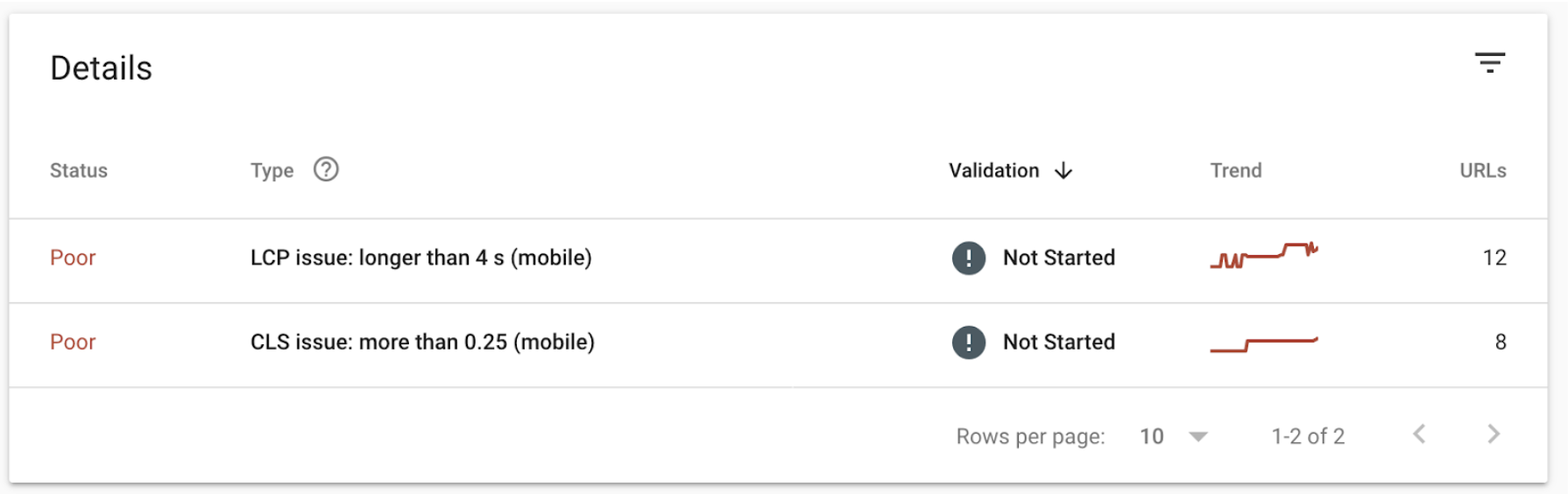
You can drill down into various sub-menus to explore a top-level report for mobile or desktop usage for all indexed URLs.
Why are Core Web Vitals important for SEO?
Imagine a page that takes too long to load and keeps users from quickly navigating to the information that they seek. Or a page that is not visually stable and provides a bad experience.
Google wants to ensure that its search results provide the best answer to users and that includes user experience. It is no longer just about keywords and backlinks, Google is placing more importance on the quality of a page based on the experience it provides users.
User experience is becoming increasingly important for Google and how it ranks pages. In other words, what hurts user experience will hurt SEO.
In the past few years, Google has been emphasizing the importance of page experience. Serious webmasters have been working on fixing their site speed and user experience to prepare for this update.
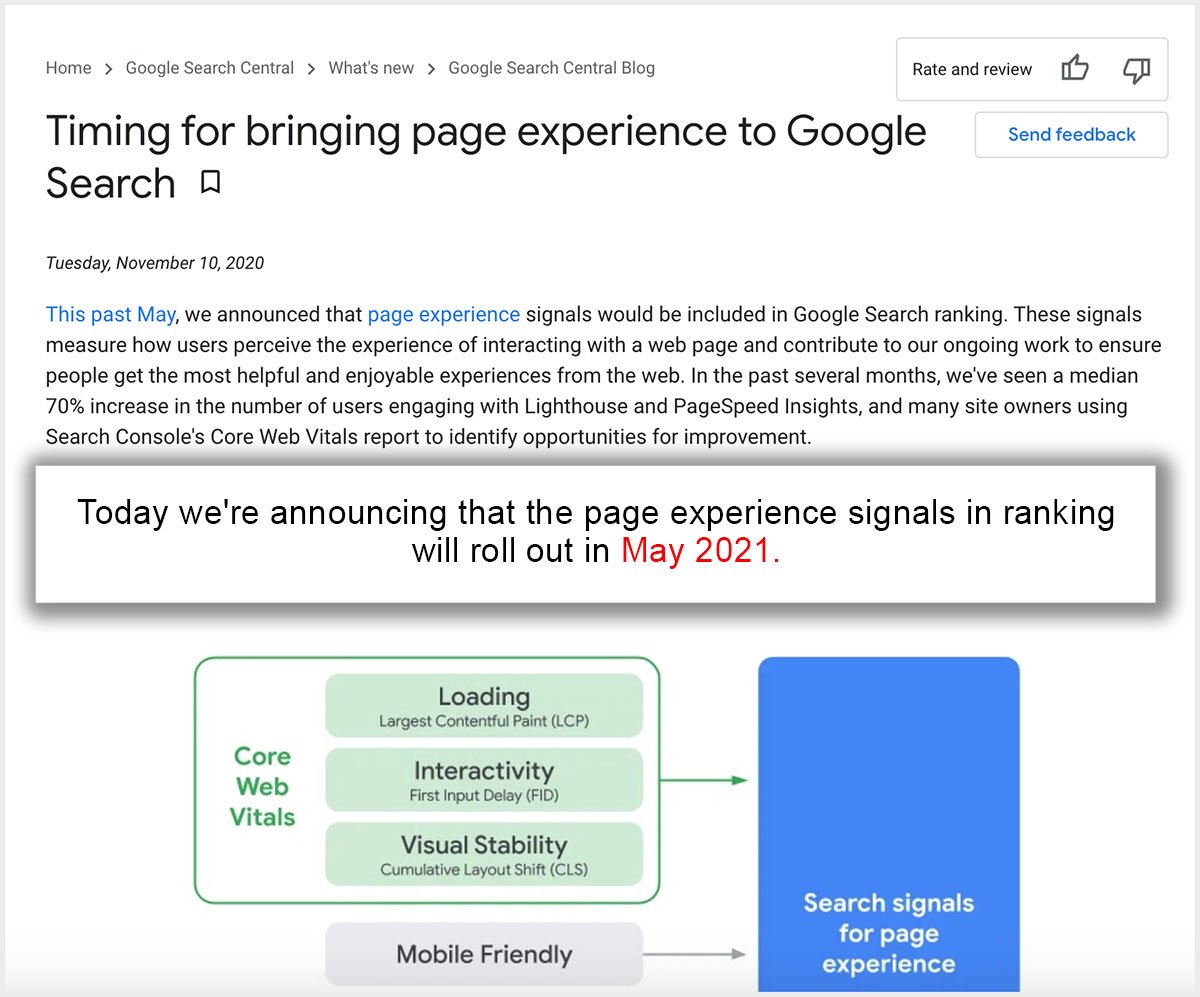
But page experience is not new to Google.
It has been part of the many existing search engine signals used by Google to rank websites, including mobile-friendliness, HTTPS, safe-browsing, and interstitial pop-ups.
Core web vitals is simply another update, that will also be a part of the page experience ranking factor.
If a page takes longer to load, it will likely have a higher bounce rate.
Google states that increasing the loading time from one second to three seconds increases bounce rates by an average of 32%. Increasing the loading time to six seconds could increase bounce rates by 106%.
Luckily, Google announced the changes to its algorithm months ahead of the updates.
Webmasters have time to check and improve the vitals on the pages that they manage before page experience starts impacting search rankings.
What Is the Largest Contentful Paint (LCP)?
The largest contentful paint (LCP) refers to the amount of time needed to render the largest content element visible in a viewport.
The largest element is often a video, an image, or a large block of text.

Unlike other page loading speed metrics, LCP does not track the entire time needed for all elements to load.
Tracking the time needed for the largest element to load provides a better indication of the typical user’s experience. So that is what LCP measures – largest contentful paint.
When the largest element appears on the screen, users (and so, search engines) assume that the page is ready to navigate.
The LCP score for your web pages indicates how the pages perform in the real world. Google uses data from Chrome browsers to analyze loading times.
The LCP is measured in seconds and ranked as good, needs improvement, or poor.
Here are the boundaries that Google uses to measure Largest Contentful Paint:
- Good – less than 2.5 seconds
- Needs improvement – up to 4 seconds
- Poor – longer than 4 seconds
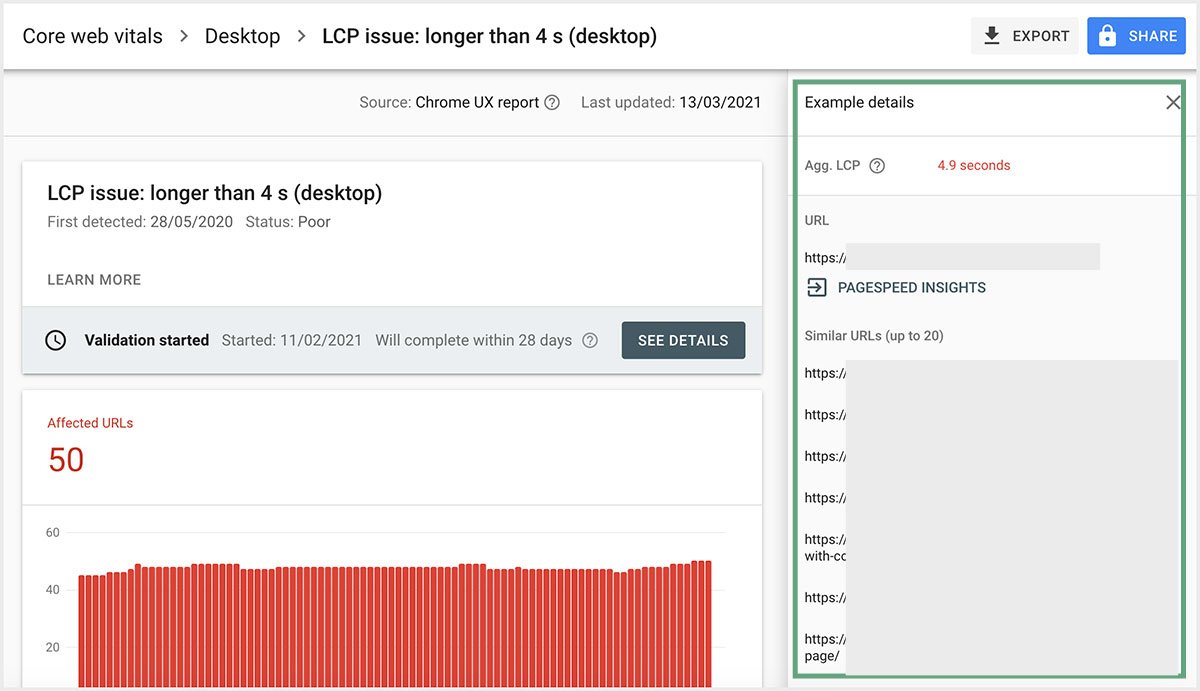
Ideally, all your URLs should achieve an LCP score of 2.5 seconds or less. Google groups the URLs into those three categories, allowing you to quickly see which pages need improvement.
Google Search Console > Core Web Vitals
PageSpeed Insights
Using Google PageSpeed Insights tool, you can also find the LCP score of your page.
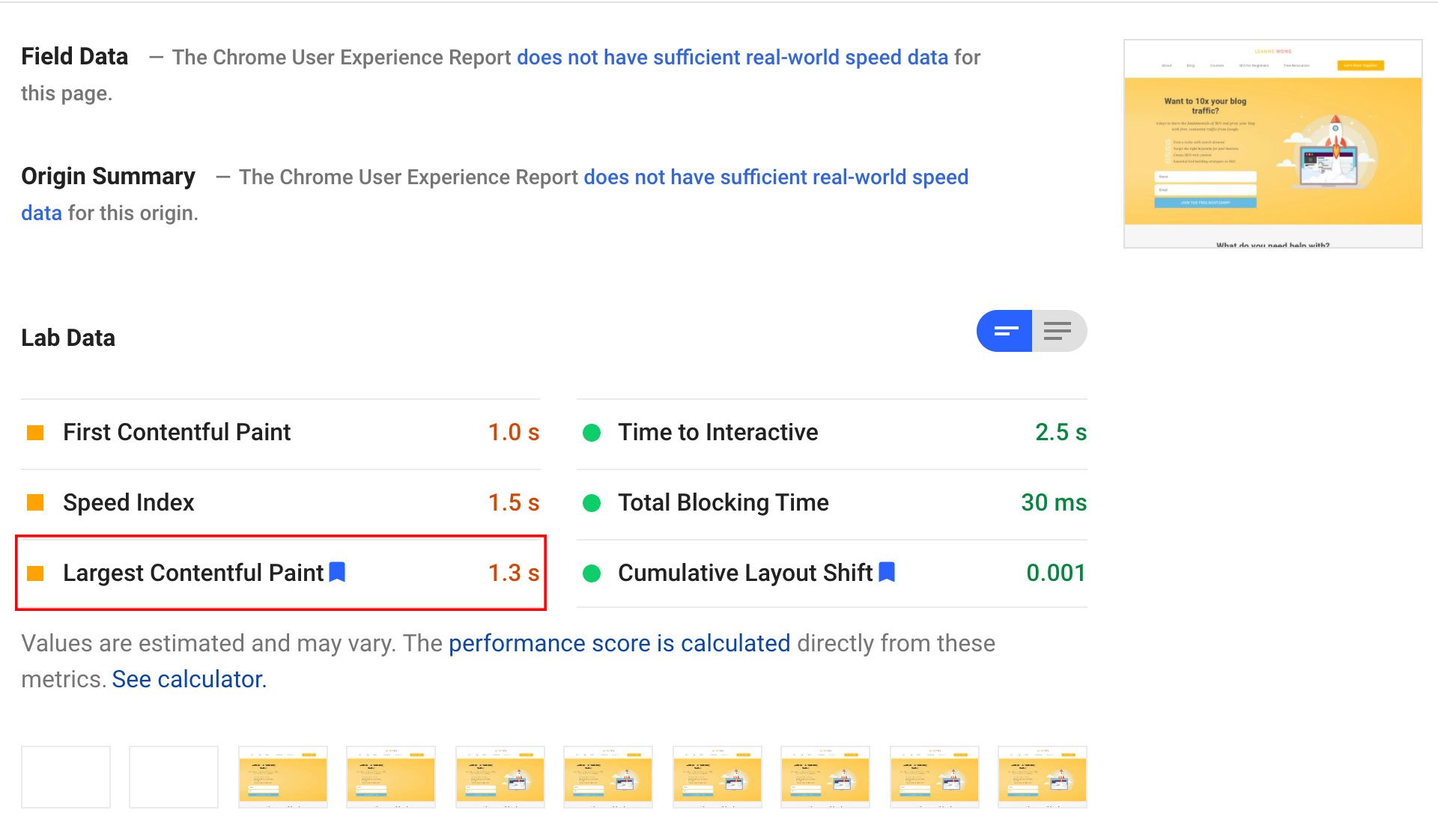
How to Improve LCP
If any of your URLs appear in the “needs improvement” or “poor” categories, find ways to speed up the loading times.
Google makes this process easy, as potential problems that impact loading times are found under the “Diagnostics” section of the pagespeed insights report.
Use Google PageSpeed Insights Report to find the largest contentful element on your page
The diagnostics section identifies the largest contentful paint (LCP) element, which is used to determine the LCP score.
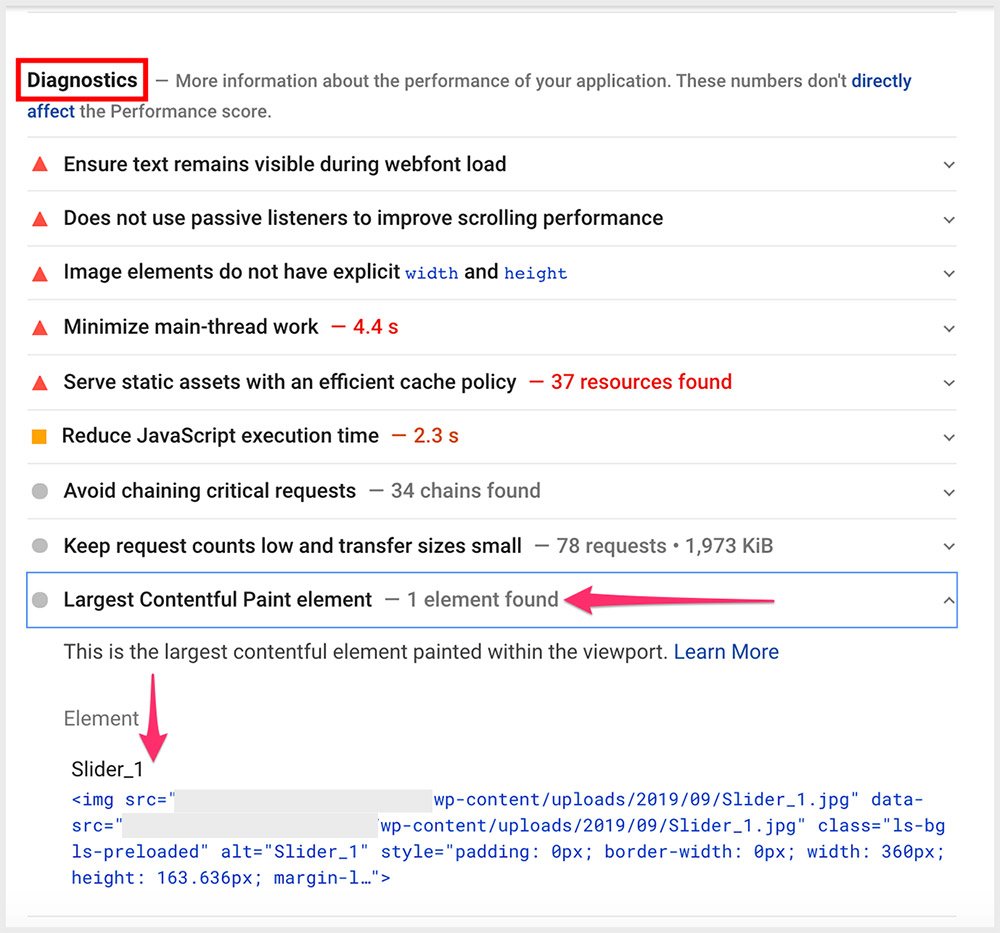
In this example, we can see that the largest contentful element for this page is a slider image.
Reduce image file size
Shrinking the file size of the largest element should positively impact the LCP time.
Images are often the largest files.
- Resize images to fit the page instead of forcing the browser to downsize images.
- The resolution should also be set to 72 dots per inch (dpi), which is the highest resolution that most browsers support.
Along with optimizing the largest elements on the page, the following steps may improve the LCP score:
- Use a better web host
- Eliminate unnecessary scripts
- Avoid inline CSS and JavaScript code
- Minify JavaScript and CSS files
- Avoid using render-blocking scripts
Shared web hosting may cause your web pages to load slower during peak usage of other sites hosted on the same shared server.
Upgrading to dedicated hosting or a cloud hosting solution may provide faster load times.
For those on a budget, switching to a more reliable web host for shared hosting may also boost page speed.
Siteground Web Hosting
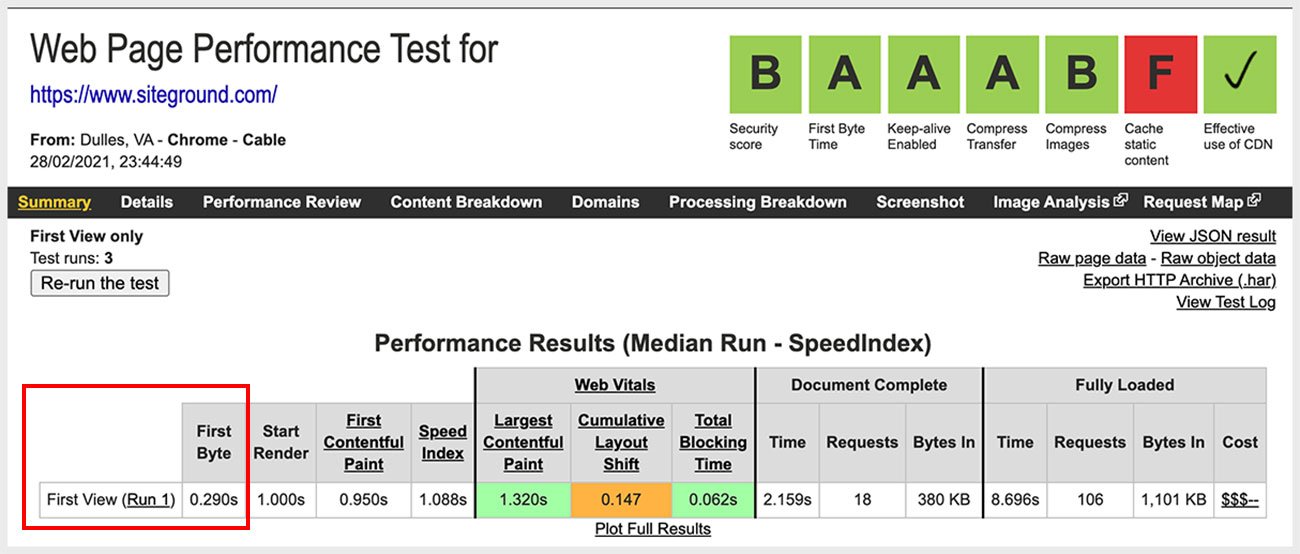
I’m using Siteground’s web hosting and they come with pretty awesome site speed optimization features, including fast server response time.
Server response time is correlated to Time to First Byte (TTFB) and this is a huge part of long LCP load times. Siteground’s TTFB is 290ms which is one of the fastest in the industry.
Remove unnecessary scripts
Remove any unnecessary scripts from the page. This may include scripts for various widgets or plugins that the page does not necessarily need, such as a social media feed or dynamic ads that appear in the top third of the page.

Avoid using CSS and JavaScript in the HTML of the web page. Placing large sections of CSS and JavaScript code in separate files can reduce load times for repeat visits, as browsers cache the files.
Minification
Using separate CSS and JavaScript files also makes it easier to minify the code using an online minification tool. Minification is the process of shortening the names of variables and eliminating unnecessary blank space to reduce file sizes.
Defer Javascript
Placing links to JavaScript files at the end of the body of the HTML or using the “async” attribute can also reduce the initial load time by letting the LCP element load first.
What Is First Input Delay (FID)?
First input delay (FID) is the time needed for the browser to respond to a user’s first input.
After a user visits a web page, they may select an option from a menu, begin filling fields in a form or click on an interactive element. The browser then responds to the user’s request.
A long delay reduces the quality of the user experience for the page. Users may become frustrated or leave the page if the browser takes too long to respond.
Good FID scores are 100 milliseconds, poor values are greater than 300 milliseconds and anything in between needs improvement.

Google uses the following metrics to rate the FID:
- Good – 100 milliseconds or less
- Needs improvement – up to 300 milliseconds
- Poor – more than 300 milliseconds
The FID determines when the page first becomes interactive. However, not all pages require the user to interact immediately. For example, a user may only scroll down the page when reading a blog post.
The FID becomes more important when dealing with pages that require user interaction, such as a login page or an online form.
Google analyzes the response time for interacting with the following elements:
- Text fields
- Checkboxes
- Radio buttons
- Select dropdowns
- Links
The FID is the user’s first impression of the responsiveness of the site. Long delays also indicate interactivity issues, which hurt user experience.
How to Improve FID
Many of the steps used for improving the LCP may also improve the FID of a web page. Long delays often occur when the browser is busy making server requests and rendering content.
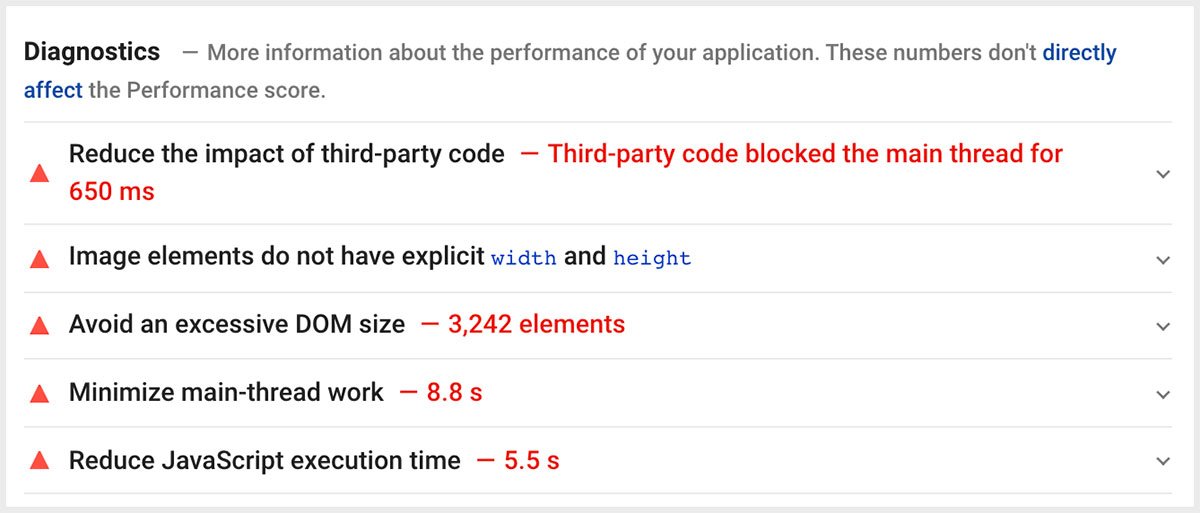
Google recommends the following steps for improving FID:
- Reduce JavaScript execution time
- Reduce the impact of third-party code
- Minimize main thread work
- Reduce request counts and transfer sizes
Reducing file sizes, minifying code, and eliminating unnecessary scripts can shorten the wait time for a page to become interactive.
Code splitting
Experienced webmasters may also use code splitting to reduce JavaScript execution time.
Code splitting involves separating JavaScript into separate bundles and only loading what is necessary when the page initially loads. The remaining code is sent when requested by an event listener.
Removing third-party code
Removing third-party code also improves FID but is not always an option. If you must keep a third-party script, load the script using the “async” attribute to prevent blocking document parsing, which can reduce the load time for other elements on the page.
If the third-party server hosting the script is slow, consider self-hosting the script.
Minimizing main thread work
Minimizing main thread work reduces FID by allowing the browser to render content more efficiently.
The main thread processes the HTML, builds the DOM objects, parses CSS, and executes scripts. It is also responsible for processing user events.
Along with the previous page speed improvements, simplifying the layout of your page may reduce main thread work.
Review the HTML and condense elements to create a streamlined layout.
Reduce request counts
Reducing request counts also improves FID. Loading a page may require the browser to make hundreds of requests.
Browsers make requests to receive documents, media, scripts, images, stylesheets, and other files needed to render the web page.
Minimize requests by combining resources whenever possible.
For example, you may not need three different CSS files for a single page. You can also utilize browser caching to limit requests.
What Is Cumulative Layout Shift (CLS)?
Cumulative layout shift (CLS) is the third component of the core web vitals.
It measures the total layout shift scores for each unexpected layout shift that occurs when loading a web page. The CLS essentially measures the stability of the page.
A layout shift occurs when elements on the page move around the viewport of the browser as the page loads.
For example, a block of text may appear across the entire width of the viewport until a sidebar loads and pushes it to the left or right.
Google totals the score of layout shifts that occur, resulting in the following rankings:
- Good – 0.1 or less
- Needs improvement – up to 0.25
- Poor – greater than 0.25

The scores are based on two factors related to each layout shift – the impact fraction multiplied by the distance fraction. The impact fraction is the fraction of the viewport that the shifted element takes up.
For example, if a block of text takes up 75% of the page, it has an impact fraction of 0.75. The distance fraction is the distance that the element moves.
A low CLS indicates that the page produces no or limited shifting of elements as the page renders.
A high score indicates that the page experiences frequent shifting, which can confuse users or force them to click on a link by mistake.
You want a low CLS.
How to Improve CLS
Layout shifts typically occur when the browser loads elements above existing content.
Common causes include images or videos with unknown dimensions or fonts that render in a smaller or larger size.
Define height and width attributes for images and videos
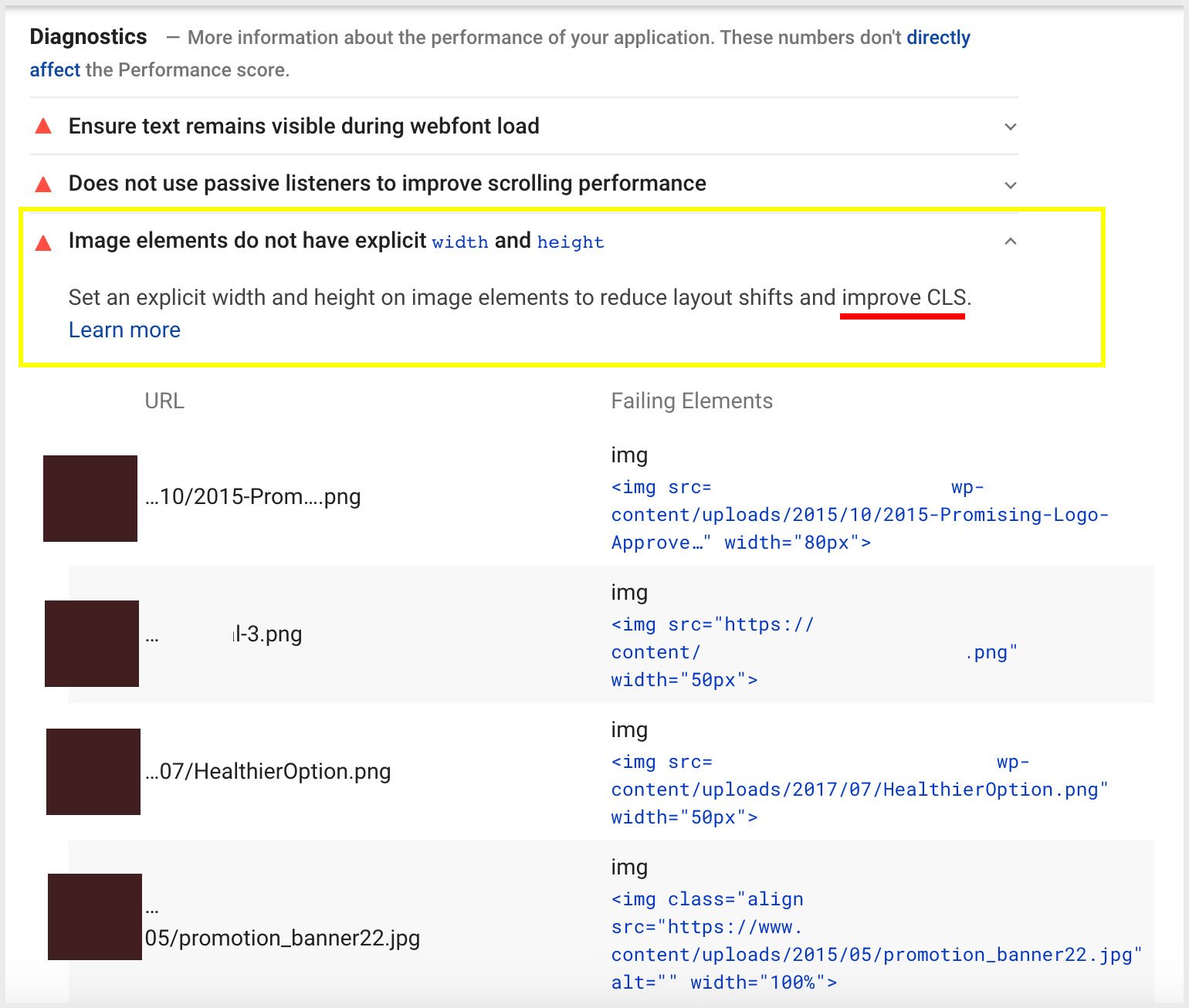
To avoid layout shifts and improve CLS, always include the size attributes when adding images or video to the page. If the size is unknown, content that appears after the element may shift as the image or video loads.
CSS aspect ratio boxes
An alternative option is to reserve space using CSS aspect ratio boxes. A ratio box ensures that the browser reserves space while the larger element loads.
Remove ads
Advertisements are also a common source of layout shifts. Removing ads may improve CLS. If you must include ads on the page, use CSS to reserve space or avoid placing them above the main content.
iframes and embedded widgets
iframes and embedded widgets may cause layout shifts if the size is not defined. As with ads, you may also include a CSS placeholder to reserve space.
Dynamic content
Dynamic content, such as sign-up forms, pop-ups, sidebars, and notices may create layout shifts when placed above existing content.
Dynamic content takes longer to load, allowing text and other content to load first. Either use a placeholder or avoid placing dynamic content above existing content.
In the end, reviewing and optimizing core web vitals are essential parts of an effective SEO strategy.
The LCP, FID, and CLS scores are based on how long it takes for elements to load or for the browser to respond to user input.
Streamline your pages to deliver a better user experience and increase your search rankings.





65 people reacted on this
What an informative article! Thanks for putting this together, I learnt so much from uour post.
The art of learning SEO is so hard. Thanks for giving some tips to make it easier to understand.
I really love this! So helpful for people!
This is a minefield for me, in the sense that I have a lot to learn also and above all to grow my blog.
I think, my SEO is bad. Based on what I read here, there are so many things I need to do. I hope I can apply what I read here.
This is a very useful post due to the fact that I use SEO on a daily basis. I will deffinelty take some of these tips and implement them in my own work.
I’m learning so much! SEO has always been something that scares me, but you make it easier to understand.
There is so much to cover but a little at a time!
This is fully awesome! The more we know about our site and how to improve it, the better our reach is which is vital.
Cheers
Google rankings do matter, so this is good info to know. I wish Google didn’t hold as much sway as they do, but Google is king and we have to do what we can to improve rankings.
Glad I came over this post. I really need to learn more about how website works. This article is really informative. Today, I was able to learning more about Core Web Vitals. Thank you and looking forward to learn more!
Cheers 🙂
Very informative! I didn’t realize the importance of core vitals until I read this!
I am working on implementing some of the things I have learned from your posts. There is so much to do and so much to try to understand.
Please let me know how it goes! Core web vitals is coming so soon in just a few weeks so it’s definitely a good time to work on this!
Thanks for this update! Aside from minimizing my image sizes, I haven’t paid much attention to the rest of my blog. I’ll make another audit of my site and see which needs upgrades 🙂
Awesomeee!
Thank you so much for all of this information! This is an area of my website that I need to work. Moving over to the Google Pagespeed Insights Tool right now so I can take a peek. And I’ll be saving this awesome post to help me thought! I appreciate your insights so much 🙂
Awesome, Sara!
I learned a great deal from reading your post today! Thanks for sharing this valuable information.
Cheers, Emily!
I just started working for a marketing agency and SEO was something I wasn’t super familiar with. Now I am learning more and more about how important it is and this was very informative! Great post!
Thank you 🙂
To be completly honest, I had never even heard of core web vitals before reading your post, so thannk you so much for the great information!
Core Web Vitals is quite new, so don’t worry! It is Google’s latest ranking algorithm update that’s set to roll out in mid-June 🙂
This article is super informative! Learning more about Core Web Vitals is on my agenda. Thank you for breaking down this subject into easily understandable paragraphs!
Of course 🙂
Wow! This is the first time I heard about Core Web Vitals. It’s so vital. I need to learn more about it.
Hope this was helpful!
Indeed such a great read! I actually need to learn more about SEO and thanks I learned something new today. Bookmarking this so I can read it over and over.
So happy to hear this 🙂
This is very interesting and clarifying – yet, quite depressing: I’ve been struggling with these stupid core web vitals forever!
Oh no!! It’s not easy but one step at a time. I’ve found that just fixing things step by step can pay off huge in load time.
This is definitely great information to have in your back pocket! Thanks so much for sharing this with us all!
Of course 🙂
I know a little bit about SEO but not something as in-depth and as technical as you. So this post is indeed a big help for people like me who are not really into the too technical side of blogging. Anyway, Google Search Console should be every blogger’s friend.
I’ve been obsessed lately with improving my mobile website speed. It’s been a challenge to me because I’m not too knowledgeable when it comes to coding, so I kept asking a friend if I had stumbling blocks. I also keep coming back to this post for more information.
I’m so happy this has been helpful for you, Ivan! Cheers.
Yes, this article is very helpful. Anyway, I just tested my site without my ad network’s script and mobile site speed has vastly improved. Now, if I could just balance site speed and ads, that would be most ideal.
I am not a tech person but I would still like to thank you for this well written post. I am still in the process of trying to understand how SEO works. Bookmarking this article for reference.
No problem, Eileen! Happy you enjoyed the post 🙂
Oh man, every time I think I finally have everything on my website setup correctly for SEO they switch it up again! Thank you for the heads up to get everything in order before June!
OMG yes! Luckily we still have time.
Very informative. I knew Google was changing things up but I didn’t know what to expect until reading your post. Thanks so much for all the good information.
Happy this has been helpful for you, Kisha!
This is going to help so many people. Anyone with a website really needs to understand as much as possible about SEO. You can have the best content in the world, but if no one sees it, it doesn’t matter.
So true! Getting found on Google is really a necessity these days.
Wow….there’s a lot of complex terms here. I’ll have to re-read it, much more slowly, this time around!
This is an info-packed post. I have been looking at some of this but I see there is more to learn! Thanks for sharing this with us!
Cheers 🙂
I’ve been doing a ton of SEO courses lately, so this info definitely came to me at the right time. The internet is constantly changing so it’s important to try and stay up to date with best practices. Thanks for sharing!
It changes so fast! Happy to help 🙂
I definitely could use some help. I need more time so that I can fix these things on my site.
Yes, it does take time. You’re not alone!
I just check my blog core web vitals on Google search console and I need to start increasing my blog load speed.
That’s the first place to start!
I love how in-depth you went with this post. SEO is so important to any website, but there’s so much more to it than simply putting in keywords.
SEO is so much more than keywords!
That’s really an informative write up with all necessary details. Would be useful for many.
Thank you!
So informative article for bloggers.Thanks for sharing with us
Cheers!
Core Web Vitals are the speed metrics that are part of Google’s Page Experience signals used to measure user experience. Thanks for the article with lot of different and meaningful conversations.
So happy you enjoyed it 🙂