

A fast-loading website is a non-negotiable for businesses today.
Slow site speed hurts SEO and online marketing efforts, as it impacts your rankings on Google, user experience, and conversions. Google has made it clear that a good page experience and Core Web Vitals are a major part of SEO rankings.
We are seeing companies investing more in website infrastructure and optimization tools to ensure their site is well-optimized to deliver a seamless user experience. How fast your page loads is a critical part of their consumer journey with your brand.
What is website load time?
Website load time is the amount of time taken for a website’s contents to be visible to the user. Ideally, a website should take 2-3 seconds to load.
The probability of bounce increases by 32% as page load time increases from 1 to 3 seconds. Websites with a faster load time tend to have better user engagement and conversion rates.
A website load time of under 3 seconds is ideal
It is difficult to improve site speed because it involves fixing issues both in the frontend and backend.
Frontend web development is things that users see, such as the text, images, and animations on the page. These tend to be easier to resolve than backend issues such as server response times, database structures, etc.
Learn the basics of how page loading works here.
In this article, we’ll learn the reasons for a slow-loading website, how to fix them, and optimize for a faster page load time.
1. Images
Images and videos are a major reason for slow site speed, as they are typically the largest files. A single high-resolution image may easily exceed 3MB.
High-quality images tend to have large file sizes. These require more bandwidth to load and increases the page size.
A handful of smaller images accumulates in the total page size as well. So while using smaller images is preferable, reducing the number of images altogether will certainly help with load time.
So, optimizing your images will be the first place to start speeding up your website.
Reduce image sizes
Reduce your image size by cropping or resizing to make them fit the page instead of having the browser scale them down.
So if the display size of your image is only 800 x 600px, you don’t need to upload a 2000 x 3000px sized picture.
A quick way to find out the display size of an image is to check it on the browser, check the ‘rendered size’.
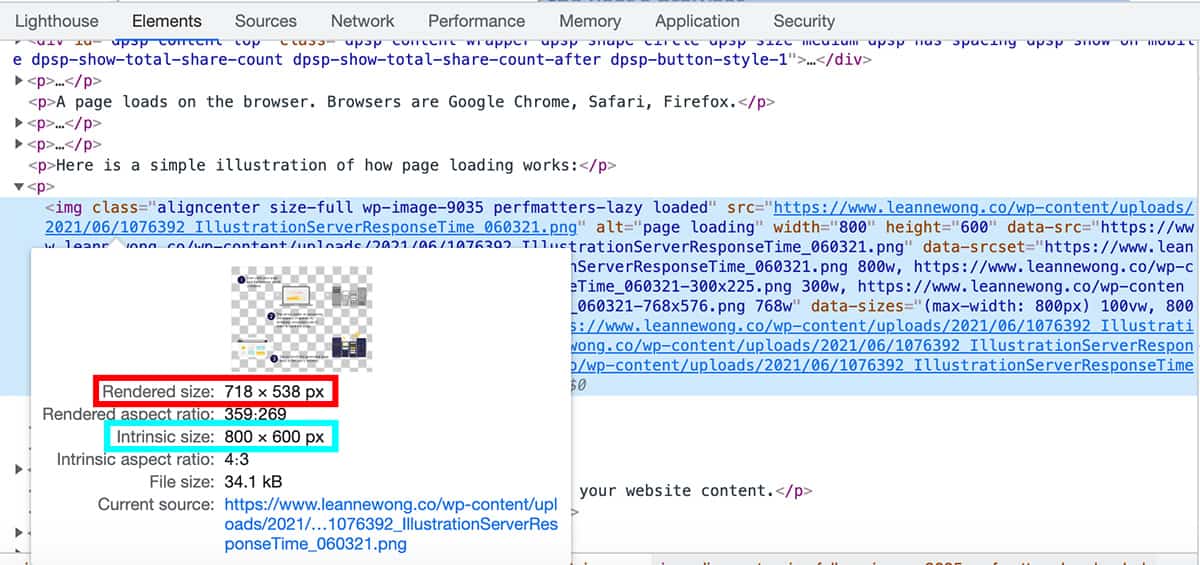
The rendered size of an image is the display size and gives you a good indication of the right image dimensions to use.
Using JPEG for most images
The image format is an important part of optimization and affects page speed. PNG format for example, typically are bigger than JPEG and slows down your site.
A good rule of thumb is to have majority of your images in JPEG format instead of PNG.
- JPEG uses lossy compression, which means some information is lost or removed from the image. Thus, resulting in a smaller file size and is a smaller image format.
- PNG uses lossless compression which does not lose data. Thus, the quality is retained at its best. This also means a bigger file size. Usually, PNG is used for icons and intricate images such as logos that require a transparent background.
Using JPEG image formats that are smaller will help your page load faster.
Speed Testing: Use a waterfall chart to analyze each resource’s page load time
The best way to fix something is to measure it. Use a tool like WebPage test helps you measure the load time of each resource on your page. From there, you can assess what images and files are slowing down your website most.
I teach more about website speed testing, how to read a waterfall chart and spot bottlenecks in page loading in the site speed optimization course here.
Next-gen image formats
Converting your images to next-gen image formats can reduce the size of the files even more. Serving an image in WebP or JPEG 2000 may reduce image file sizes by 25% to 50%.
Next-gen image format is also the Google recommended format.
CSS image sprites
Using CSS image sprites is another method for saving space. CSS sprites combine multiple images into a single file. CSS code is used to load the portion of the image that you want to display.
2. Render-blocking content
Render blocking content are things like Javascript and CSS that need to be loaded first before the rest of your page can be loaded. That’s why it’s called render-blocking.
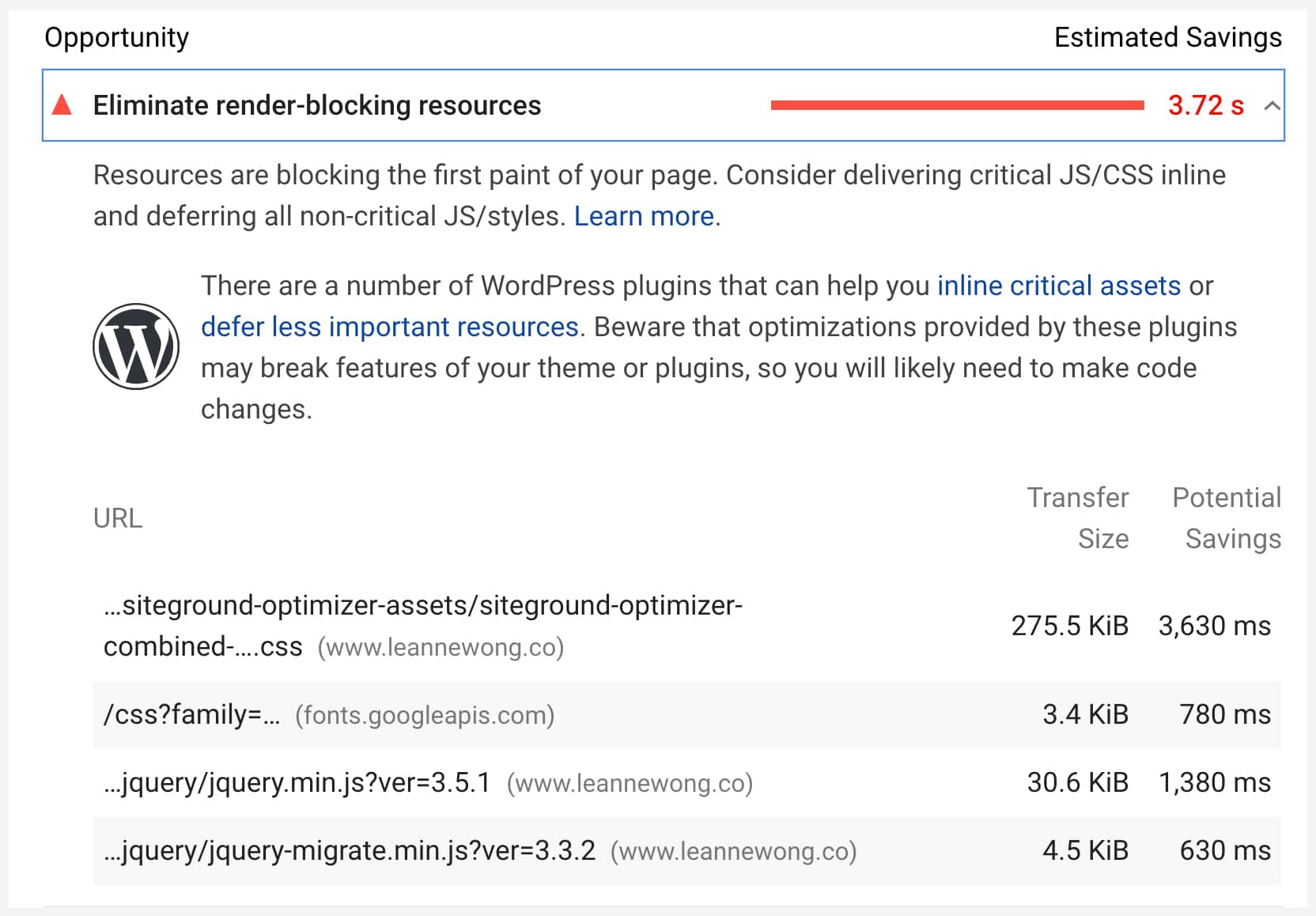
If you’ve been working on core web vitals, you might have come across this speed warning on Google PageSpeed Insights.
It’s a major contributor to a slow page load and also one of the more complex issues to fix. You can find out which are the resources that are render-blocking using Google PageSpeed Insights, GTmetrix, and most speed testing tools.
Before
After
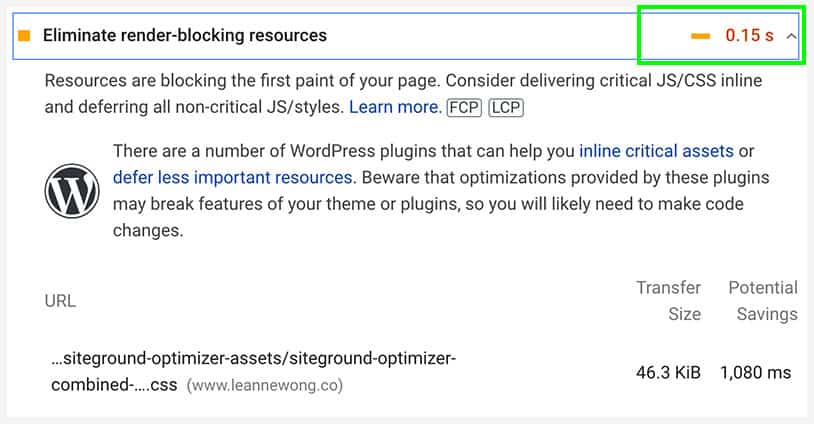
I used a number of optimization methods to eliminate render-blocking resources down from 3.7s to 0.15s, including asynchronous loading, caching, minification, and removal of plugins.
3. Excessive HTTP Requests
When a browser visits a URL, it begins parsing the HTML document and sends HTTP requests to access the website contents.
A typical HTML document includes about 70 HTTP requests to load the various scripts, images, CSS files, and other resources needed for the page.
Websites with more HTTP requests take longer to load, as the browser needs to wait for each request. The more HTTP requests are needed to be processed, the longer the page load time.
Minifying CSS and Javascript files are one way to reduce the number of requests. Combining multiple CSS files into one single file, for example, helps with this. The browser only needs to request one file instead of multiple files.
4. JavaScript
JavaScript is the most used scripting language for websites and web applications. It is often used for any on-page interactions, such as animations or clickable elements.
JavaScript can also slow the page down. Render-blocking JavaScript files keep the browser from loading the page until it processes the script.
Asynchronous loading
To fix this, use asynchronous loading for any JavaScript that is not essential for the main content of the page. Adding the “async” attribute to a script allows the browser to load the rest of the page before parsing the script.
But some JavaScript files that are critical to the layout of the page cannot be loaded asynchronously. Critical JavaScript files should be condensed by minifying and concatenating the code.
Minifying Javascript
Minifying JavaScript involves removing all whitespaces and comments to make the file smaller. Concatenating involves combining multiple scripts into one file to reduce HTTP requests.
If you are using WordPress, you can use optimization plugins such as WP Rocket, Autoptimize, and Perfmatters. These plugins help minify and condense JavaScript and CSS for faster loading times.
5. Server Response Time
A slow server is a leading cause of slow site speed. When somebody visits your website, the browser makes a request and waits for the server to respond.
A browser typically needs to make between 69 and 75 requests to the server to load a page. A delay of just a few milliseconds for each request can significantly increase the total loading time.
What is a good server response time?
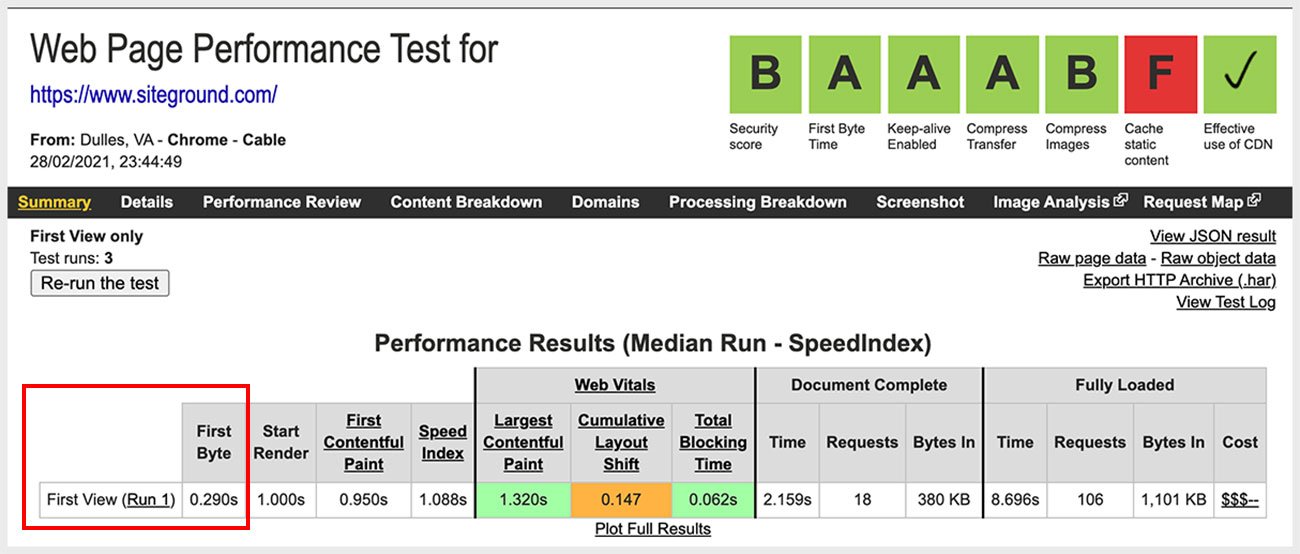
A server response time of 350 ms or less is considered fast while response times of 800 ms are considered slow. Below is the first byte time for Siteground.
Time to First Byte
The amount of time between the first request and the first response is called the time to first byte (TTFB).
A slow server response time (SRT) may be due to the quality of your web hosting service. Poor web hosting services do not have adequate resources to handle website traffic.
Inferior hosting providers often use outdated equipment or lack the bandwidth to deal with thousands of simultaneous users. These issues lead to slow server response time.
The best solution is to switch to a more reliable web host.
If you have a dependable web hosting service and still experience a slow server response time, you may need to try using a different web server. Apache was the most popular type of web server for decades but was recently surpassed by Nginx.
About 34% of websites are served using Nginx web servers. Another 33.4% use Apache. However, various benchmarking tests have found that Litespeed web server tends to provide faster performance for WordPress sites.







31 people reacted on this
This is indeed such a good read. I have to check my own website and see how can I be able to improve mine. Glad I came over this post.
Thank you! Cheers
Always important to be checking this!
This made me wonder how fast or slow my site loads.. Unfortunately my site have lots of images.. I had an issue about it before.. Which made me decide to avail an image host service so the images can load faster.. Thank you for sharing these tips.. I will keep this in mind and apply them on my blog too
Images are a major part of site load time!
Truthfully I have never even thought for a second about this! This article has made me rethink my website for sure. Thank you!
Site speed is quite important for user experience and SEO!
These are all awesome points to consider. I get frustrated when I visit a website and there are all kinds of things running on the website that makes it slow – sometimes it even crashes. I try to make my page load time fast.
That’s not good indeed!
Super useful information for people with a new or existing website. Especially business owners!
Thank you!
This article is so informative and useful. I will def follow these steps or tips on my future website. Thank you!
Glad to help 🙂
Site speed is something I have been working on together with SEO and keywords. No one wants to stay on a slow site. Thanks for these tips
Cheers 🙂
I’d love to invest in the Site Speed Optimization Course Bundle. I think it’s worth every penny
Thank you! Here’s the link for easy reference – https://www.leannewong.co/site-speed-optimization-bundle/
Very informative! I’ll be nipping off to check my website over for anything slowing it up, now! Thank you!
Cheers
Website Load Time has been a hot topic this year. It really does affect the UX of the site. The faster the loading time, better for readers!
YES!
These are such amazing points that you have shared here to bulid an SEO optimized site. Super informative, I also subscribed to your updates.
Welcome, Neha! Cheers.
I’ve been working on passing Core Web Vitals on my websites for a while now, and I’m finally getting close! Compressing my images a lot and serving them in WebP format has been helping, especially with the Largest Contentful Paint score.
Same here, image optimization and WebP formats have been a big help in my site speed as well!
Page Speed is something that I have as a goal to work on the last quarter this year. I already do some of this, such as small image files and all jpgs. But I know I can work on other aspects to speed up things a bit.
Images are a good place to start, they tend to contribute significantly to the overall page size.
I’ve had issues with my site loading slowly for years. I’ve been working hard to fix it and can use all the tips!
It’s certainly not something that can be fixed overnight 😉
I have spent a lot of time working on my site loading time as it was negatively affecting my google traffic. Since I fixed a lot of the above it has been much better and it’s been reflected in an uptick in google search traffic.
OMG that’s fantastic!! Cheers!