

An SEO audit reviews your website for factors that affect Google rankings.
Our goal is to check our website for SEO-friendliness and find opportunities for improvement so we can boost our website’s rankings and drive more traffic from Google.
A standard SEO audit looks into:
- Baseline SEO traffic performance
- Technical SEO
- On-Page SEO
- Off-Page SEO
Content List
- Step 1: Organic Traffic
- Step 2: Backlinks
- Step 3: Make sure Google indexes one version of your website
- Step 4: Core Web Vitals
- Step 5: Improve Page Speed
- Step 6: Find and fix indexation errors from Google Search Console
- Step 7: Check if your website is mobile-friendly
- Step 8: On-Page SEO
- Step 9: Improve content with SEO Copywriting
- Step 10: Optimize Your Website for Featured Snippets
- Step 11: Use Screaming Frog to run a website crawl
- Step 12: Broken Links
- Step 13: Redirects
- Step 14: Canonical tags
- Step 15: Structured Data
- Step 16: Identify thin content
- Step 17: XML sitemap
- Step 18: Identify internal linking opportunities
- Step 19: Information Architecture
- Step 20: Get Google to recrawl your website
- Step 21: Improve User Experience
Step 1: Organic Traffic
Organic traffic refers to visitors who reach your site through organic search results (unpaid) instead of clicking on a Google ad.
We want to get a baseline understanding of how much traffic our website is getting from Google now.
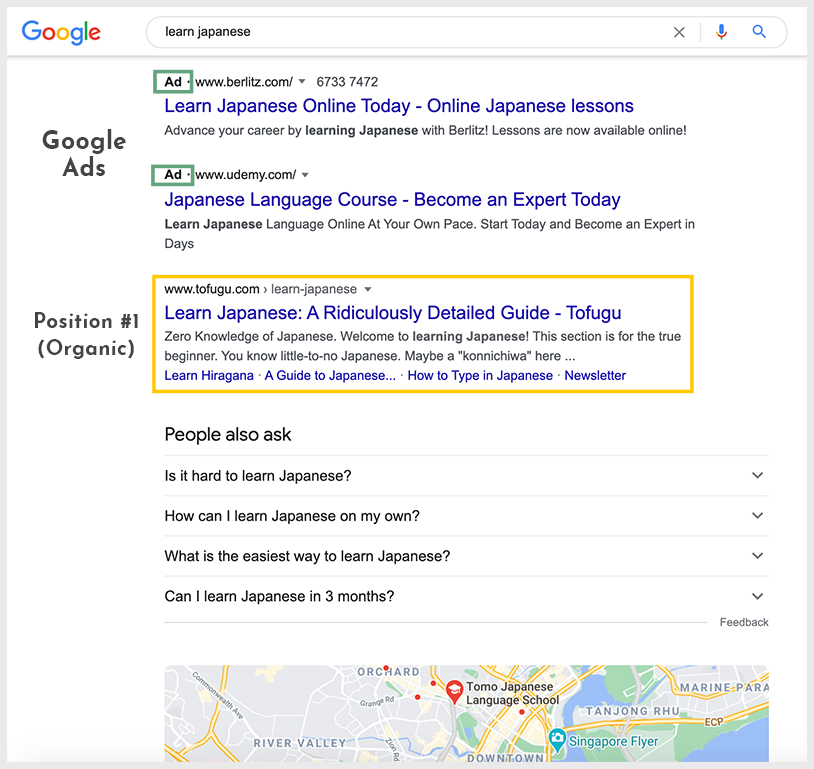
Ranking in the first position on Google is a coveted position that drives high amounts of organic traffic and visibility to a website.
The higher you rank on Google’s search results, the more search traffic you can drive to your website.
Google Analytics
Use Google Analytics to check how much organic traffic your website is getting.
Acquisition > All traffic > Organic Search
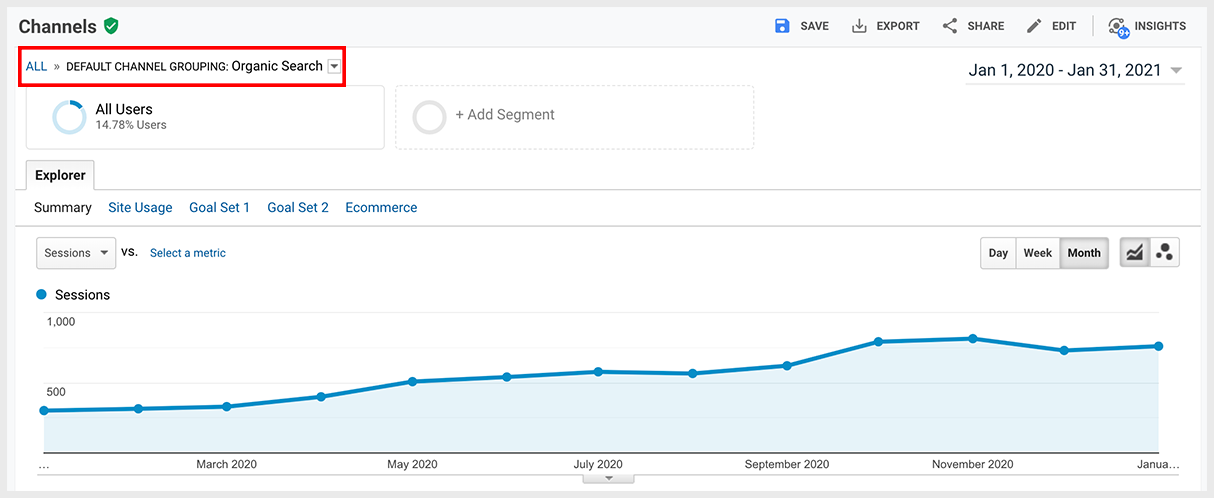
Looking at the amount of organic traffic (sessions) that your website receives provides an overview of your current SEO performance. If you look at monthly organic traffic over the past 6 to 12 months, you hope to see a gradual increase.
After viewing the total organic traffic for your site, you can drill down into individual landing pages.
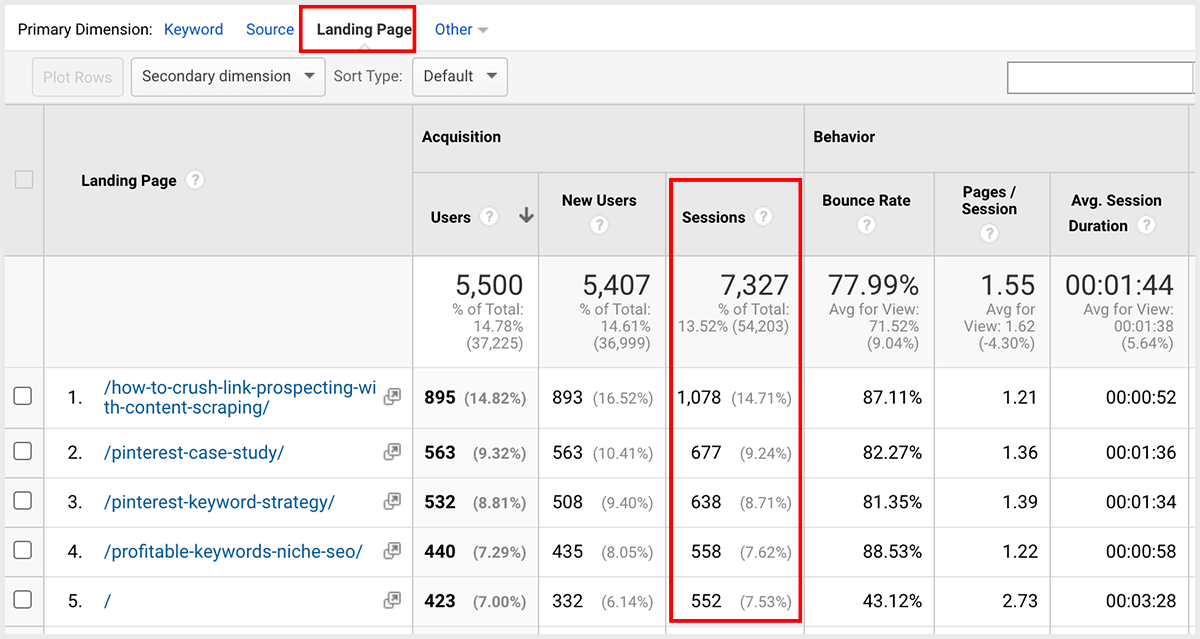
You may find that some pages receive significantly more or less traffic compared to others.
Google Analytics also allows you to view organic traffic by location. If you discover that most of your traffic comes from specific regions, you can capitalize on that interest by expanding marketing and targeted SEO in those markets.
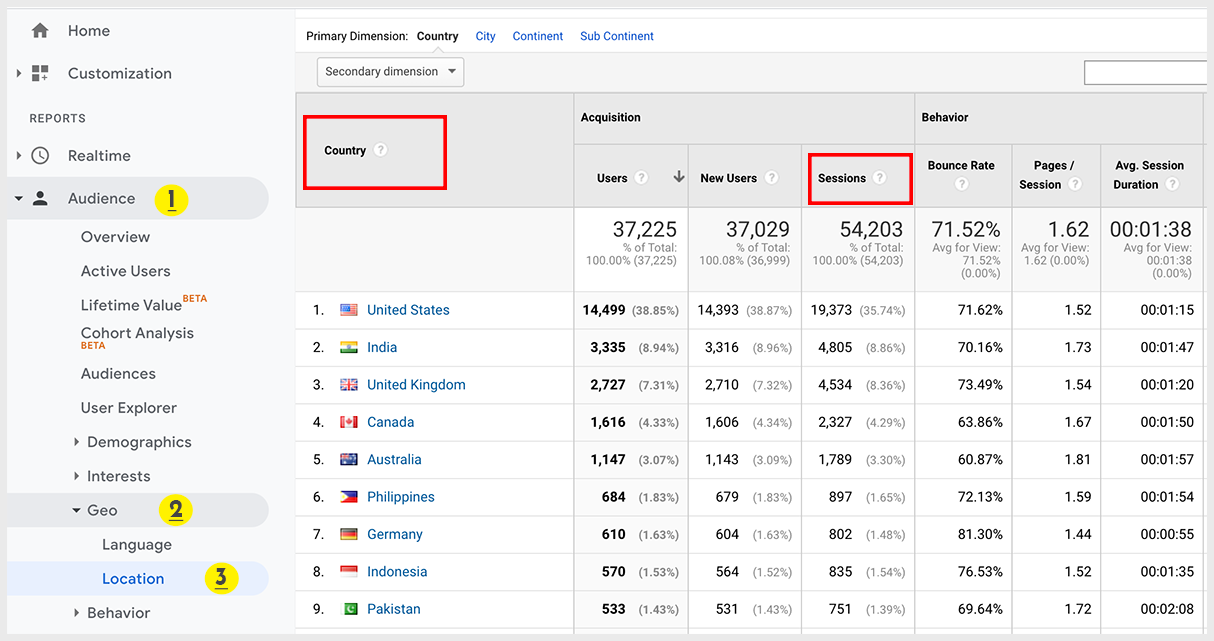
The information that you gather provides a starting point for the rest of the SEO audit process. You can focus on specific landing pages or locations that provide less organic traffic.
Bounce rate and conversions
Along with organic traffic, you should review organic bounce rates and conversion rates.
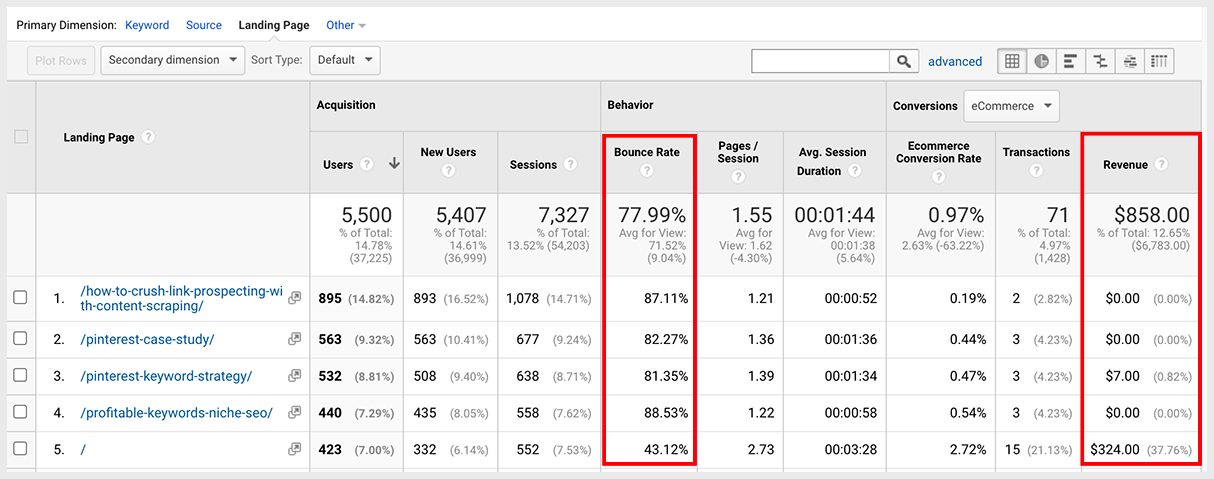
- Which pages drive the most traffic?
- Which pages have the highest bounce rate?
- Which pages drive the most conversion value?
A high bounce rate and low conversion rate indicate that a page is not doing its job of converting organic traffic into new customers or frequent visitors.
Step 2: Backlinks
Backlinks are external websites that have linked to you. The quality of the backlinks directly influences your overall domain authority, which search engines use to analyze the credibility of your website.
The higher your domain authority, the higher your credibility and ranking ability (SEO).
Domain authority is a ranking score developed by Moz.
The score ranges from 0 to 100. A good domain authority score would be 30 and higher.
Audit your backlinks domain rating
You can evaluate a backlink’s domain rating with SEO tools such as SEMrush or Ahrefs.
Ahrefs > Referring domains

- Where are your backlinks coming from?
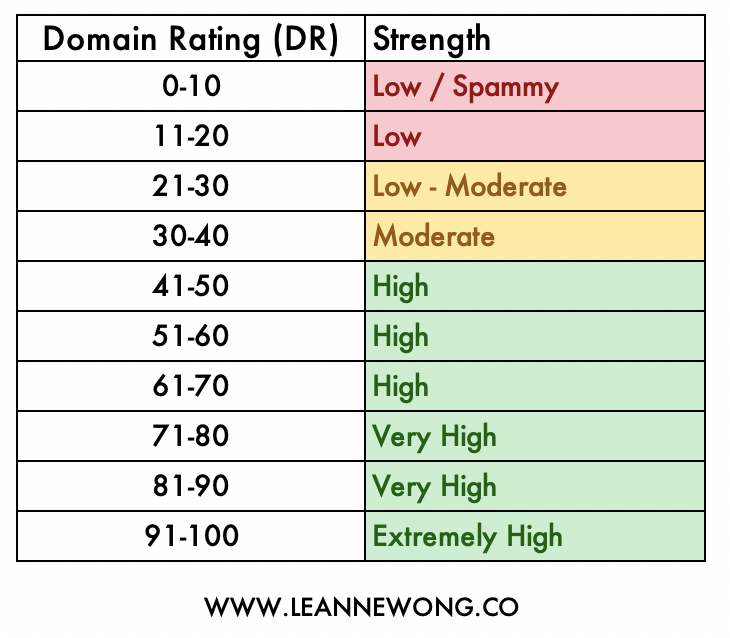
- How many backlinks are from referring domains with low DR?
- How many backlinks are from high DR domains?
Lower scores may come from toxic websites and can drag down the domain authority of your website.
Low quality and spammy backlinks
Low-quality backlinks can hurt your SEO.
Audit your backlinks to check for low-quality, spammy links. Backlinks from websites with a DR of 10 and lower tend to be low quality links.
Anchor text
You also want to review your backlink’s anchor text. A healthy link profile should mostly contain branded anchor text, such as the name and URL of your website.
Toxic backlinks often use anchor text containing targeted keywords.
Disavow spammy backlinks
Usually, Google is smart enough to tell which are spammy links. But in some cases, you may want to manually protect your website from spammy links by telling Google ‘these spammy links have nothing to do with me’.
This is more urgent if you notice a considerable number of spammy links that are pointing to your website. Eg: Hundreds of low-quality links from the same website with a low DR. This is usually a red flag.
To remove negative backlinks, you can use Google search console to disavow links.
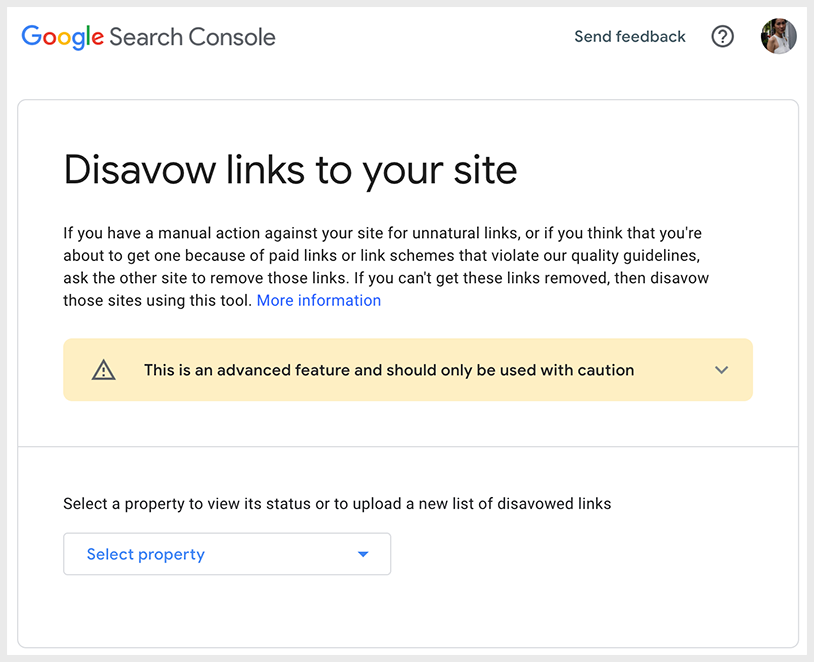
Read this tutorial on how to disavow spammy links.
Step 3: Make sure Google indexes one version of your website
Ensuring that Google indexes your site is a crucial part of technical SEO. If your website isn’t indexed, it will simply not show up on search results.
You also want to make sure only one version of your website is indexed by Google. It is common to have multiple versions of your site.
- www.yourwebsite.com
- yourwebsite.com
- http://yourwebsite.com
- https://yourwebsite.com
The SEO implication of having multiple versions of a domain is that you have the same content resting on multiple sites.Meaning traffic will be split across these multiple sites, and any backlink value acquired will also be split.
You don’t want that. Instead, you want Google to index only one version of your website and rank that on search results. So you have one version of your website that drives traffic and acquires backlinks.
Since 2019, Google is able to pick out which version of your website is the preferred one. This is why it has removed the ‘preferred domain’ setting on search console.
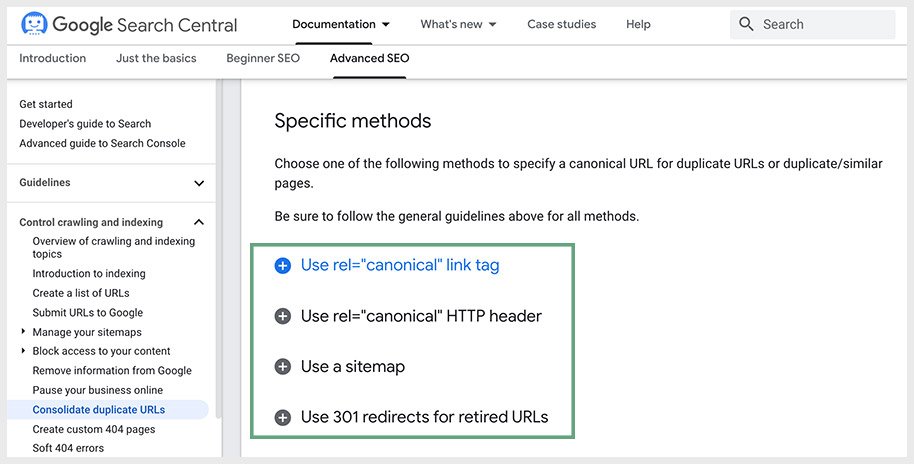
But you should do your best to help Google understand which version of your website is the original and preferred one. Google has recommended four methods to do this:
- Use canonical tag
- Add a canonical tag in the HTML document of all duplicate pages to point to the preferred version
- Use rel=canonical HTTP header
- Sends a rel=canonical header in your page response.
- Use a sitemap
- Use a sitemap to specify the canonical version of the website or page
- Use 301 redirects of old and retired pages
For web developers, here’s a handy guide to consolidate duplicate URLs.
Step 4: Core Web Vitals
Core Web Vitals are the page experience update on Google’s search algorithm that will be rolling out in May 2021. This comprises of three metrics:
- Largest Contentful Paint
- First Input Delay
- Cumulative Layout Shift

This means starting May 2021, websites that fail the core web vitals will be negatively impacted. Expect drops in rankings and traffic loss if your website does not provide a good user experience.
Because Google will assess a website’s core web vital performance in its ranking algorithm.
What is a good Core Web Vitals performance?
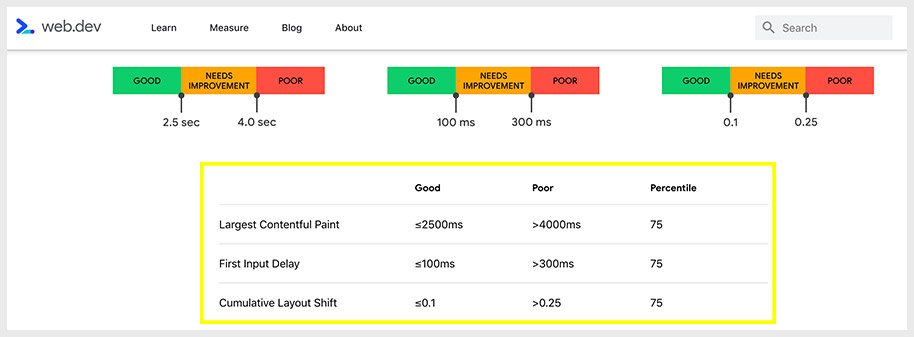
- Largest Contentful Paint: within 2.5s
- First Input Delay: less than 100ms
- Cumulative Layout Shift: less than 0.1
A good threshold to measure is the 75th percentile of page loads. Meaning:
If at least 75 percent of page views to a site meet the “good” threshold, the site is classified as having “good” performance for that metric.
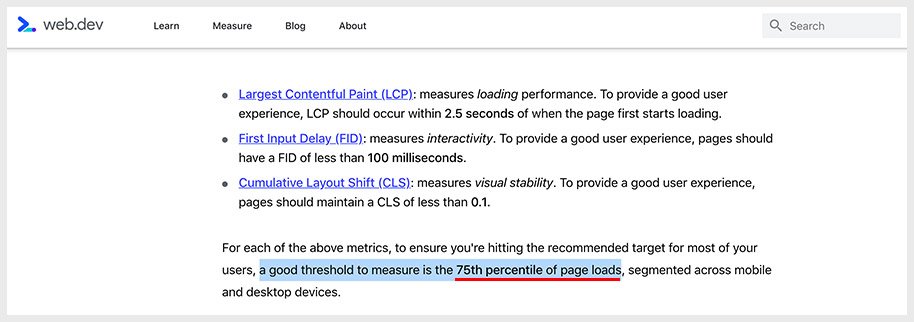
So yes, if more than 25% of page views on your site perform poorly for a metric, your site would be classified as “poor” for that metric.
How to check your website’s core web vitals
You can check your website’s core web vitals using Google Page Speed Insights and Google Search Console core web vitals report.
I recommend using both to check individual pages on your website – homepage, landing pages, blog posts.
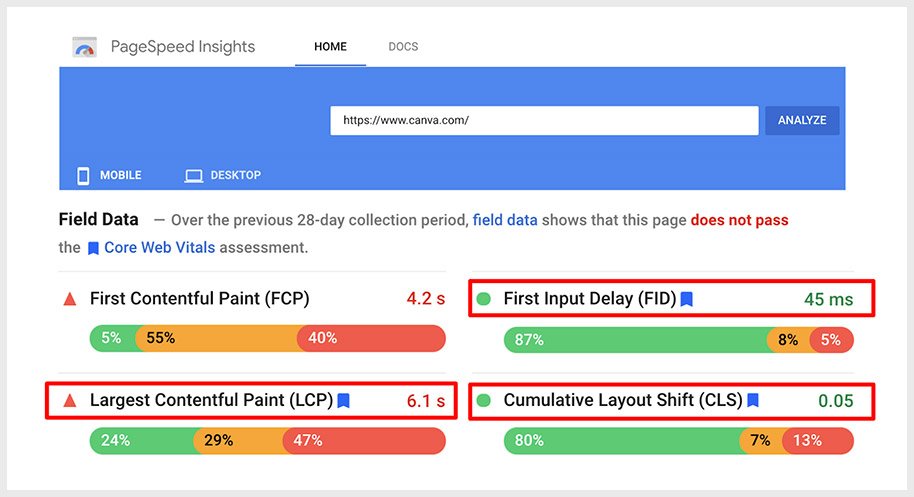
PageSpeed Insights Tool – LCP, FID, CLS
Enter your URL in the Google PageSpeed Insights tool and look at the field data report for – Largest Contentful Paint (LCP), First Input Delay (FID), Cumulative Layout Shift (CLS). Notice how there is a ‘bookmark’ icon next to the metric. These are the core web vitals metrics.
Search Console – Core Web Vitals Report
Dashboard > Enhancements > Core Web Vitals
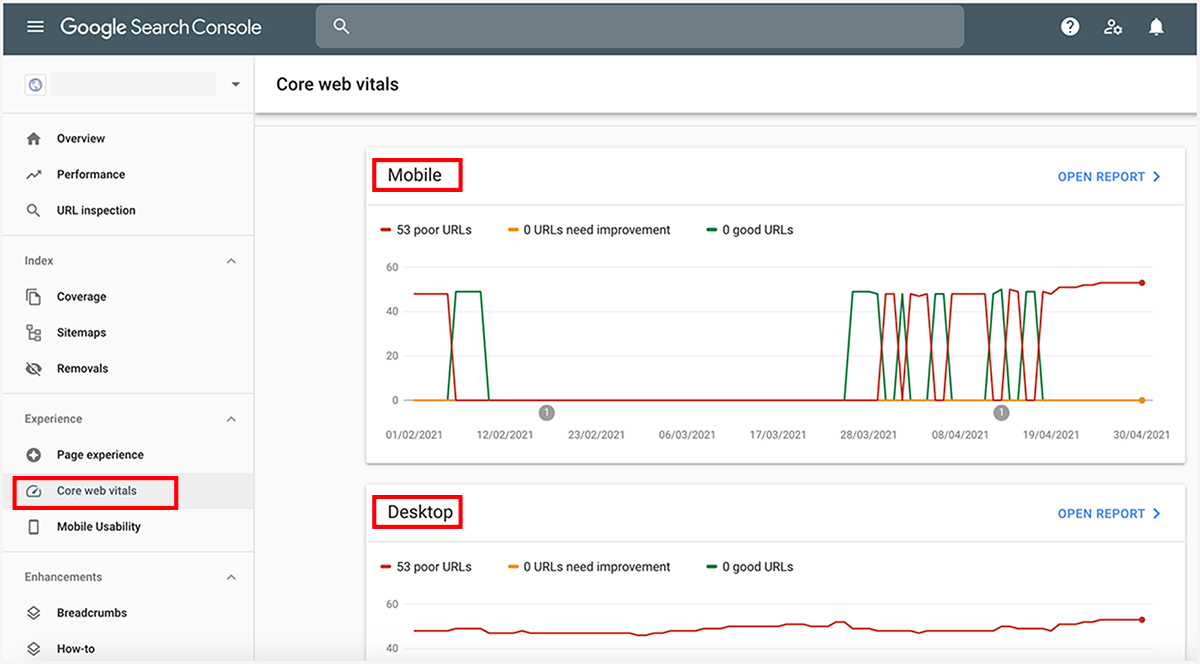
This includes core web vitals performance data on both mobile devices and desktop.
Now, page experience is not new for Google because UX factors are already included in the search ranking signals. Such as mobile-friendliness, HTTPS, safe browsing, and non-intrusive interstitials.
Core web vitals is another experience related update that will be part of Google’s ranking algorithm.
All this indicates that SEO is getting more focused on web performance. So getting up to speed on technical SEO and improving page speed and user experience will be important for your rankings.
Step 5: Improve Page Speed
Page speed is a ranking factor on Google that affects your website rankings. Ideally, no page on your site should take more than 2 seconds to load.
Google PageSpeed Insights
When you input your site URL into Google PageSpeed, it will provide you with a score out of a hundred.
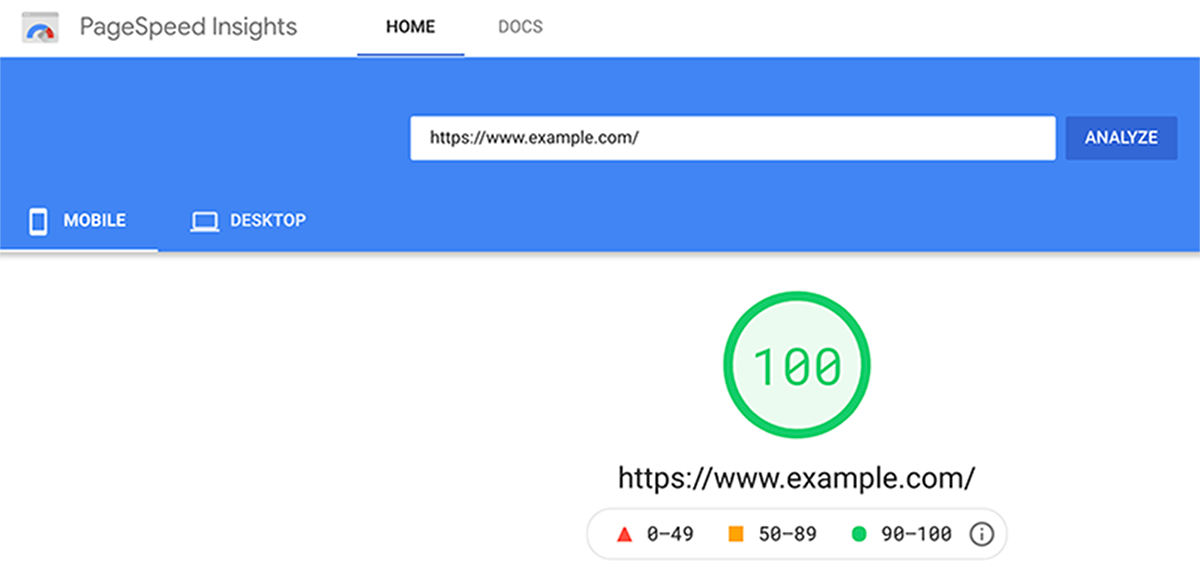
Anything above 90 is great and that’s what we have to aim for. It won’t be easy, but I have personally seen the effects of a page speed score of 90 and above on a website, and the positive impact on SEO rankings is HUGE.
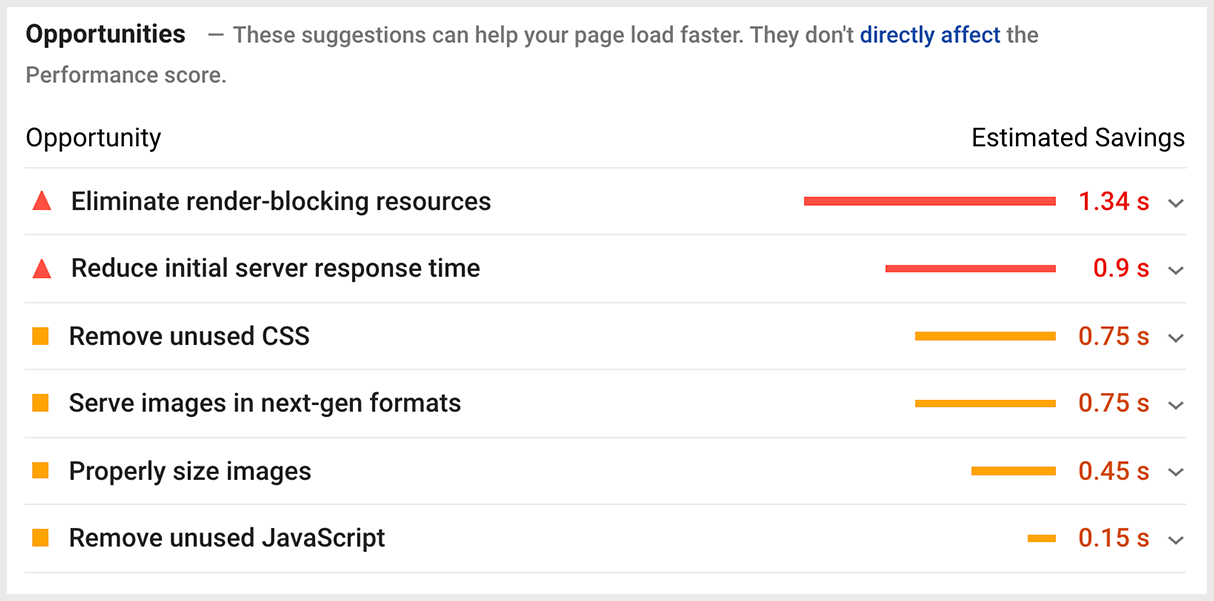
Start by looking at the ‘Opportunities‘ suggested. These provide you with fixes that you can make to improve your page speed.
Lighthouse audit
You can also use the Lighthouse audit on Google Chrome. To do this, you will need to open Chrome DevTools and click on the ‘Lighthouse’ tab.
Right click ‘inspect’ > Lighthouse > Generate report
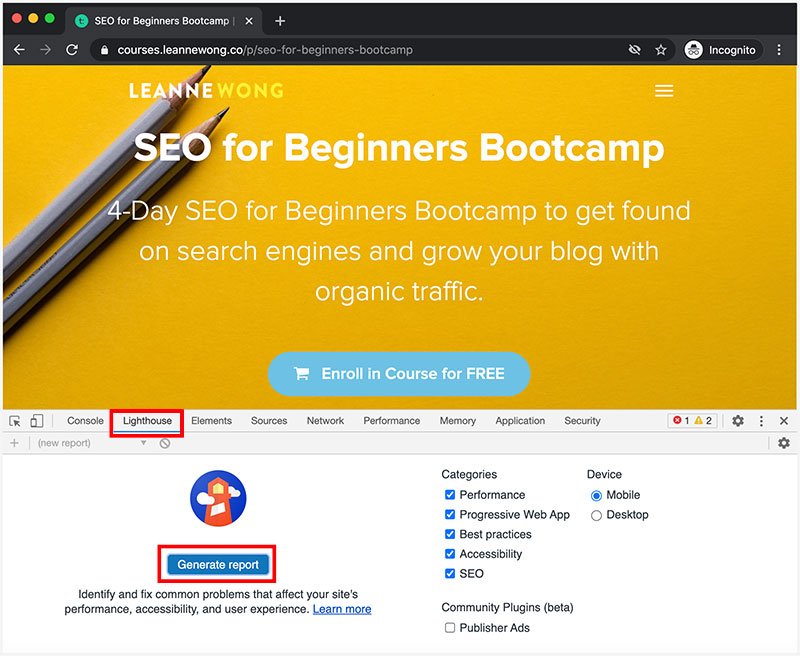
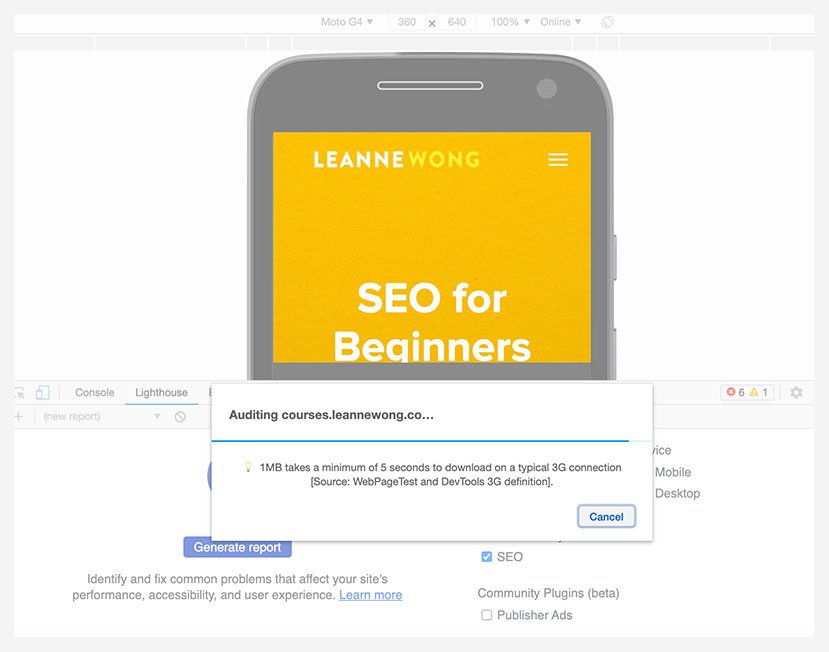
The audit takes about 30 seconds and provides you with web performance scores including SEO. You can view the speed index as well as the time till interactive.
GTmetrix
You can use also use GTmetrix. This is another free page speed test tool and will allow you to start analyzing your site immediately. It will provide you a range of metrics including the full load time and total page size.
What I like about GTmetrix is that it provides a speed visualization:
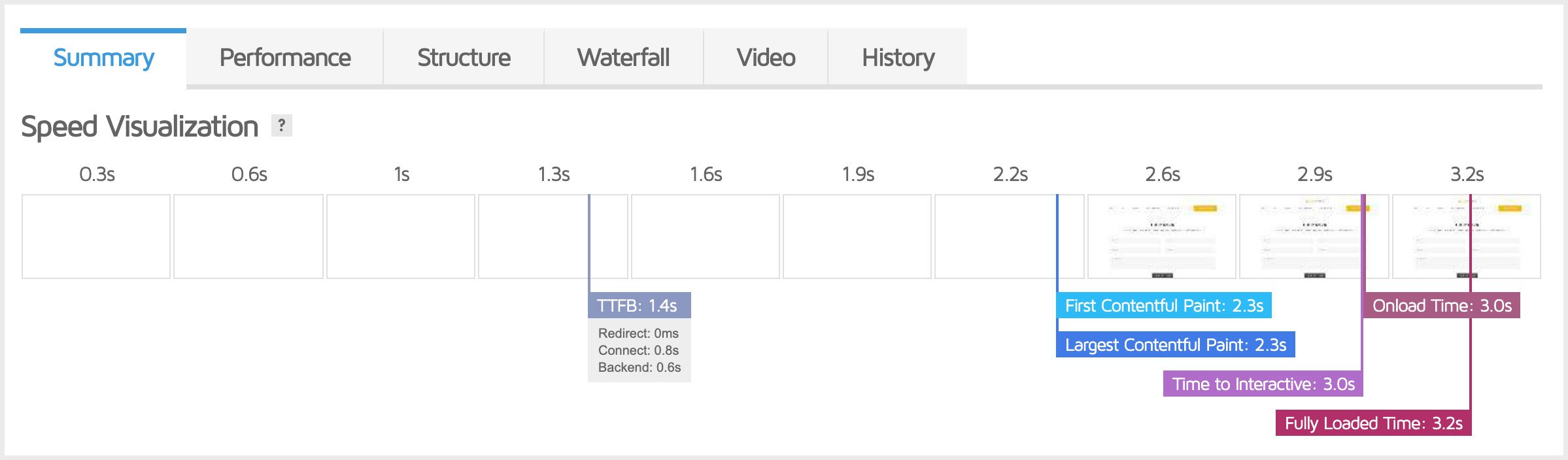
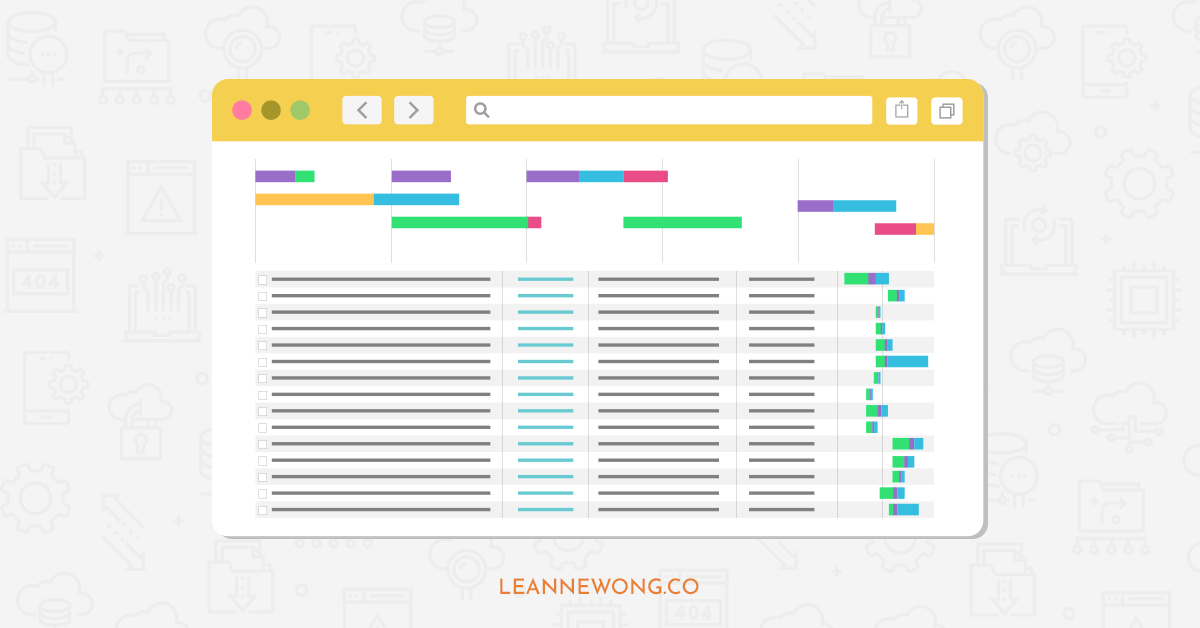
You can use the Waterfall chart to see every request made during the page load. This shows you what are the HTML, CSS, Javascript, Fonts, Images, and other resources that are requested during the page load.
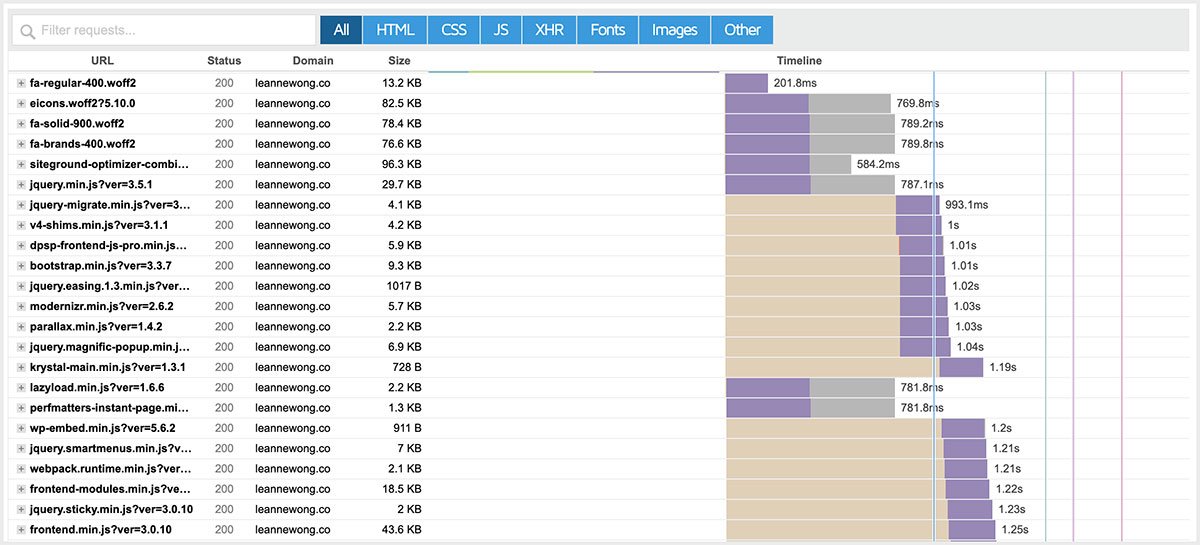
From this, you can tell what are the exact resources contributing to your page load and allows you to find bottlenecks causing issues with your site speed.
Step 6: Find and fix indexation errors from Google Search Console
The indexation coverage report on Google search console shows you if there are any issues with Google indexing your website.
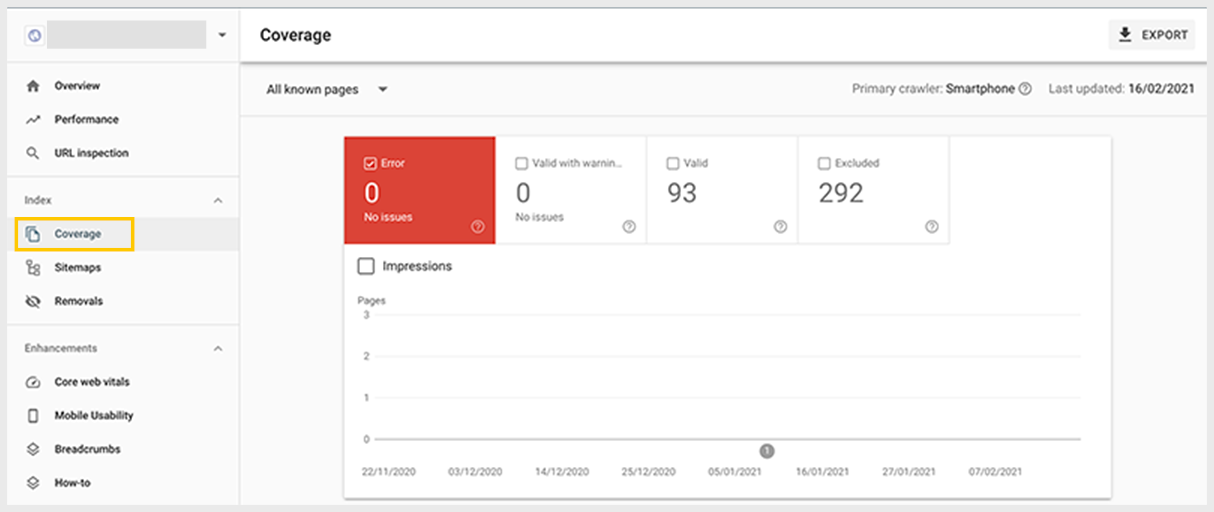
Dashboard > Coverage
- Error
- Valid with warnings
- Valid
- Excluded
The error tab tells you how many URLs had an error in indexation. Ideally, this should be 0.
If not, click on the error tab, and check which are the URLs that are having problems.
Step 7: Check If Your Website Is Mobile-Friendly
You can check whether your site is mobile-friendly using the Google Mobile Test tool.
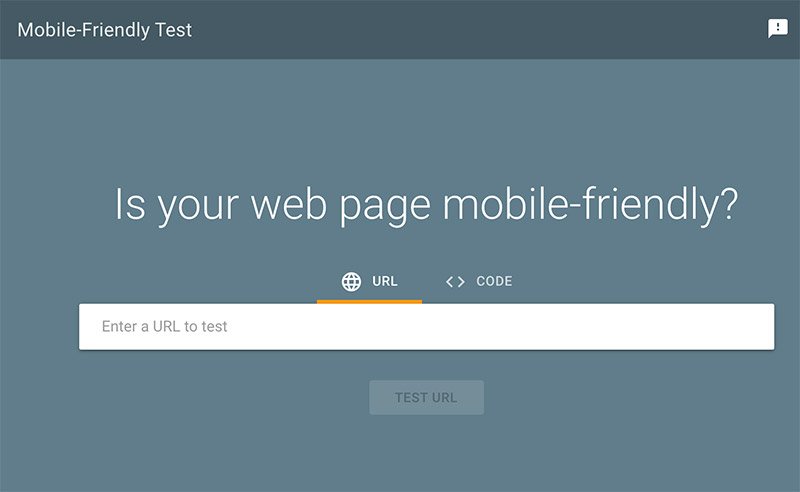
This provides you with the option to check code as well as live URLs. If you fail the test, you can also edit your code.
- You can access this tool through the Search Console.
- To use it, you just need to paste the URL into the box and click ‘test URL.’
In seconds, you’ll see if your site is mobile-friendly. You can also check out a preview of how your site looks on a mobile device.
You can also input the code and view any usability errors. For instance, it’s possible that your page only load partially. You might also find that certain CSS fonts don’t load on the site at all.
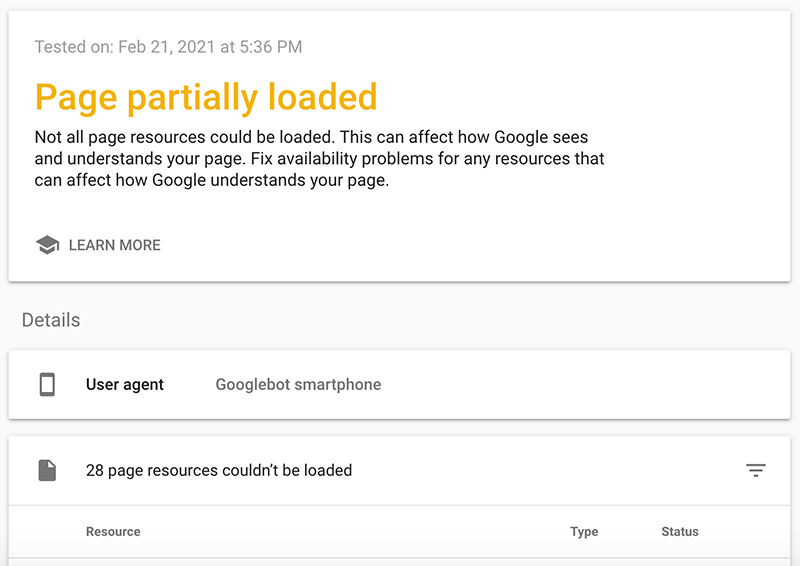
The Google mobile test tool will provide a list of ‘page loading errors’ and exactly what resources could not be loaded.
Step 8: On-Page SEO
Next, you should take steps to improve your on-page SEO. The key elements that weigh in on your SEO rankings include:
- Title
- Meta description
- Headings
- Internal linking
- Image alt text
- Body content
How you use keywords in these on-page elements matters. Google will always check your site content to determine whether it is relevant for a search query. This includes looking at keyword density, relevance, and context.
That brings us to the structure of your content for SEO.
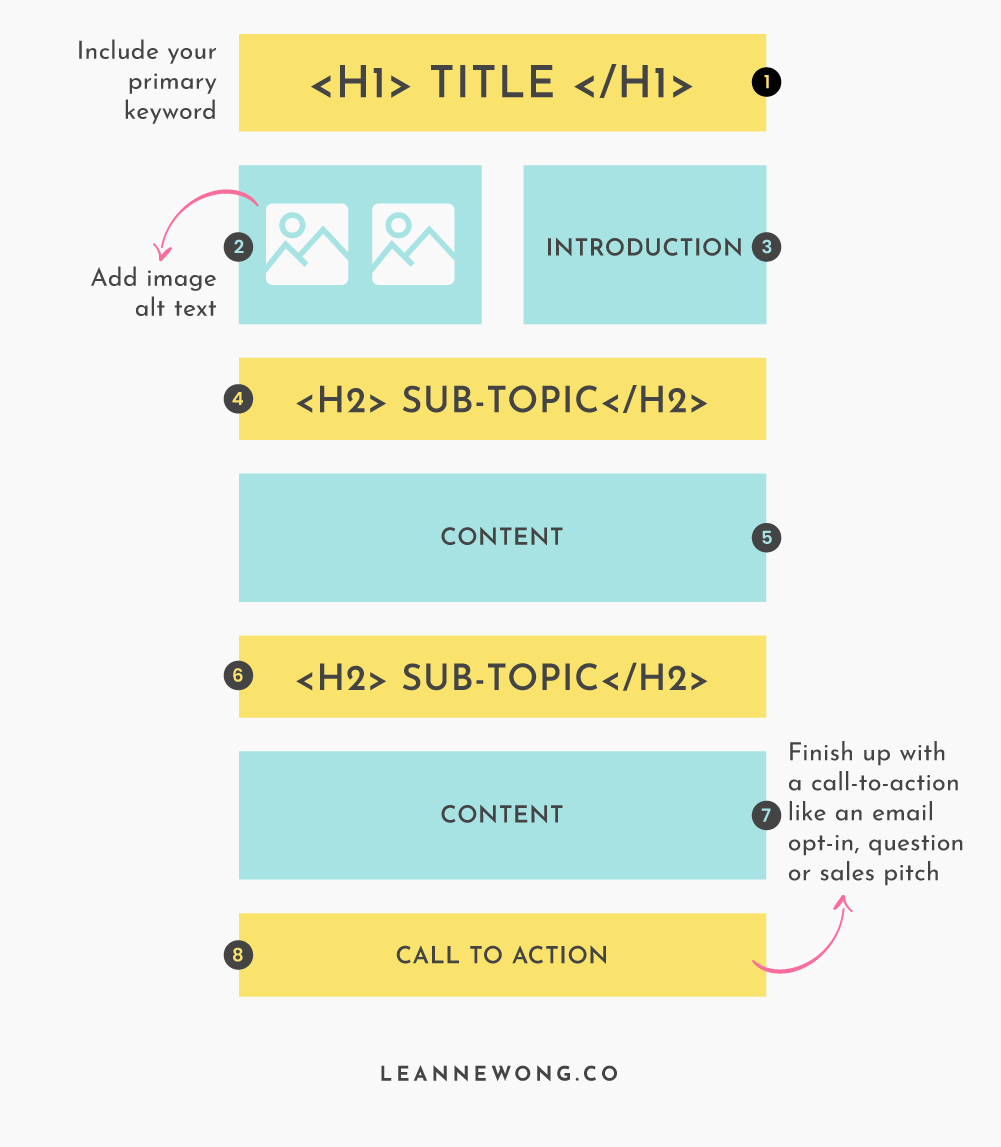
Here’s a simple structure of a blog post for a website. You have the key on-page SEO elements such as title, H1, meta description, headings, image alt text and internal links. The bare minimum.
Some common on-page SEO checkpoints:
- Does every page and blog post on my website have a unique and keyword-targeted title?
- Does every page and blog post have a unique and keyword-targeted meta description?
- Does every page and blog post have sub-headings?
- Are sub-headings optimized for relevant keyword topics?
- Is there sufficient body content (word count)?
- Do images have alt text?
- Are internal links present?
On-Page SEO includes understanding search intent and how the content you offer matches it.
Read more: What is Search Intent in SEO? A Guide to Writing Content that People Love
Step 9: Improve content with SEO copywriting
SEO copywriting focuses on optimization for topic clusters and targeted keywords. This strategy can be used for improving existing content and creating new content.
Topic cluster
- A topic cluster is a collection of content built around a central pillar page.
Pillar page
- A pillar page is an in-depth article that fully addresses the main questions that visitors want to find answers to. Commonly known as cornerstone content, a pillar page may contain thousands of words.
- From the pillar page, you link to relevant supplemental content on your website – cluster pages.
Cluster pages
- Cluster pages are smaller content pieces that relate to the pillar page. These cluster pages are usually tutorials, how-to blog posts, listicles.
SEO Content strategy
Hubspot has found that the topic cluster model can improve search engine rankings due to its strong semantic linking strategy.
By building cluster pages that link to a lengthy keyword-rich pillar page, you pass some of the ranking authority on to the pillar page. In other words, you’re boosting the ranking ability of your pillar page by getting dozens of cluster pages to link to it.
This internal linking through topic clustering tells Google that your pillar page is the most authoritative, as the other pages are linking to it.

Topic clustering works best for informative and long-form content. Your pillar page is the ‘champion’ page on your website and it needs to have high keyword density to match. Working on the pillar page is our key focus here.
- Aim for at least 2,000 words for a pillar page. Provide extensive coverage on a keyword topic on the pillar page.
- Include your main keyword once in your title and the first 100 words of your content.
- Include latent semantic indexing (LSI) keywords throughout the content to avoid stuffing your target keyword. LSI keywords are related terms that help search engines understand the content on a web page.
- To find LSI keywords, look at the “related searches” section toward the bottom of a Google search results page. You can also find ideas by looking at the autocomplete recommendations as you type a target keyword into the search bar.
Step 10: Optimize Your Website for Featured Snippets
Want to shortcut your way to ranking on Google?
Featured snippets have been gaining prominence on the search results with a large answer box in position #0.
As Google’s algorithm evolves to provide the best user experience and instant answers, featured snippets and rich results are even more important now than before.
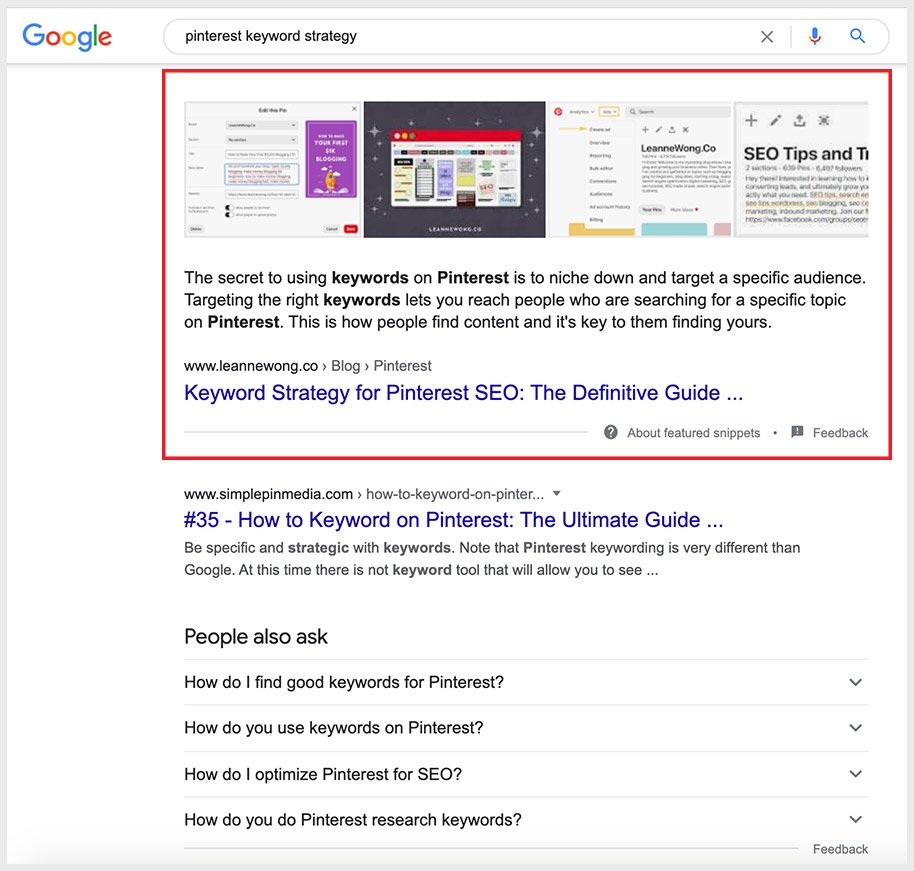
Scoring a featured snippet on search results jumpstarts your website to the top of Google, without needing to rank in position 1.
You can outrank your competitors and steal their traffic by targeting keywords that trigger featured snippets.
Occupying the largest real estate on search results means higher traffic and more conversions.
To rank in featured snippets, your content should answer the user search query immediately. Articles that answer “How to” questions directly works best.
The higher your ranking position on Google, the higher your chances of scoring a featured snippet. 99.5% of featured snippet pages already rank in the top 10 positions on Google.
That means working on SEO early and having an SEO strategy in place is key.
Work on SEO early and improve your rankings on Google now:
- You must use HTTPS
- Your web page should be mobile optimized
- Optimize for on-page SEO
- Gain page authority from backlinks and internal links
- Research keywords that trigger featured snippets and include them in your content
Step 11: Use Screaming Frog to run a website crawl
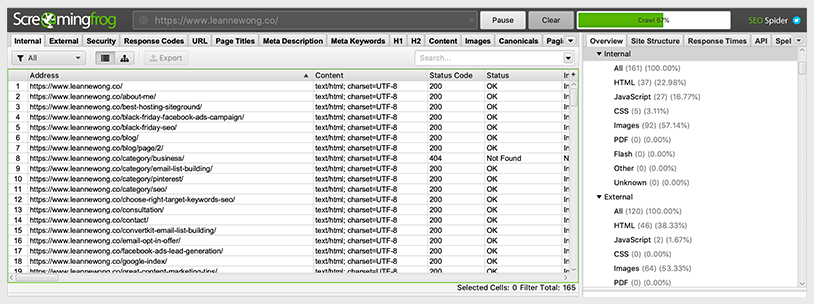
You can use Screaming Frog to improve onsite SEO and discover common technical SEO problems. Basically, you are performing a crawl of your own website. You can crawl 500 URLs on the free version.
Broken links
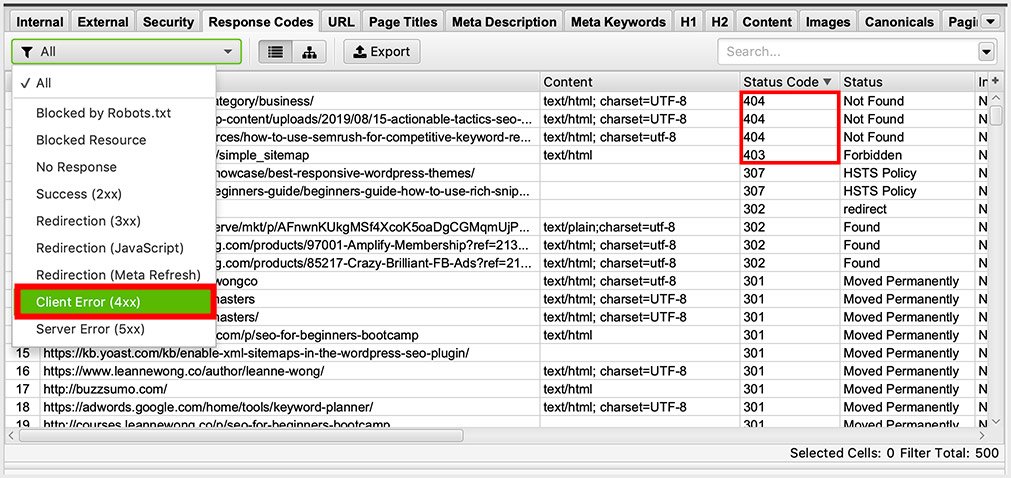
The first thing you want to find are broken links (4xx) server errors (5xx).
Dead links on your website are high-priority fixes.
You will be able to fix these yourself or send them directly to a developer.
Essential technical and onsite SEO issues
- Redirects: You can also discover permanent and temporary redirects, identifying redirect loops and chains.
- Duplicate content: You can also find and remove duplicate content that can hurt your SEO performance
- Title and meta description: Analyze issues with meta descriptions or page titles.
- Robots and directives: Review directives such as ‘noindex’ and ‘nofollow’.
- Canonical tags.
Step 12: Broken Links (Status Code 404)
Broken links are links to URLs that cannot be found. They hurt user experience and may result in the loss of backlink juice. These impact SEO.
- Imagine when a user clicks on a related blog post on your website and is presented with a broken page that reads ‘Not Found 404’. That will likely cause them to exit your site right?
- If you change the URL of your page, delete pages, make sure that there are no backlinks pointing to those pages.
Because you don’t want to lose any link juice coming to your website! Backlinks that point to broken pages on your website are not preserved. Meaning, all that link equity from the authoritative referring domain will be lost.  You can find broken links with Screamingfrog (above) or with Google Search Console.
Use Google Search Console to find broken links.
Index > Coverage > Error
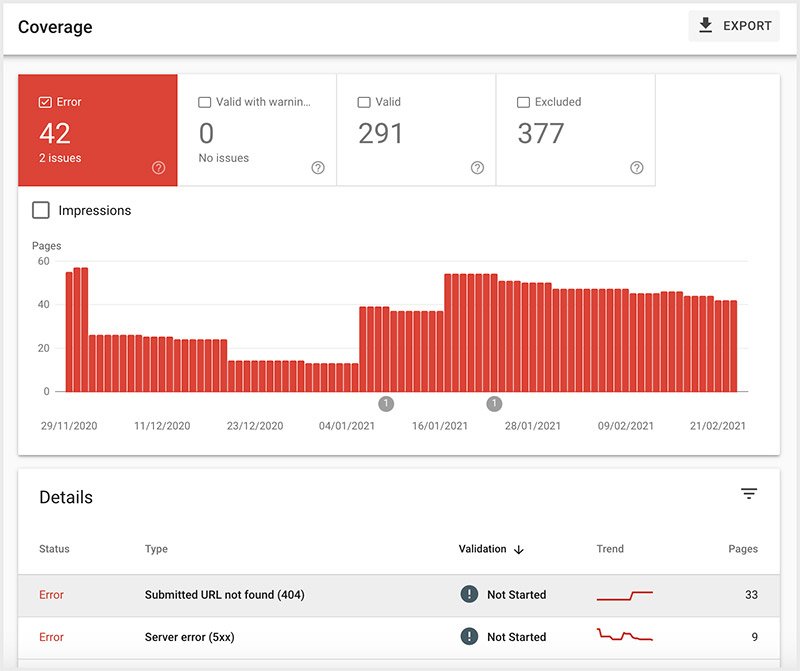
The most common cause of broken links is changing the URL name.
- For example, you may have updated an old blog post with a new URL name, but forget to include a redirect to the new URL.
- So any website or page that previously linked to your old blog post URL is linking to a broken page now, and that’s how broken links are found.
Another case is when you delete a page without remembering to include a redirect to a new URL.
Broken links may also appear due to typos in the URLs when submitting an XML sitemap to search engines or due to a typo in a backlink.
How to fix broken links
To fix broken backlinks, reach out to the webmaster of the site with the incorrect URL. Another option is to create another page and redirect your old broken URL to the new one.
To fix broken internal links, identify the broken links (404) on your website either with ScreamingFrog or Google Search Console. If the broken link comes from a deleted page, replace the missing page. You can then add new content or redirect to a relevant URL.
Step 13: Redirects
Redirects are used to direct web browsers and search engines to a different URL compared to the requested URL.
There are three main types of redirects:
- 301 – Moved Permanently
- 302 – Moved Temporarily
- Meta Refresh
A meta refresh redirect is initiated on the page level instead of the server by adding a meta tag in the header section of the HTML. It often includes a delay and a message letting the visitor know that they are being redirected. However, it does not pass page authority to the new URL.
302 redirects are used for temporary URL changes, which should be avoided.
The preferred choice for redirecting is a 301 redirect, as the ranking value of the original URL is passed to the new URL.
When are redirects used
Redirects are often used when you change a URL or delete a page. This helps to redirect links to the (old) original URL to a new page that is live.
Thus, preventing users from landing on a broken page and preserves any previous backlink value to the old page.
Step 14: Canonical Tags
Canonical tags are used to tell search engines which URL is the original source of a web page. These tags are primarily used to avoid issues caused by duplicate content.
If you find that you are duplicating the same page content, blog post or product to another page (with another URL), just make sure to add a canonical tag that points to the original.
This way, you are helping yourself by consolidating duplicate versions of content to a single source and in doing so, consolidating its ranking signal.
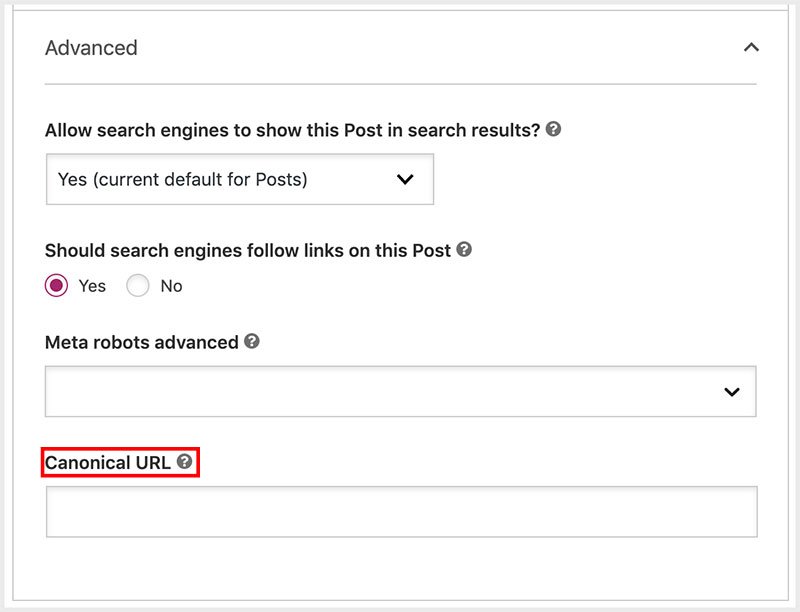
Add canonical URL with Yoast
On Yoast, you can add the canonical URL directly on the page. So if I had a duplicate version of a page and there was an original existing one on my website, I would add the original URL in the canonical of every duplicate version.
Step 15: Structured Data (Schema Markup)
Structured data helps Google understand the content of a page. Structured data or schema markup provides a rich result on Google. Learn more about the structured data formats Google uses.
Google supports a number of structured data formats:
- Article
- Breadcrumbs
- Carousel
- Course
- Reviews
- FAQ
- How-to
- Local business
- Product
- Podcast
- Q&A
- Recipe
- Sitelinks
- Video
How to add structured data to your website
There are a few ways to add structured data to your website:
- Google structured data markup helper
- WordPress plugins like Yoast
- Adding structured data code manually
Structured data helps to provide more context to your content and enables it to show up as a rich result on Google. I’m sure you are familiar with the ‘reviews’ rich result.
Reviews
The review snippet shows an average rating from many reviewers. Google finds the review schema markup or valid reviews and shows the rich result below. This includes stars and summary info.

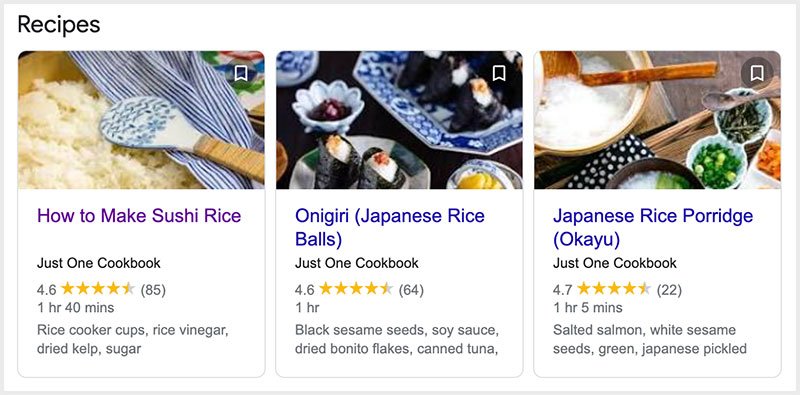
Recipe
Below is a recipe host carousel from Just One Cookbook, using the recipe schema markup enhancement.
FAQ
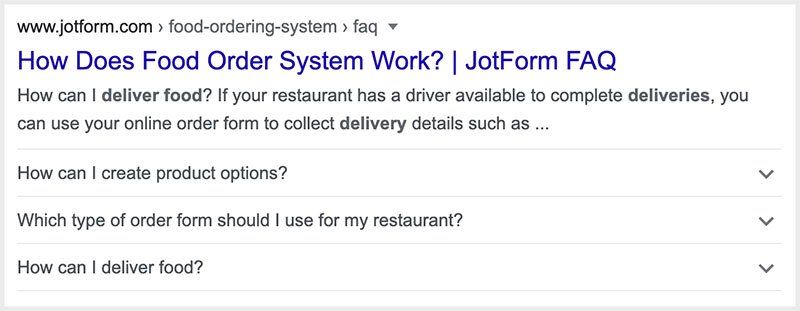
When a frequently asked questions (FAQ) page is properly marked up with structured data, it may appear as a FAQ rich result on Google.
Q&A
Q&A pages contain information in a question and answer format. When properly marked up, they can appear as a rich result on Google.

Video
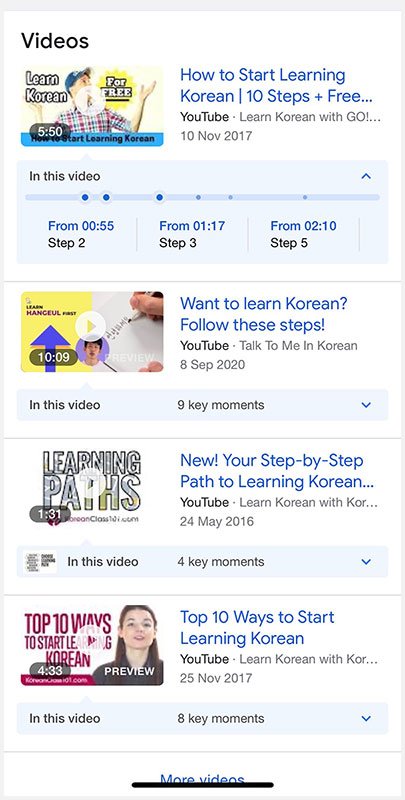
Videos rank and appear on Google search results. You can provide more information about your video such as description, thumbnail, duration, and marking up your video with schema markup.
Below is an example of a video rich result where Google shows ‘clips’ which enables users to quickly navigate to specific points in the video.
Google Rich Results Test Tool
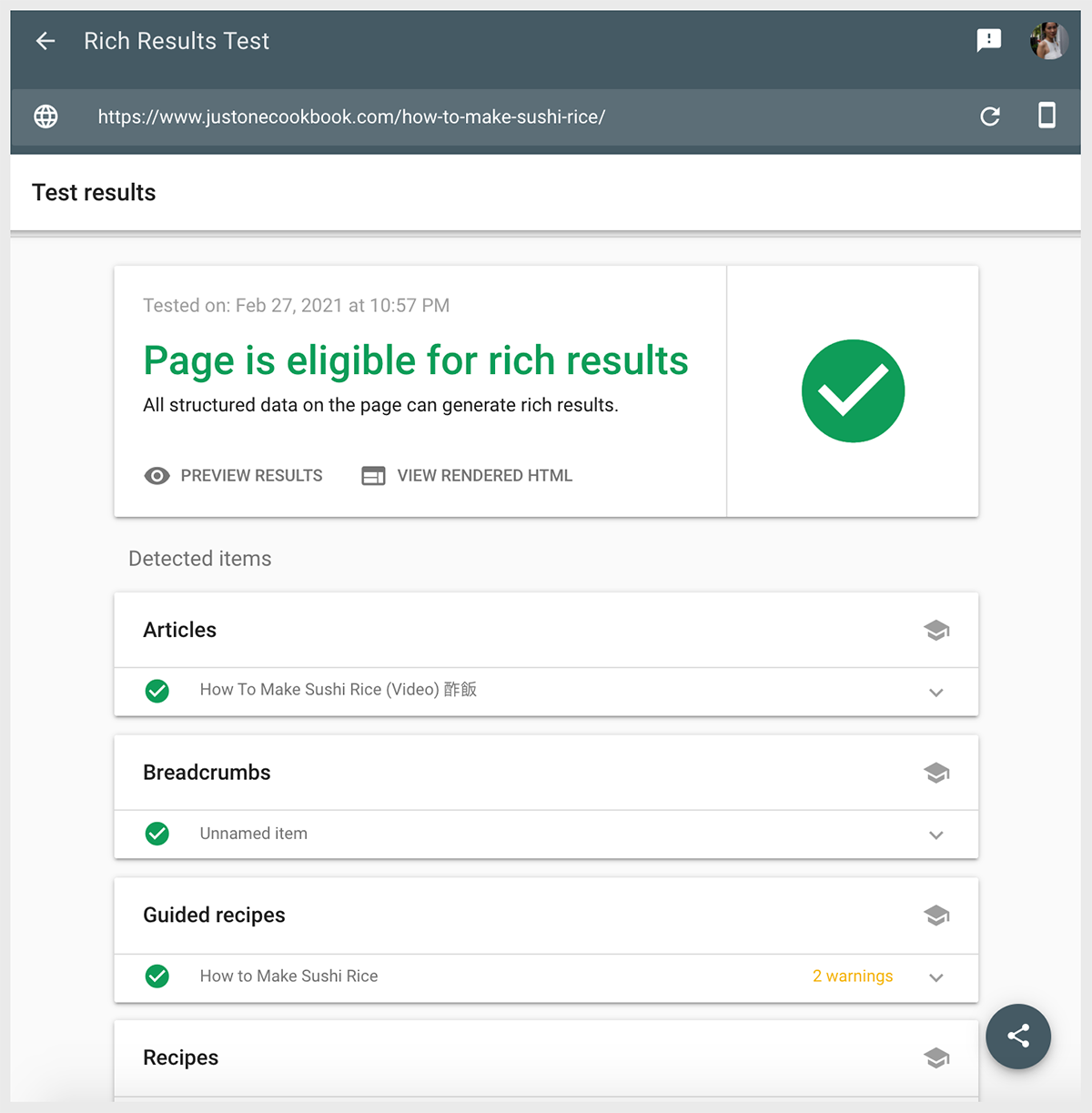
Once you’ve implemented structured data for your website, you want to run a test to make sure everything works correctly.
Use the Google Rich Results test to check any page on your website for rich results implementation.
Step 16: Identify Thin Content
Thin content is content that offers no real value to visitors. This may include poorly written articles or content with a low word count.
Google uses a variety of factors to analyze the potential quality and relevance of content. Keyword stuffing, poor spelling, grammar mistakes, duplicate content, and low word counts hurt your SEO score.
How to identify thin content
- Use a free online website page word counter to analyze the word count of all pages on your site. Look for pages with less than 300 words and try to expand the content.
Some SEO experts believe that an average of 600 to 700 words per page is optimal. However, there is no fast-and-hard rule for word counts. The goal should be to provide something of value to users.
- You can also identify thin content by looking for web pages with the least organic traffic and highest bounce rates. These pages may not receive traffic or hold a visitor’s attention due to a lack of content that provides value.
When adding more content, avoid duplicating information that you have used elsewhere on your site and limit the use of exact keyword matches for your targeted keywords.
Step 17: XML Sitemap
Every website should have an XML sitemap that is updated and submitted to search engines frequently. In its most simple form, an XML sitemap is a list of URLs and the date that each URL was last modified.
Search engines use sitemaps to crawl websites. The date that a URL was last modified lets Google know whether it needs to recrawl the website.
Some website owners choose to create multiple sitemaps. If you have an eCommerce site or a website with thousands of pages, you can organize URLs to different categories, making it easier to update sitemaps as you add new content.

You do not need to include every page in an XML sitemap. For example, you may not need Google to index your privacy policy or terms and conditions. However, you should include every page that you want Google to crawl and index. Such as:
- New blog posts
- Pages with a change of URL
- Landing pages – products, services, etc.
Update your sitemap every time you add a new URL that you want to appear in search results, such as a new blog post or a product listing.
You should also update your sitemap after updating existing URLs by changing the “last modified by” date.
Step 18: Identify internal linking opportunities
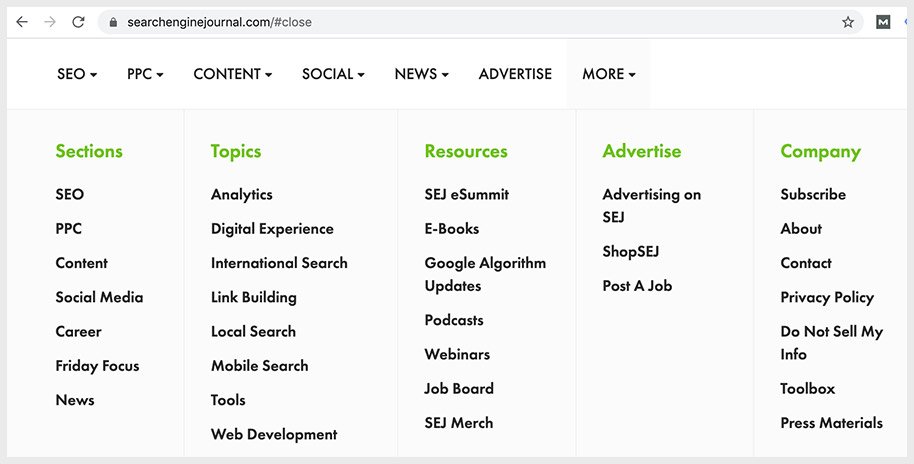
Internal links help visitors and search engines navigate your website.
Most websites include internal links in the menu and footer. Example from Search Engine Journal:
Body content
However, you should also include internal links throughout your content to direct visitors to relevant content.
For example, a recent blog post may reference a topic that you explore in another blog post. Including an internal link helps readers discover more information. Make sure to also use keyword-rich anchor text in the internal links.
Page authority
To identify the best internal linking opportunities, review the page authority of your web pages. SEO tools like Moz and Ahrefs allow you to view the page authority for each page.
Page authority is passed from one page to the next. For example, if a page with high authority links to a page with less authority, the second page may receive an SEO boost.
Try to add internal links from the pages with the highest authority to the pages that you want to improve.
Breadcrumbs

Breadcrumbs are also needed for a successful internal linking strategy, as they help visitors keep track of their location within your website.
Breadcrumbs are typically used to categorize web pages based on the hierarchy of the website architecture or specific attributes, such as product categories and content tags.
Step 19: Information Architecture
Information architecture refers to the organization and structure of your web pages. A lackluster linking strategy can make certain blog posts and web pages difficult for users and search engines to find.
If a user or a search engine needs to follow a handful of internal links to reach a web page, they may give up before it reaches the URL.
The ideal structure groups relevant content together and minimizes the clicks needed to reach web pages from one another. If you need to follow more than four links to reach the page, use an internal link to bring it closer to the home page. This may involve adding a link from the homepage.
WordPress and other website-building platforms simplify your information architecture by allowing you to create tags and categories. Websites that are built from scratch can achieve a better layout by nesting groups of content together.
For example, all individual product pages may be grouped under http://yourwebsite.com/products/.
- You can then create product categories to organize the products.
- The “product” page should link to every “category” page while each “category” page links to each product in its category.
Step 20: Get Google to recrawl your website
After updating a web page or publishing a new page, get Google to recrawl your website. You can submit an updated sitemap through Google Search Console in the “Sitemaps” section.
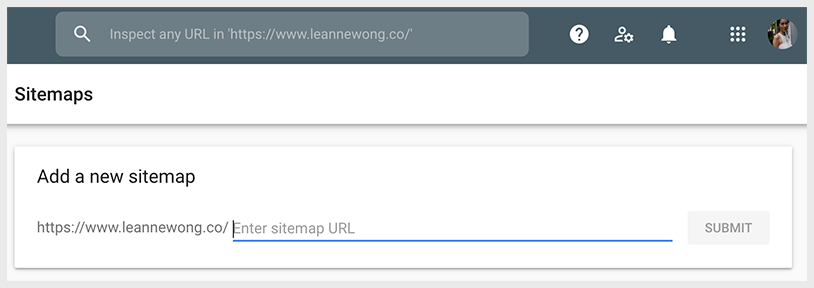
You can also view the status of submitted sitemaps, including the number of pages indexed. If the sitemap contains more URLs compared to the number of indexed URLs, you may need to look for issues that keep Google from indexing a URL.
Crawl errors may keep Google from indexing certain pages. Common errors include:
- URL errors
- DNS errors
- Server errors
DNS errors and server errors are typically related to issues with your web host and are often temporary.
URL errors include 404 Not Found errors due to typos or missing redirects.
After resolving errors, resubmit your sitemap. Along with submitting your sitemap to Google, send it to Bing and other search engines that you want your websites to appear in.
If you use WordPress, Drupal, or Wix to manage your website, you may use a plugin or add-on to automatically submit and resubmit sitemaps to search engines.
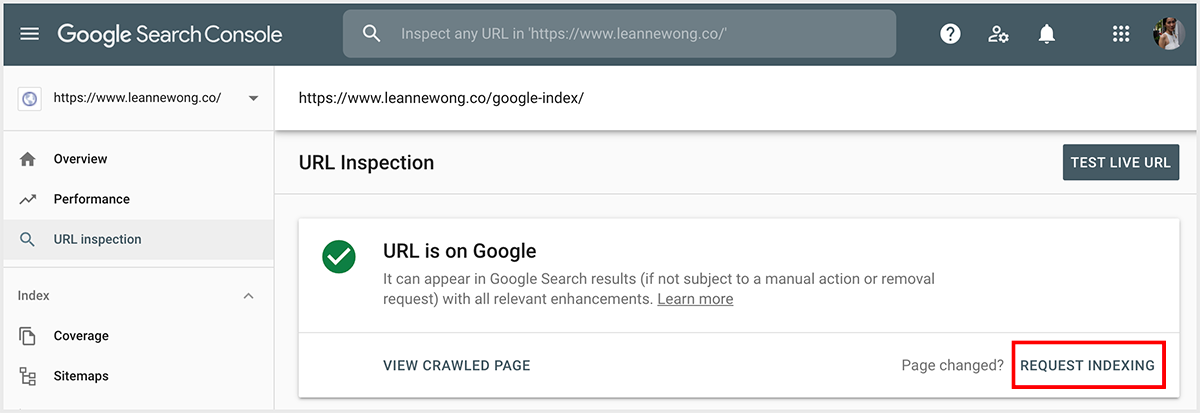
Page changed? Request indexing
If you have recently updated your page content, you can get Google to speed up re-indexing your page.
Step 21: Improve User Experience
The final part of the SEO audit process involves improving the user experience. Visitors should find it easy to navigate your website and locate the information that they need.
A poor user experience keeps people from staying on your site and complete taking action such as making a purchase or signing up for your email list.
Mobile usability
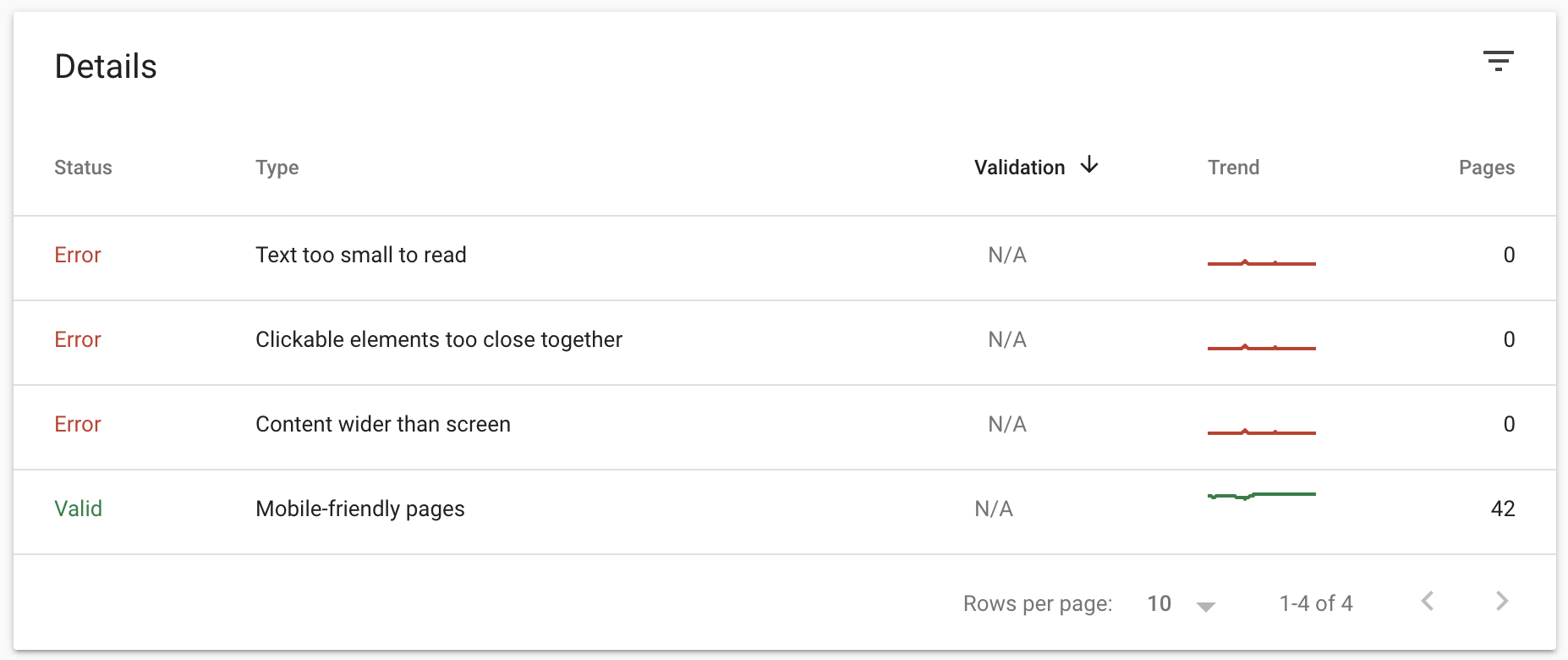
First, analyze the mobile user experience for your website.
Because mobile usability also influences your Google rankings. Websites should load properly on any device, including smartphones and tablets.
Responsive web design
Using responsive web design is a big part of improving page load speed. It also improves the user experience of your site on mobile devices.
- Crop or resize images to fit on the page, instead of forcing the browser to shrink the image.
- Using smaller images to fit different screen sizes for mobile and tablet.
- Ensuring the layout and font size of your page content fits properly on mobile devices.
- Text shouldn’t be too small to read on mobile, and clickable elements (e.g. buttons) should be appropriately spaced out.
Additional optimization tips
Eliminating unnecessary plugins or widgets can help boost page speed.
User experience also depends on how people can navigate your website. Make sure you’re using internal links throughout your site so users can easily find inner pages from the home page.
Use easy-to-read colors and fonts. Break up large chunks of text with images or shorter paragraphs.



92 people reacted on this
This post is useful and informative for blogger like me. Thanks a lot.
Your posts are always so rich with information. They literally never disappoint. In this post I am most concentrating on the information shared about cluster pages. I find this very interesting and also very logical.
Thank you so much, Elise! The topic clustering method is quite a powerful SEO content strategy!
So many useful tips and sites and it’s exciting to get started on mine! Hopefully it will promote traffic very soon.
Google traffic will come when optimized correctly. All the best to you! 🙂
Yes, there’s so may tips that I could use. Working on incorporating backlinks more at this time.
Backlinks are still a necessary ranking factor to be working on indeed!
This list is super! It’s like SEO Audit 101 for all the digital marketers.
Thanks for sharing!
That’s the goal 🙂 Cheers
I really need to look into learning more about SEO for my site. All of this information was extremely helpful for me! I just pinned your post to share with my influencer friends that are looking to up their SEO game as well. Thank you.
Oh my thank you so much!! I also have a free SEO Bootcamp and would love for you to join as well : ) https://courses.leannewong.co/p/seo-for-beginners-bootcamp
Wow! this is jammed packed with new and helpful information. I need to work more on my SEO. this is by far the most helpful guide I’ve read.
So happy to hear this and really glad that this guide has helped you!
This was incredibly comprehensive. Thanks for sharing.
Tonnes of really awesome SEO tips here! I have to definitely apply some fo these to my own website.
Cheers!!
Very informative, I like that you included a lot of information on how to rank higher. It’s going to help a lot of bloggers.
Thank you! Hope you enjoyed the guide 🙂
SEO can be confusing. There are so many aspects to it. Thank you for such an informative post. I have a lot of notes on things I need to work on for my own website.
It is really not an easy topic. Happy that you’re here!
This is indeed a great in-depth post written on how to do an SEO audit of your site and rank it well on Google. Bookmarked it for later reading.
Cheers!
Thank you for this! I have to bookmark it so I can read every now and then and apply it on my website. Indeed, I need to learn so many things to improve my website.
Cheers!
That’s really nice and complete guide about SEO, i always get spammy backlink at 0-4 rank and it’s annoying
Oh no that’s risky. Would be good to do a check every once in a while to make sure there are no toxic links.
Boy oh boy….I have a long way to go with my SEO! I didn’t even know there is offline SEO! Thanks Leanne!
This is a great SEO site audit guide for newbies alike. There’s always something new and so much to learn. I’m taking notes on all these points. Thank you!
So happy to hear this! We have a new course on site speed optimization and core web vitals too – https://www.leannewong.co/site-speed-optimization-bundle/
Wow! I really learned a lot on this post. I focus a lot on organic traffic. So nice. Thanks!
Thank you 🙂
This is a very detailed post with a lot of important information! I have been looking into making some of these changes on my site.
I wish I could everything you said here at once. I am particulary interested about on-page SEO. I hope I could do it now.
One step at a time 🙂
My blog is a continuous work in progress. I know there is so much room for improvement and I always refer to your site for information and guides. I have to spend more time to do an SEO site audit! Thank you again for this really helpful post.
It is an ongoing journey! Most things will take time to implement and make progress.
Ok I have some serious updating to do for my website! Thank you for sharing 🙂
Cheers 🙂
A really impressive and comprehensive post that any blogger should be able to get value from. All bloggers should conduct their own audits on a regular basis to stay on top of things and you have created a fabulous, helpful resource to assist many. Well done.
Absolutely, it’s essential to audit your own website regularly!
There are so many ways to improve one’s website ranking, it’s a challenge to know where to start! But you have given me much to work on.
So glad to hear this!
I need all the steps. I want to go through them one by one and follow along to make sure everything is as good as it can be.
That’s the way to go!
Do you have a good cheat sheet for understanding how to navigate GA ?
Hey Elise, I have a Google Analytics ebook in the SEO Demystified course – https://courses.leannewong.co/p/seo-demystified/
I need to check my backlinks ranking! I love how detailed you are with your information. I’m a visual person, and it greatly helps when you can follow along with the steps. Thanks for sharing!!
Cheers 🙂
Wow! What a plethora of information! I am bookmarking so I can continue to use it as I work on SEO, especially with the new Core Web Vital changes.
YAYYY!
Thanks for sharing these useful tips! Making sure your website is optimized for mobile is sooo important. Everyone is using their phones to browse the web these days.
Absolutely!
I have to check my backlinks. Thank you for the reminder. I haven’t done that in a while. I don’t want my DA to do a nose dive.
Yes definitely check on your backlinks regularly!
A lot of important and helpful information. I will definitely share this with my blogger friend. Thank you!
Thank you 🙂
I’m so glad I found this post. My traffic has been at a standstill, and I’ve been at a loss. I think it’s time I gave my site a really close look. Thanks!
Cheers 🙂
I appreciate this info so much. SEO is something I’m constantly trying to understand.
Cheers 🙂
This is a fantastic resource for anyone who’s looking to really optimize their site for SEO. It’s about so much more than just on page SEO.
Thank you so much, Ben!
I really haven’t checked my ranking yet and never gone through an audit check yet. This is indeed a great read and reminder to me to check out my websites status.
Just a few times a year, a good SEO audit clean up/check goes a long way!
I am trying to boost traffic of my blog and this post proved to be so helpful! Thanks for sharing such a detailed post.
Cheers
This was a really awesome informational SEO resource! I learned a lot, thanks for sharing!
Thank you!
I really need to try out Screaming Frog – I am sure that this program will find a ton of little things I could do better. I am still learning my way around SEO, but hey, your article helps – thank you and blessings!
Take your time dear! Happy to help 🙂
This is truly an SEO 101 for me. You carry so many lessons in this post. Such great strategies! I will try those to improve my travel blog.
– The Broad Life –
Cheers 🙂
This is wow and I totally need this right now because I find some tips on how SEO works thanks for sharing this and I will save this post!
Cheers 🙂
Thank you so much for all of this great information. This makes me want to go give my site a once over.
The sheer amount of information here is almost staggering. I was going to hire someone to do and audit for me, but I might not have to after reading this!
Haha cheers Brianne 🙂
WoW. It is a very useful big article! I’m still a beginner in blogging world and definitely Ill use all your SEO tips. This weekend I’m going to add google search console.
🙂 🙂
Wow, such a piece of great information about traffic. Thanks for sharing with us.
Thanks Angela 🙂
I’ve been trying to improve my site little by little since last year. I worked on all my content last year, adding new information and images. It did wonders to my search traffic and I want it to stay that way. For this, I can use your checklist to further improve my website.
So happy to hear that! Woo!!
Yes, and I think every new blogger should use this post as their reference for improving their website.
I wanted to do an SEO audit on my site and I remembered this post. This is a great checklist to start with.
Excellent post Leanne, thank you for sharing. SEO has so many important pillars and somehow you seem to simplify it and make it seem doable. Love the structured data part. Will have to get to work on it asap. ?
That’s awesome, Estie 🙂
SEO audit is essential for identifying strengths, weaknesses & potentials of your website for long-term success. Technical SEO audit will help you identify the technical problems with your website that are restricting search engines to crawl through your site or understand content.
Leanne – this is a gem of a post. There are so many actionable tips and so much new information. I have bookmarked it and will share it within my network. I will be spending a fair amount of time applying these concepts to my blog.
While you’re pointing to a lot of tools to use, some of the results may be too technical for the average blogger to resolve. What would you advise one to do in this case? Do you offer “site audit” services? If so, I’d appreciate it if you’d email me your rates and how it would work.
Hi Nadim, thank you for your kind words and appreciate your feedback. Will get in touch.
Excellent post Leanne! I’ve been concerned about the upcoming Google changes and have been “cleaning” up as much as I can. This post is incredibly helpful – thank you.
I know, the upcoming change has gotten us quite busy as well! Cheers 🙂