
Facebook ads are a great way to scale a business at a low cost. Before diving into Facebook ads, I had focused on organic traffic acquisition channels such as SEO, Pinterest, and social media posts.
I did not spend a dime on ads during the first 2 years of my blog/business. Because, well, I had no budget to do so. Lol!
Another reason was that I wanted to build an audience organically first and test out my offers, products, and services before running ads.
To this day, I believe that was the right decision. Because ads can become very expensive if you run them long-term (and you do want to give Facebook enough time to learn and optimize your campaign).
Facebook Ads should be used to amplify and boost your offer and business. It is not a shortcut to quick profits and success.
The strategies laid out in this blog post may not guarantee the same success as my personal case study. But it will surely help you develop an effective Facebook ads strategy, and hopefully drive a healthy return on ad spend!
Step 1: Develop Your Facebook Ads Strategy
The first step to any Facebook Campaign is developing an ad strategy.
- What is your goal?
- To drive more sign-ups for your email list, drive more purchases, or create more brand awareness?
- How do you plan to attain your goal with Facebook Ads?
- Do you have a website and the right setup in place to nurture and follow up with your audience?
- How will you make a return on your ad spend (ROAS)?
- Do you have a high-converting offer and sales funnel in place to convert traffic into sales?
I believe every ad strategy should have the ROAS at its core. The only way to continue running ads is to make it profitable.
This is why I always choose the conversions campaign objective when I run Facebook Ads. However, you do need an offer on the landing page you are sending people to and a proven sales funnel that works.
So before running Facebook Ads, test your offer first with organic traffic strategies like SEO and Pinterest.
Step 2: Create a Facebook Campaign
Start creating your Facebook campaign by choosing the right campaign objective. The objective that you select shapes the rest of your campaign, and Facebook will optimize your campaign based on the objective.
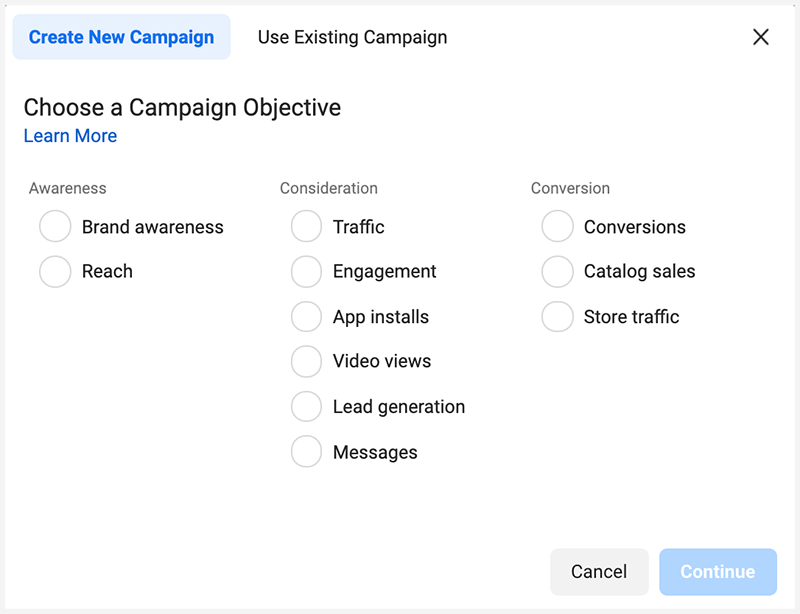
While Facebook gives you a large selection of predefined objectives, the three most common campaign objectives are:
- Lead generation
- Traffic
- Conversions
Lead generation
Choosing lead generation as your goal allows you to collect sign-ups directly from the ad instead of directing users to a separate landing page. It tends to be more effective at reaching mobile users due to the simplicity of the sign-up forms.
If you prefer to send users to a landing page to sign up for your mailing list, choose “Conversions” or “Traffic” as your objective.
Traffic
Selecting “Traffic” as your goal optimizes the ad campaign to reach more users and increase awareness of your brand or product.
Focusing on traffic is a good choice if you want to reach as many people as possible.
Conversions
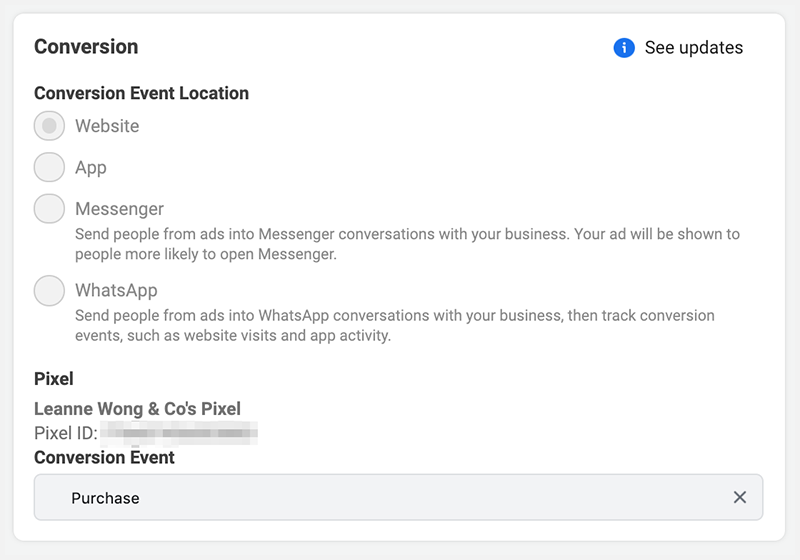
However, if you want more sign-ups from a targeted demographic, select “Conversions” as your goal. Using conversions as a goal allows you to focus on a specific outcome. This is the conversion event you want Facebook to optimize towards such as a sign-up, lead completion, or purchase.
You need to set up the conversion events and pixel on your website first.
Facebook will optimize your campaign and show your ads to people more likely to convert.
Facebook is incredibly good at retargeting campaigns and provide a high return on ad spend if you set up your ads right.
I have scaled my list building and made 457% ROAS with a conversion campaign. Learn how I did it in this case study!
Step 3: Budget and Schedule
Your strategy also needs a budget and a schedule. When setting a budget, you can set the lifetime budget or a daily budget.
If you choose to set the lifetime budget, Facebook will attempt to divide the total spending evenly across the duration that you set.
For example, if you choose a lifetime budget of $100 and run your ad for five days, Facebook will attempt to spend about $20 per day from your budget. Do note that Facebook will spend all of the budget you have set.
Step 4: Get Specific with Your Audience Targeting
Running successful ads requires you to get specific on your Facebook audience targeting. Narrowing the focus of your ads to specific groups of Facebook users helps boost conversions.
With the right audience-targeting tactics, Facebook will show your ads to the people who are most likely to respond to them.
During the campaign setup, Facebook allows you to create a new audience or use a saved one. The audience targeting includes a wide range of criteria that you can use to narrow the focus of your ads:
- Locations
- Age
- Gender
- Languages
- Detailed targeting
- Connections
- Custom audiences
Location
I recommend checking your Google Analytics to gather this data beforehand. You should already know:
- Top 5-10 countries/locations that comprise the majority of your audience
- The age group of your audience
Narrowing the focus to individual locations makes it easier to focus your ad spend on a specific region.
This is especially useful if you only serve specific locations in your country.
You can include landmarks, phrases, or imagery that may be more likely to appeal to people in specific regions. You can narrow the audience targeting to specific countries, states, provinces, cities, congressional districts, zip codes, or postcodes.
Age
One of the most used targeting options is the age range. Check Google Analytics to see who are the people and their age group that have the most conversions or make up the majority of your traffic.
Also, if your business serves a specific age group, then you want to narrow your targeting to match that. So if you only serve seniors, for example, don’t waste ad dollars targeting younger Facebook users.
Interest targeting
Interest targeting allows you to target people who are interested in specific categories, such as books, TV, or yoga.
I recommend using Facebook’s Audience Insights tool as well as it offers useful information on your target audience that you can use to tailor your ads.
For example, you can use Audience Insights to determine the size of your target audience or their past purchase activity.
Facebook allows you to view user statistics related to specific demographics, such as the number of users within a certain age group.
You can also find out how frequently your target audience uses Facebook, how often they buy stuff online, and what similar pages they tend to like.
Step 5: Pay Attention to the Metrics That Matter
After launching your Facebook Ads campaign, track the metrics that matter most to monitor and tweak your strategy. Three of the most important metrics are:
- Cost per click (CPC)
- Cost per lead (CPL)
- Cost per result
Cost per click
CPC is the average amount that you spend each time that a user clicks on one of your ads.
Across all industries, the average cost per click is about $1.72. If you are targeting a popular market, you may spend more per click. Narrowing your focus using the targeting options discussed may reduce your CPC.
Cost per lead
Cost per lead (CPL) refers to the average cost to acquire one lead.
Your CPL is typically higher compared to your CPC, as not everyone who clicks on an ad will sign up to your mailing list. It is an important metric to track as it offers an overview of the success of your ads.
If the CPL starts to increase compared to the cost per click, you may need to revise the text of your ads or landing page to convert more visitors.
Keep in mind that Facebook will not track leads from conversions that occur on your website. It only tracks leads that you acquire from sign-up forms connected to your ad using the “Lead Generation” objective.
Cost per purchase
Cost per purchase refers to the average cost per purchase. This is often called CPA (cost per acquisition) in the marketing world.
Your cost per purchase is always much higher than CPC or CPL. It would be much more expensive to convert a paying customer than a sign up or a click.
What you want to know is – is my cost per purchase acceptable?
ROAS
Now, the cost per purchase is not important unless you look at ROAS. How much conversion value are you getting from each purchase?
If your cost per purchase is $10 but your ROAS is 300%, that means you are making $3 for every $1 ad spend, then your campaign is quite profitable. The cost per purchase is acceptable.
If your campaign is not profitable and you are barely breaking even on your ads, then it is time to re-evaluate your cost per purchase and campaign targeting.
Start running ads!
If you want to build bigger lists and convert more visitors, start developing your Facebook Ads strategy.
Remember to select the right objective, appeal to your audience’s interests, and focus on targeted advertising.
You also need to continue tracking metrics to evaluate the success of your strategy.
Along with these suggestions, you should ensure that any landing pages or email autoresponders connected to your ads campaign are optimized. Use relevant keywords in your content, including the sales copy in your ads.


19 people reacted on this
I think lead generation really helps. Facebook ads is not as good anymore compare before but it is still useful.
I really don’t utilize Facebook Ads right now. We did use it when I was looking for a kidney donor. We did pretty well with targeting then but you have additional details that might help if I decide to use FB ads again. Thank you for sharing!
I am not that active on my Facebook Page but I am so glad I came over this post. Now I have some idea about running an ad. I need to learn more about it.
There were so many great tips and tricks to read about in this article! Super informative, thank you. 🙂
These are great tips! I want to use FB ads more!
It’s always been this easy! Fingers locked, the campaign ends up a success. Can you believe that for all the years I’ve been a social media manager, I’ve never carried out a Facebook Ad campaign!!!
Thank you for breaking this down. I’ve always wondered how FB ads work and this shows how they can be effective.
Thanks for the tips! It’s so important to develop a strong strategy and understand how each aspect affects your outcomes.
This is extremely useful especially in the industry I am in! Facebook ads are a huge marketing tool these days.
Thanks for doing such a deep dive into this topic. Facebook ads can be great, but only if you know how to leverage them. There are a lot of moving parts.
Thank you for another helpful post. I really should start paying attention to my blog. I mean, organic traffic is nice, but boosting it through facebook ads is something that I should also do.
Those are fantastic tips. I think it’d be helpful for promoting my blog.
Thanks for another great post absolutely filled to capacity with information! Since I started reading your blog, I’ve really been able to up my online presence.
Here I have to read everything calmly, I gave it a read but I realized that I need a more in-depth one to really learn something and help myself. I save the post, very interesting!
Launching a Facebook ad campaign is something that is foreign to me. I’m glad that I came across this informational article.
Facebook ads are one of the few social media ads that I have used. I like to target, since my blog is about beer, to maximize results. I have had a good deal of success!
Facebook ads and social media advertising is definitely tasking. This article explains the basics very well and gives a nice breakdown of where to begin and what needs to be done. Good read.
Facebook ads can be very beneficial to most businesses! Targeting the appropriate demographic is very important as well. This is a wonderfully laid out and explained article.
With Facebook ads, you pay every time someone clicks on your ads — Pay-Per-Click. A strong Facebook advertising strategy takes this idea and gets more people to click on ads. The more clicks your ad gets, the better your chances of funneling people to your site are, and therefore the higher your revenue potential from that ad.