

Site speed is one of the most essential parts of web performance and the user experience of your website.
It provides an overview of the loading time for pages on your site, which influences everything from search rankings to conversion rates.
A good performance on page speed has tremendous benefits for SEO.
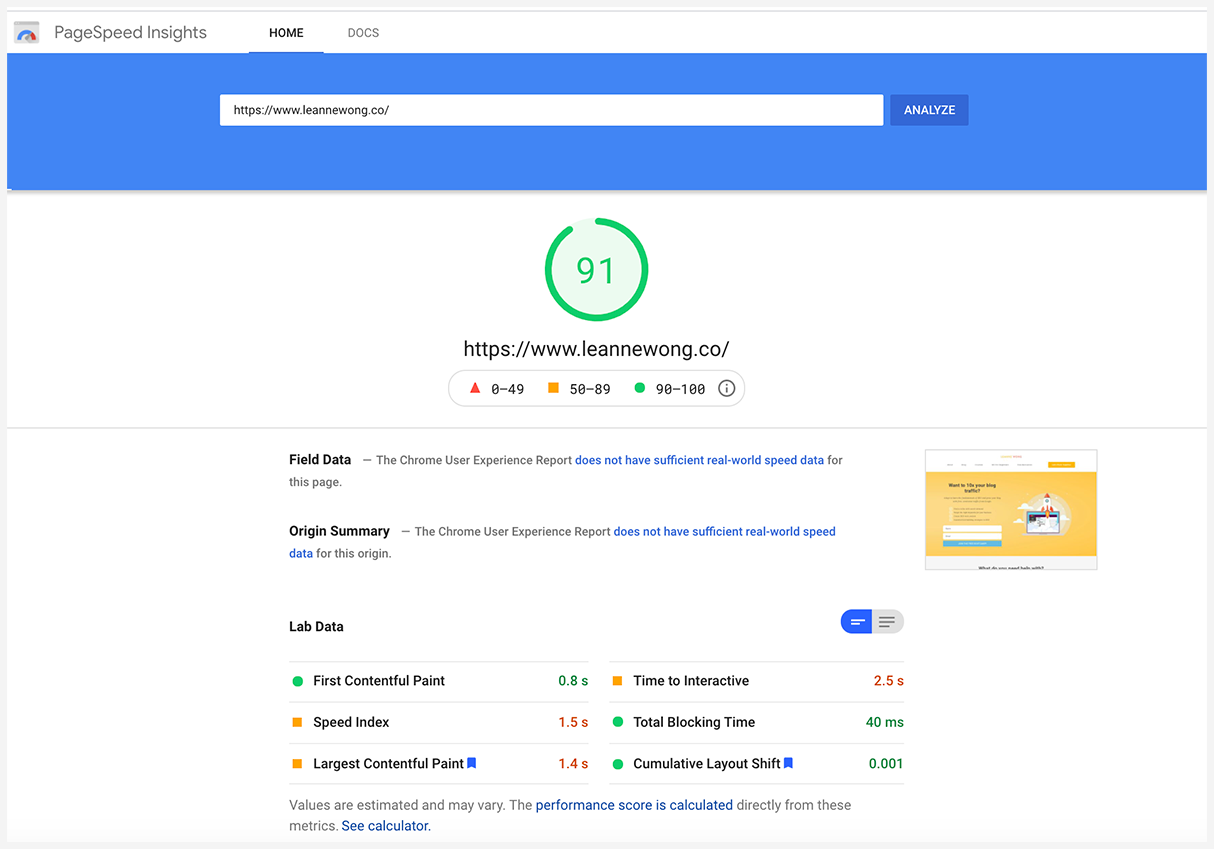
Getting that green 90/100 score on Google PageSpeed Insights is absolutely possible and I’m going to show you how today.
What is site speed?
Site speed is the overall speed of your website to load. It measures how quickly a user can see and interact with your website.
Site speed is typically measured based on the average page speed of all the individual pages on your website. Some of the important metrics to know:
- Average page load time
- Average server response time
Average page load time
Average page load time is the length of time needed for a browser to fully load a web page.
The average page load time is 4.7 seconds on desktops and 11.4 seconds on mobile devices. Google recommends a page load time of 2 seconds or less.
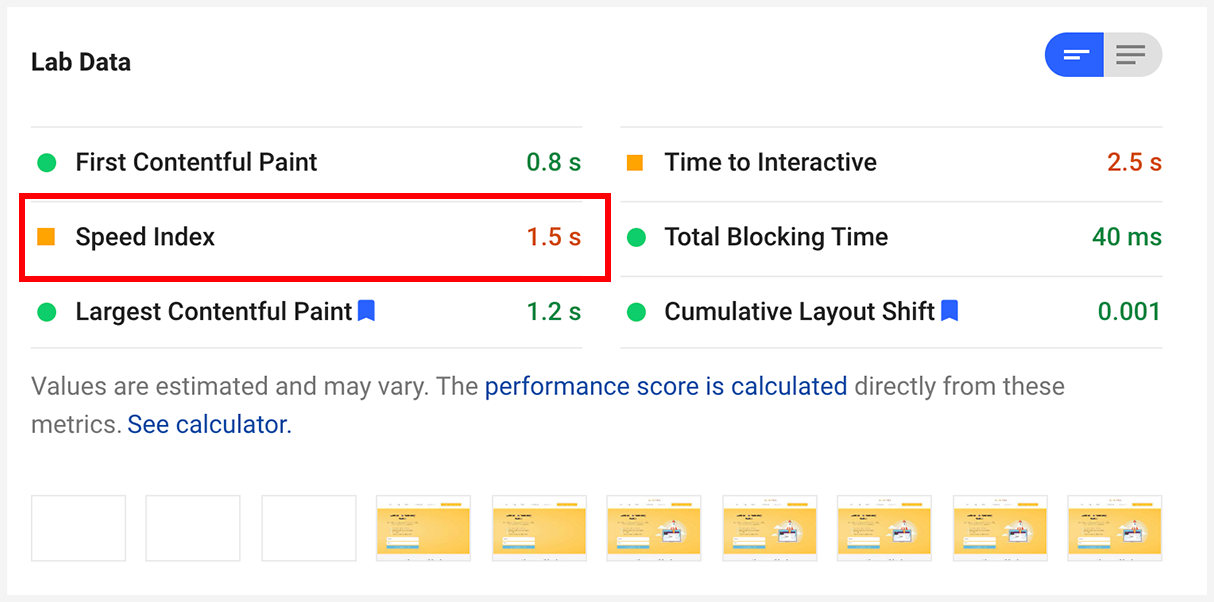
On Google PageSpeed Insights tool, this is measured with the ‘Speed Index‘
How does a page’s contents load?
When somebody lands on your page, the browser sends a request to your server.
The server sends the files needed to display the page, which includes HTML, CSS, images, and various scripts.
As the browser receives files it begins loading the web page on your screen.
With a slow page load time, it may take longer for blocks of text or images to appear. The layout of the page may also change as elements are loaded.
This entire page load process is called page experience. It affects how users interact and find information on your page. Essentially, page load time affects how useful and meaningful your page is.
Learn more about how fast your website’s load time should be.
Server response time
The server response time is the time needed for the server to respond to user requests.
A slow server is a common cause of longer page load time, as it takes longer for the browser to receive documents to load on the page.
Time to First Byte is the metric for server response time.
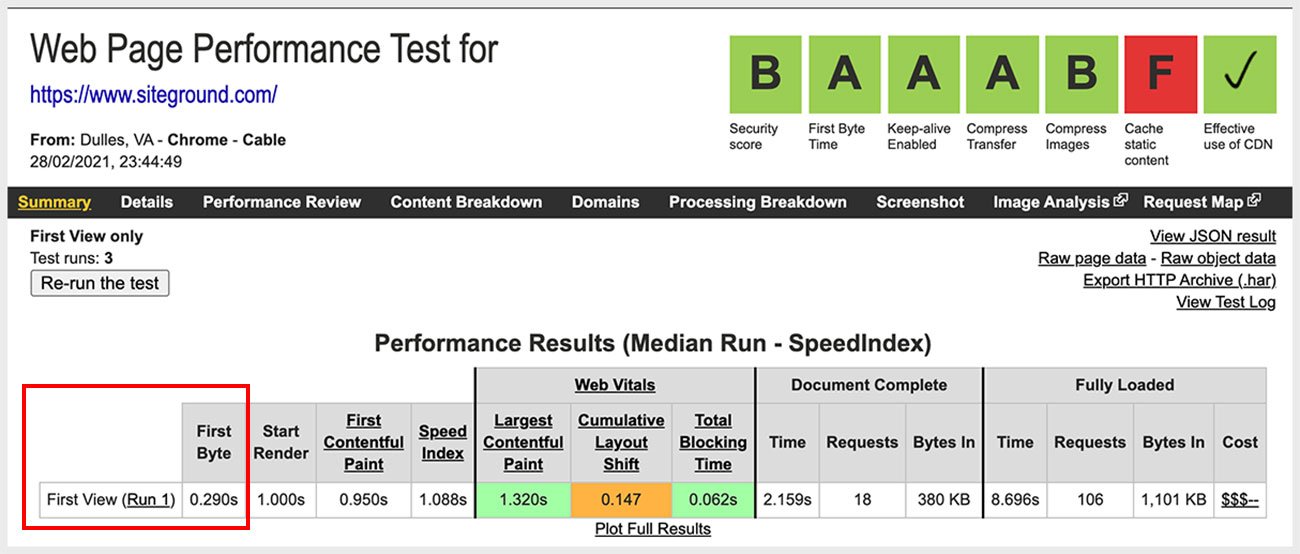
Siteground’s TTFB is 0.290 seconds or 290 milliseconds! Which is one of the fastest in the industry.
A good TTFB is under 600 milliseconds. Check your server response time with the Webpage Test Tool and look for the First Byte timing.
Why is site speed important for SEO?
Site speed is an important ranking factor used by Google and other search engines to rank web pages on search results.
In 2018, Google announced that speed was now an official ranking factor on search results. Google emphasized site speed again when it rolled out mobile-first indexing.
4 years ago, mobile devices accounted for over half of all website traffic. As of February 2021, over 55% of all traffic comes from mobile devices.
It often takes longer for web pages to fully load on mobile devices compared to desktop devices. Due to the increased usage of smartphones and tablets, search engines started to prioritize mobile web page performance.
In other words, a website that loads quickly on a mobile device is prioritized for higher rankings on mobile search results.
And also, since mobile traffic exceeds desktop, your site speed on mobile is more important than on desktop.
2021 Core Web Vitals Algorithm Update
In 2021, Google has rolled out another major algorithm update that places more emphasis on site speed.
This is the ‘Page Experience’ update with Core Web Vitals that will be a major ranking signal come June 2021.
Core web vitals have to do with page load time, interactivity of your page, and how visually stable your page is.

Continue reading for an introduction to core web vitals and a step-by-step course on core web vitals.
Will this page experience update impact my rankings and traffic from Google?
I believe so, yes.
Google has hinted that they will start displaying user experience badges next to websites that meet their standards of a good web experience on the search results.
This shows that the ranking system will start to prioritize websites with a fast site speed and user experience.
A slow loading site that fails Google’s requirements would expect drops in rankings and traffic.
Site speed impacts user experience and conversions
Along with SEO, site speed influences user experience and conversion rates.
Research from Google indicates that 53% of mobile visitors leave web pages that do not load within three seconds.
If your bounce rate is high, site speed is one of the first things to review. People are less likely to stay or interact with a website that takes too long to load.
High bounce rates also result in lower conversion rates.
If people leave your website due to a poor user experience, they won’t be taking further action such as joining your email list or making a purchase.
Pages that load quickly provide a superior user experience, which would help increase conversion rates.
Users want to instantly begin reading content or scrolling through the page to find the information that they want. Any delay can impact their buying decision.
How to improve site speed
The first step for improving site speed is to analyze the current performance of your website.
We need speed testing tools for this:
- Google PageSpeed Insights
- Pingdom
- GTmetrix
Google PageSpeed Insights
Google PageSpeed Insights provides a simple interface for diagnosing your site speed and website performance.
You can also analyze each web page and get detailed speed optimization recommendations under ‘Opportunities‘.

Pingdom
The Pingdom Website Speed Test is another useful speed testing tool.

Pingdom shows you in a quick glance, your page load time, page size and number of requests your page makes.

GTmetrix
What I love about Gtmetrix is its page speed visualization reports. It really helps to understand what elements are on a page and how they are loaded.
Core web vitals performance

Speed Visualization

You can see exactly how your page content is loaded and at what points do the speed metrics come in.
- Time to first byte (TTFB) is 388ms
- First contentful paint is 1.2s, which appears to be buttons and the headings
- Largest contentful paint is 1.7s, which is the large banner image on the page
Use Browser Caching
Browser caching allows browsers to store files so people who have visited your website before can see your page contents sooner.
These types of files should be cached:
- Images files
- PDF files
- Media files
- Static resources
Static resources include CSS, JavaScript, and other scripts that do not change frequently. You can set the expiration date for different file types.
Google recommends a minimum cache time of one week for images and media files and up to one year for static resources.
Browser caching is set using headers in the .htaccess file or with the help of a plugin.
- W3 Total Cache
- WP Super Cache
- WP Rocket
- Built-in caching from your web host (Siteground cache)
Siteground Optimizer WordPress plugin – Dynamic Caching
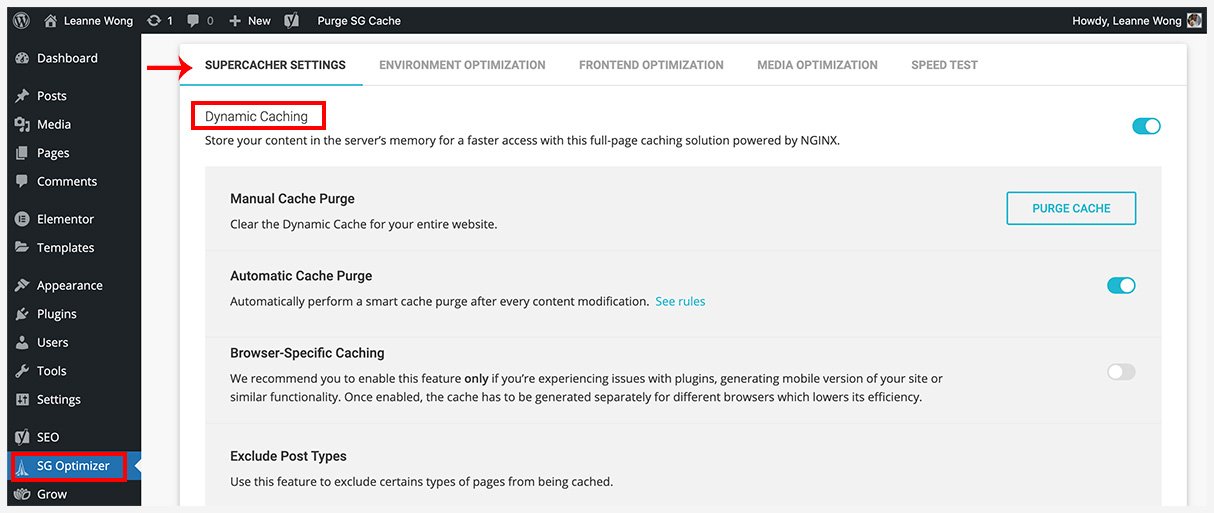
Siteground’s Dynamic Caching provides 5X faster page loading for websites. Dynamic caching is now available at no extra charge for their startup plans too!
Optimize Images
Large images are among the most common causes of slow site speeds. The average web page contains 2.07MB of documents.
Images often contribute 60% or more to the download size of a web page.
Optimize large images by reducing their size or resolution.
For example, most browsers can only display up to 72 dots per inch (DPI). If an image has a resolution of 300 DPI, you can reduce the resolution to 72 DPI without impacting the sharpness of the image.
Images should also be scaled to the display size. For example, instead of using a 1000×500-pixel image and shrinking it to half the size in the browser, use a 500×250-pixel image.
Compress or Minify Code
Along with images, reducing the size of the files needed to display a web page can improve site speed.
Google recommends using UglifyJS or CSSNano to minify HTML, CSS, and JavaScript.
By removing spaces and commas, you eliminate white spaces and reduce the size of the file.
While the code may be more difficult for a human to read, browsers can download the files faster due to their smaller sizes.
With Siteground Optimizer plugin, I don’t need to install any additional plugins.
It comes with minification for HTML, CSS and Javascript too.
Siteground Optimizer WordPress plugin – Minification
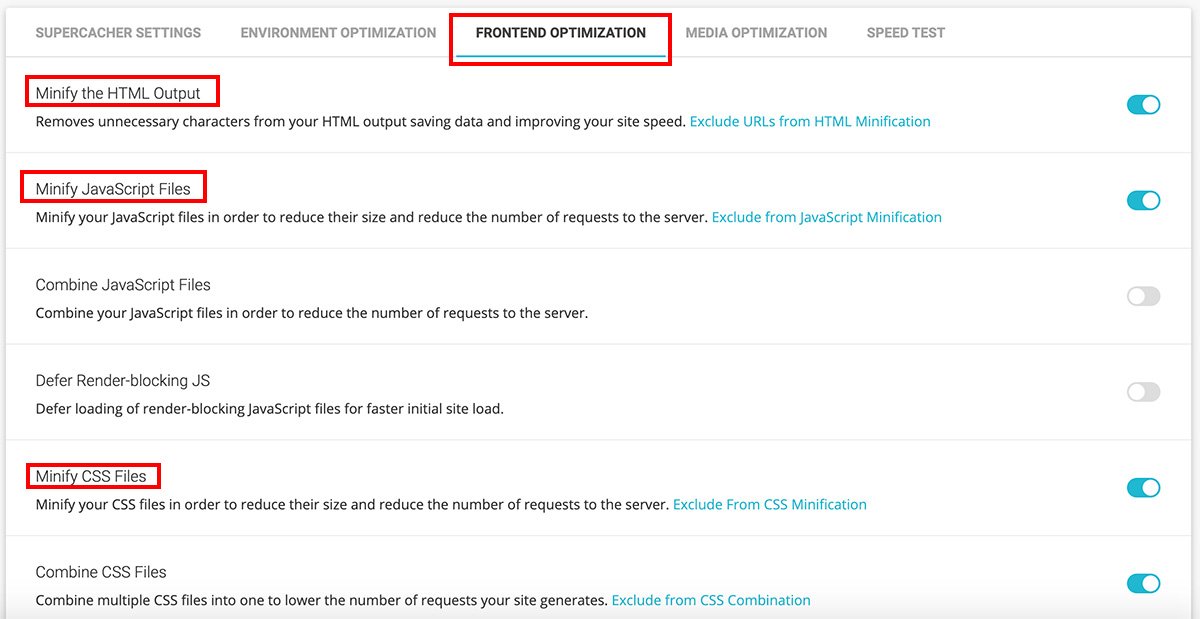
I recommend compressing and minifying CSS and Javascript especially if your website is heavily reliant on them.
Limit the Use of Third-Party Plugins
Popular website building platforms, such as WordPress and Wix, allow users to easily increase the functionality of their websites with add-ons.
On WordPress, plugins are necessary for a well-functioning site.
But don’t overdo it!
The more plugins you add to your site, the heavier your website and that will have an impact in slowing down the speed of your website.
I would suggest only installing plugins when they are essential to the functioning of your website.
For example, contact forms, page builders, site optimization, and e-commerce plugins would be essential for your website to function.
But plugins that display your Instagram feed, or link Google Analytics data on your WordPress dashboard are not necessary.
For me personally, I have removed plugins like MonsterInsights and Convertkit plugins because my website could function without them. Less is better when it comes to site speed.
Get a super plugin that does multiple site speed optimizations
Plugins that can do multiple jobs are more efficient than single-purpose plugins. If possible, install a plugin that can help you save on other installing plugins as well.
The Siteground Optimizer plugin that is free for all Siteground’s hosting plans is an example of this. With one plugin I can do multiple site speed optimizations:
- Browser caching
- Lazy loading
- Convert images to Next-gen format (latest update!)
- Minification of HTML, CSS, JS
and a lot more.
Reduce the Use of Redirects
Redirects increase the server response time by redirecting the browser to another page. While some redirects are necessary, using too many redirects hurts your site speed.
Some of the potential reasons to use redirects include:
- The URL of a web page has moved or changed
- Your website has migrated to a new domain
- You have switched from HTTP to HTTPS
- The structure of your website has changed
If the redirects are not necessary, you may accidentally create a redirect chain or loop. A redirect chain occurs when a browser is redirected more than once.
A redirect loop occurs when you redirect back to the original page. A redirect loop prevents users from accessing your page.
The best way to avoid these issues is to reduce the use of redirects, including redirects used for directing users to platform-specific versions of a web page.
Reduce Bottlenecks in the Server Response Time
A slow server response time is often a contributing factor to slow site speeds.
Slow database queries are a common reason for slow server responses as they create bottlenecks that keep the browser from receiving documents and loading the page.
Unreliable website hosting can also result in slow server response times.
Switching from a shared hosting plan to a dedicated hosting plan or cloud hosting solution may result in faster response times.
You may want to optimize your server database as well.
Use a Content Distribution Network
A content distribution network (CDN) helps improve page loading speeds by distributing the load of assets across more than one server.
It reduces the demand on the server hosting your web page by serving static resources and images from a separate server.
Cloudflare, Amazon, and Google Cloud are a few of the most reputable CDN providers.
When you use a CDN, you upload files or entire copies of your website to your CDN account.
You can upload static files, including CSS files, images, and JavaScript.
As CDN providers manage servers in locations across the globe, they can deliver content from servers located near the geographical location of the website visitors.
Summary
Site speed is now a major ranking on Google. SEO is no longer about keywords, content, and backlinks.
How fast your page loads and the user experience it provides will be a core ranking signal on Google. But the impact of site speed is beyond SEO.
Slow web pages create a poor user experience, resulting in lower conversion rates and higher bounce rates. If you haven’t started optimizing for site speed, it is time to do so now.







70 people reacted on this
It’s interesting to read about ways you can help your content to load faster. I will click off of a site if it takes too long to load, so I know this is important.
This is such important SEO info!! Thank you for sharing!
Thanks Erin 🙂 Cheers
This is awesome information! Definitely need to incorporate this into my own website.
Thank you!
Awesome tips, slow sever is the worse. The faster the blog, the more attracted people would want to visit it.
Slow server response time is one of the trickiest to fix!
Site speed definitely means a lot if you want to attract and keep your traffic. I’ve had many a problem with mine which has led to people ultimately getting fed up. It’s something I now try to keep on top of.
Oh no! Site speed is definitely a crucial part of the user experience. A little optimization can make a huge difference 🙂
It is important to take site speed into consideration. I can’t tell you how many websites run show or crash because of site issues. I will have to make sure my site is running optimally.
That’s not optimal indeed! Hope you’ve managed to resolve those site issues.
This is so informative and definitely shares useful tips.
I will be sharing this with my blogger/vlogger friend. Thank you!
Thank you!!
A fast site speed will result in a better user experience, while a slow site speed will result in a poor user experience. This was my primary goal when i designed my blog. I didn’t want anything necessary to reduce my blog’s loading speed..
Having speed in mind during website design and build is both smart and effective.
This was very informative! Definitely gonna use some these to improve my site.
Happy to help!
I absolutely have some work to do in this area. However, I am currently working on tips from another one of your posts.
One step at a time 🙂
I use Google PageSpeed Insights, but haven’t heard of the other two before. It never hurts to have another check on the page speed and a different set of data.
Google PageSpeed insights is a good one to diagnose site speed. Other speed testing tools can be useful for more details 🙂
great tips for optimizing site speed. i was unaware of many of these and can’t wait to try them out.
Cheers 🙂
Site speed really is everything. There is nothing more infuriating than waiting for a page to load! Something all website owners need to pay attention to.
Fixing site speed has been a top priority for me and my clients too!
I am interested to know more about Pingdom and GTmetric. Unfortunately I am under blogger platform, so I guess this is not applicable to me.
Pingdom and GTmetrix can be used no matter the CMS!
Very informative…I have recently moved from Blogger to wordpress org and my website is huge so the migration has not been easy. This has impacted my website speed. Have bookmarked your post and will try all these steps.
Oh site migrations are tricky. Though it is also a good opportunity to fix the website structure with speed in mind.
This article is just what I needed. I am in the process of updating my website and need to know all of the latest and greatest tips and best plugins to use. Thank you.
I’m so happy to hear this! Cheers.
It is important when websites load fast. If they don’t people will just leave.
Absolutely!
Damn! I just checked out my site at pagespeed and I am astonished at how bad it is! Clearly, there’s a lot more work for me, to do! Thanks for sharing all this, Leanne!
Oh shucks, it’s not too late to start optimizing for a faster load time.
This is great information. I have to go back to check my site speeds — I probably have some areas that could really be cleaned up for improved Google rankings!
It’ll have a positive impact for sure!
Such a helpful article, thank you!
Thank you for sharing these site speed tools and the importance of SEO and site speed. As well as Siteground hosting. I’d been wondering which tools were most effective for testing my site!
It’s my pleasure, Lizzy! Hope you’ve managed to use some of these speed testing tools for your website. 🙂
I’m really glad I read this because speed has become an issue for my blog and I don’t know why. It takes far too long for my home page to load. I might need to contact wordpress or something but I will start by checking Google PageSpeed insights, which I didn’t know about until now.
Google PageSpeed Insights tool is a good first start. Then, I’d recommend looking to your web hosting 🙂
So true. Some people don’t have don’t have enough patience and if the site is loading so slow, they surely will exit and search somewhere else, which I can relate. These infos here are helpful.
Totally agree with this!
Love your website, it always has a bunch of information! Thanks for sharing with us
Thank you, Angela!
I definitely agree with you that site speed is a ranking factor. I get a good score for my desktop site but my mobile site speed is super slow. That’s why I asked the help of a developer to speed things up a bit. It’s a good long-term investment.
It is! I’m glad you’ve managed to get help to optimize for mobile site speed. It’s so important.
Yes, although my recent score went down a little again. I’ve been told it’s the external scripts from my ad network. Hope I can find a new ad network that has site speed in mind.
I am so glad to have come across your article as I have been wondering about my site’s speed performance for other viewers. I need to make some improvements on my site, most especially on the mobile version of my theme. Thanks a lot!
Yes mobile speed is really important!
So important to know these types of things for your website to perform at its best. A slow website is an off-put.
IKR!
I WILL COMPLETELY LOSE INTEREST IF A WEBSITE IS SLOW TO LOAD. IT BECOMES FRUSTRATING
Me too 🙁
Website speed refers to how quickly a browser is able to load fully functional webpages from a given site. Poorly performing sites that render slowly in a browser can drive users away.
Loading time is important factor for any website. I also learn something from your blog. Thank you for this post.
Cheers 🙂
Websites or pages which take time to load in a browser can end up driving the users away. At the same time, websites which load quickly will receive more web traffic resulting in better conversion rates. Your website’s first impression is very important for determining how your company and brand will be perceived by the users. Website visitors make an instant judgment about the business on the basis of their experience with the website. If your website has a good page speed you’ve immediately built a strong first impression. A fast loading website impresses the user and makes him happy & satisfied.
YES
I learned a lot from this post! Yes, loading of the site is so important! The faster, the better for the readers.
Site speed is really important as it affects the overall performance of the site. It also affects the user experience.
Speed certainly does matter. But I did not know there was an actual measurement for this. I need to check my blog’s speed and determine my next steps if my number’s aren’t good.
Yes Google has specific benchmarks for this
This is so important for anyone with a website to remember. If it takes longer than a few seconds to load, people will leave immediately.
Exactly right!
I don’t like waiting for pages to load, so I can see why it’s so important for seo. Great read! I will try to impement for my seo.
Cheers!
Website speed is like rocket fuel for your online success. It’s a critical factor in attracting & converting site visitors, & slow loading speeds can spell disaster – in fact, 40% of users abandon sites that take more than 3 seconds to load. A slow site means a poor user experience, which in turn impacts your business, your conversion rate, and your search engine rankings.
YES!